Play video
Most organizations are moving from in-house legacy IT systems to cloud-first Software as a Service, or SaaS technologies. So why look at decommissioning technologies which follow a dated on-premises model? Archive Central is born in the cloud SaaS technology with infinite elasticity and a licensing model that allows you to flex up and flex down as systems come in and out of scope for legacy data retention. With Archive Central, any IT system can be decommissioned, with support for structured and unstructured data linked together for easy search and retrieval. Like all modern apps, there is no training required for end-users. And, of course, data privacy is built-in by design with all the important IT security certifications and data retention rules. These can be based on object keys, table rows, or even individual fields to be removed based on any data-driven criteria. Sunset and secure your legacy data with Archive Central.
ウェブ・インターフェースで簡単にアクセス可能
コスト効率の最大化
ロールベースの機密
データへの読み取り
専用アクセス
転送中および静止時の
データの暗号化
データプライバシー法の遵守

レガシーシステムからのデータ活用の最適化


新しいテクノロジーを受け入れる

レガシーデータがITランドスケープの近代化を妨げることはありません。Archive Centralは、レガシーデータを一元管理されたアーカイブに安全に保存します。これにより、重要なデータへのアクセスを確保しながら、最新のテクノロジーを導入することができます。


業界をリードするコンプライアンスでデータを保護

Archive Centralの高度なセキュリティ機能により、GDPRやその他のデータプライバシー規制へのコンプライアンスを確保できます。ロールベースのアクセスコントロール、暗号化されたデータストレージ、業界標準の認証により、お客様の機密情報を不正アクセスから保護し、規制要件を満たします。


レガシーデータへのアクセスを最適化

レガシーデータを検索可能でセキュアなアーカイブに変換し、Webベースのインターフェイスからアクセスできるようにします。Archive Centralでは、使い慣れたシステムデザインを模倣したユーザーフレンドリーなレイアウトを作成することができます。


ビジネスクリティカルなシステムに集中

Archive Centralは、レガシーデータの保管とコンプライアンスニーズに対応し、法的要件を満たす読み取り専用アクセスを提供します。老朽化したハードウェアの保守や古くなったソフトウェアのパッチを適用する必要がなくなるため、チームは古いシステムの管理ではなく、戦略的なプロジェクトに集中することができます。

Play video
In this short video, we are looking at the basic concept of how data can be visualised in Archive Central. On this demo system, we have our test data grouped by different functional areas. So if I am a Finance user, my authorisation might only allow me to see this Finance workspace. In the Finance workspace I am now introduced to our concept of Collections. So a Collection is effectively our generic term of a data model. So we are grouping all the data that is related to this data model inside this Collection. And if we pick, for example, this vendor record that is coming from an SAP system, we can take a look at how this is used. So if I pick the vendor that I am interested in I can now see this vendor. And while the user interface at first looks different to how users might know it from the SAP world, we grouped the data in a very similar fashion. So if you would take a look at vendor records in SAP, the data would also be grouped by Address, Control, Payments transactions, Contact persons and so on. And we can do the same not just for master data but also for transactional data. So if I pick my example of Accounting Documents further down before drilling into one of the examples, every time I have data in such a tabular view, I have different options to choose from. So on the left hand side I have my filter criteria, where currently I am filtering down all the documents to the ones from fiscal year 2012, while also selecting on multiple company codes for which I have data on. But further than that, I can add filters on all the database tables and fields that are part of this collection. Also, what I can do if the data is displayed in such a tabular view. On the top right hand side, I can go to the table settings. Change the way the data is displayed like adding specific fields to this view. Group them in a specific order or in general prepare the display of this data. Because now I could either save this report again to reuse it later on, or if an auditor requests to have this subset of data provided, we can now download this data if we have the sufficient authorization on the system, and hand that over to the auditor. And inside one of these examples, we can again see as in your source system, you have the data related to the document header in one specific section; but you can also see the line items in a separate tab. And you could drill down into these line items as you could on your source system. The same is now possible for data that is also coming from different systems or different functional areas. Now I want to introduce you to the concept of Saved Views. Our Saved Views are effectively simple reports that can be built on top of Collections. In this example, I have a Saved View that is built on top of Employee Data that is also coming from an SAP system and visualising and grouping my employees by country of birth. If I'm not interested in all the employees that were born in Germany, I can simply drill down and take a look at that if I click in the corresponding section of my graph. We can now see on the left hand side also the filter criteria DE that it has created based on where I just clicked in the graph. And if I now just take a look at one of these records, and one point I want to highlight here is if we go to the Pay Information and select one payroll period and just drill down into this period; what our extractors can do is not just bring across everything that was stored in the database in the transparent format, but as you can see, our extractors can also handle any attachment or unstructured data that might be generated by reports on the source system, such as a payslip that is now, in this example, being downloaded and preserved on Archive Central in the PDF format displayed inline in my browser. And again, if my user has the authorisation, I could download this PDF on the top right hand side and provide it to whoever requested that data, such as an auditor. And another option to highlight in this section are these tables on the bottom side here. Such as the RT table or CRT table. SAP HR experts will directly see that these tables originated from clustered tables within my source system. So in this case, our extractors were able to transform the clustered tables into a transparent format so that we can very easily take a look and report on these tables. And also, if I click on one of these table headers, I again have the same options as we had for the accounting documents. Create specific filters. Save it as a Saved View or change and download the data that I prepared in this example. And the same approach goes for data that is coming from different systems, different functional areas. It is very flexible and I hope that this small introduction gave you a good understanding of how flexible the solution can be.

Archive Centralのデモを見る

財務データ、人事データを使った簡単なデモをご覧ください。Archive Centralでアーカイブされたデータがどのように構造化され、どのようにアクセスされ、どのように可視化されるかをご覧いただけます。

データの内容は組織ごとに異なります。本デモにご関心のあるデータが含まれていない場合は、ぜひお問い合わせください。個別デモをご依頼いただければ、お客様のニーズに沿った関連事例を用いて、Archive Central上でお客様のデータがどのように表示・活用できるかをご紹介いたします。

Archive Centralの主な活用方法

レガシーシステムの廃止

レガシーシステムの廃止

レガシーシステムは、老朽化したハードウェアやベンダーサポートの縮小、セキュリティ脆弱性の増大などにより、維持・運用コストが高騰する傾向があります。さらに、これらのシステムは最新のセキュリティ基準やコンプライアンス要件に適合していないプラットフォームに依存しているケースも少なくありません。

一方で、ビジネスデータには法的な保存義務があるため、レガシーシステムの廃止が容易に進まないという課題があります。その結果、多くの企業が必要以上に長期間、システムの維持を余儀なくされています。

Archive Centralは、このような課題を解決するために設計された最新のデータ管理プラットフォームです。重要なビジネスデータをクラウド上に安全にアーカイブすることで、企業は必要な記録へのアクセスを維持したままレガシーシステムを廃止することができます。

また、Archive Centralはデータ保持規制への準拠を支援するとともに、高度な検索・取得機能を提供します。これにより、時代遅れの技術に伴うリスクを低減し、コスト削減、データガバナンスの強化、業務効率の向上を実現します。

ERPシステムの
ライトサイジング

ERPシステムの適正規模化

ビジネスの成長に伴い、ERP(企業資源計画)システムには膨大なデータが蓄積され、システム性能の低下、ストレージコストの増加、そしてデータ管理の複雑化といった課題が生じます。こうした状況に対応するため、企業にはデータ増加を適切にコントロールし、ERP環境を俊敏かつコスト効率の高い状態に維持できるソリューションが求められています。

Archive Centralは、日常業務で使用されなくなった記録データやドキュメントをオフロードできる、安全で拡張性の高いリポジトリを提供することで、これらの課題に対応します。データアーカイブプロセスを通じて、ERPのパフォーマンスを最適化し、インフラコストを削減するとともに、システムアップグレードや移行を効率化します。Archive Centralを活用することで、企業はコンプライアンスを維持しながらデータ管理を簡素化し、ERPシステムを戦略的な成長に向けてより効果的に活用することが可能になります。

ビジネス変革

ビジネス変革

合併、買収、事業分離の結果、複雑なデータ管理要件が発生することがよくあります。このような取引に関与する組織は、規制遵守、法的義務、ガバナンスの目的で特定のデータセットを保持する必要があります。このようなデータに対し、異なる組織間で安全かつ制御されたアクセスを確保することは困難です。

Archive Centralは、ビジネス変革におけるデータ管理のための堅牢なソリューションを提供します。Archive Centralのプラットフォームを利用することで、企業は関連するマスターデータやトランザクションデータを安全にアーカイブし、権限のある関係者と共有することができます。Archive Centralは、きめ細かなアクセス制御、監査証跡、高度なデータ保護機能により、機密情報の完全性とセキュリティを維持しながら、シームレスなデータ移行をサポートします。

個人情報保護
コンプライアンス

データプライバシー法の遵守とデータ主権

今日の規制環境では、企業はグローバルおよびローカルなデータプライバシー法を遵守する必要性に直面しており、多くの場合、特定のデータは特定の地理的境界内に存在する必要があります。

例えば、インドの金融規制では、金融データをインド国内のサーバで保存・処理し、コンプライアンスを確保するために毎日データを同期することが義務付けられています。

Archive Centralはこのようなデータ主権(Data Sovereignty)要件を効果的にサポートするように設計されています。Archive Centralのプラットフォームは、インドを含む特定の地域でホスティングすることができ、現地のコンプライアンス要件を満たすことができます。このような柔軟性により、企業は機密データを安全にアーカイブすることができ、同時に各地域のデータ保存に関する法令を遵守することができます。Archive Centralは、シームレスなデータ同期、強固なセキュリティ対策、包括的なコンプライアンスレポーティングを実現し、データのローカライゼーション要件が厳しい複数の地域で事業を展開する企業にとって理想的なソリューションです。

プロジェクトの実現

お客様のニーズを理解した後、当社の専門家がデータを分析し、お客様のニーズに合わせてベストプラクティスをカスタマイズし、
データのエクスポートから整理、可視化まで、すべてを処理します。必要な場合のみ、お客様のビジネス・ユーザーを関与させます。

AC_Artwork_graphic1_JP_2026

Archive Centralでのデータのアーカイブ方法

SAPからのエクスポート

SAPシステムからデータをエクスポート

Archive CentralはSAP Archive Extractorとのシームレスな統合により、 SAPシステムを使用している企業のデータアーカイブプロセスを簡素化します。このExtractorは、EPI-USE Labsが過去25年以上にわたって綿密にマッピングした堅牢なData Sync Manager™ SAPオブジェクトモデルを活用しています。これにより、テーブルのクラスタリング解除や、添付ファイルとしてアップロードされた関連する非構造化データの抽出を含め、複雑なデータ構造間の関係やリンクの整合性を維持しながら、データが首尾一貫してエクスポートされることが保証されます。

当社の自動分析ツールは、お客様のSAP環境をスキャンし、データ保持ポリシーのコンプライアンスを確保しながら、アーカイブに最適なデータセットを特定します。このプロセスは手作業を減らし、エラーを最小限に抑え、データ抽出を高速化します。

 
あらゆるシステムから
エクスポート

あらゆるシステムからデータをエクスポート

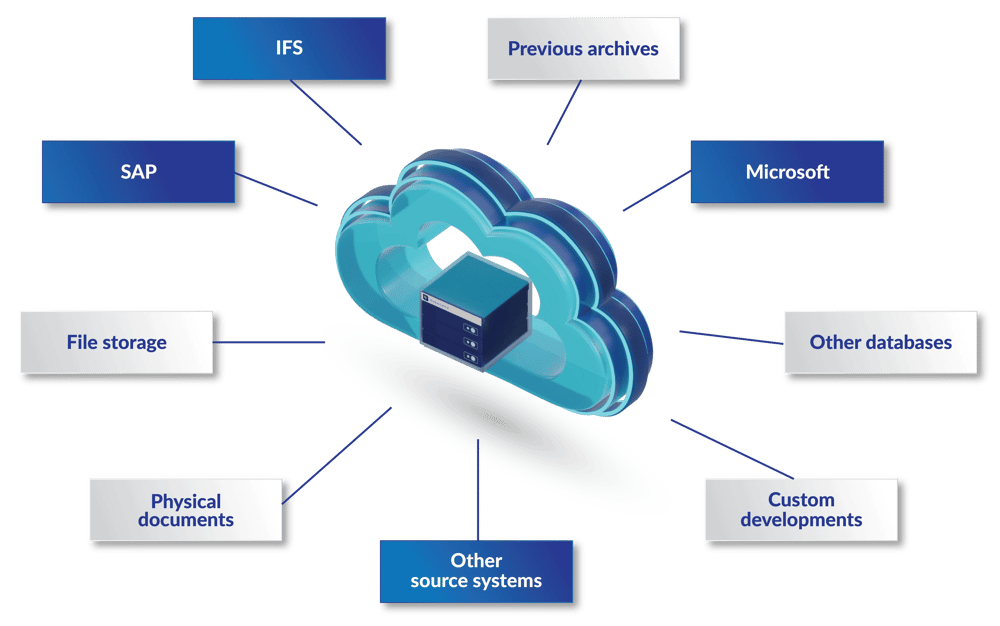
Archive CentralはSAPデータに限らず、あらゆるITシステムからのアーカイブをサポートします。Microsoftアプリケーション、Oracleデータベース、カスタムメイドのソフトウェア、数十年前のレガシープラットフォームなど、データがどのような場所に存在しても、Archive Centralの汎用的なソリューションがデータを安全にアーカイブします。

Archive Centralのプラットフォームは多様なデータタイプやフォーマットに対応し、セキュアな保管、高度な検索性、容易な検索を実現する堅牢なツールを提供します。

Archive Centralの核心は、現在および将来のあらゆるアーカイブニーズをサポートするというコミットメントです。今後10年間、どのようなテクノロジーを採用しようとも、 Archive Centralはお客様のレガシーシステムにとって信頼できるアーカイブソリューションであり続けます。Archive Centralのプラットフォームはお客様のビジネスと共に進化し、長期的なデータアクセシビリティとコンプライアンスを実現します。

AC_Data_cloud_v5

自社データの取り込み

データの取り込み

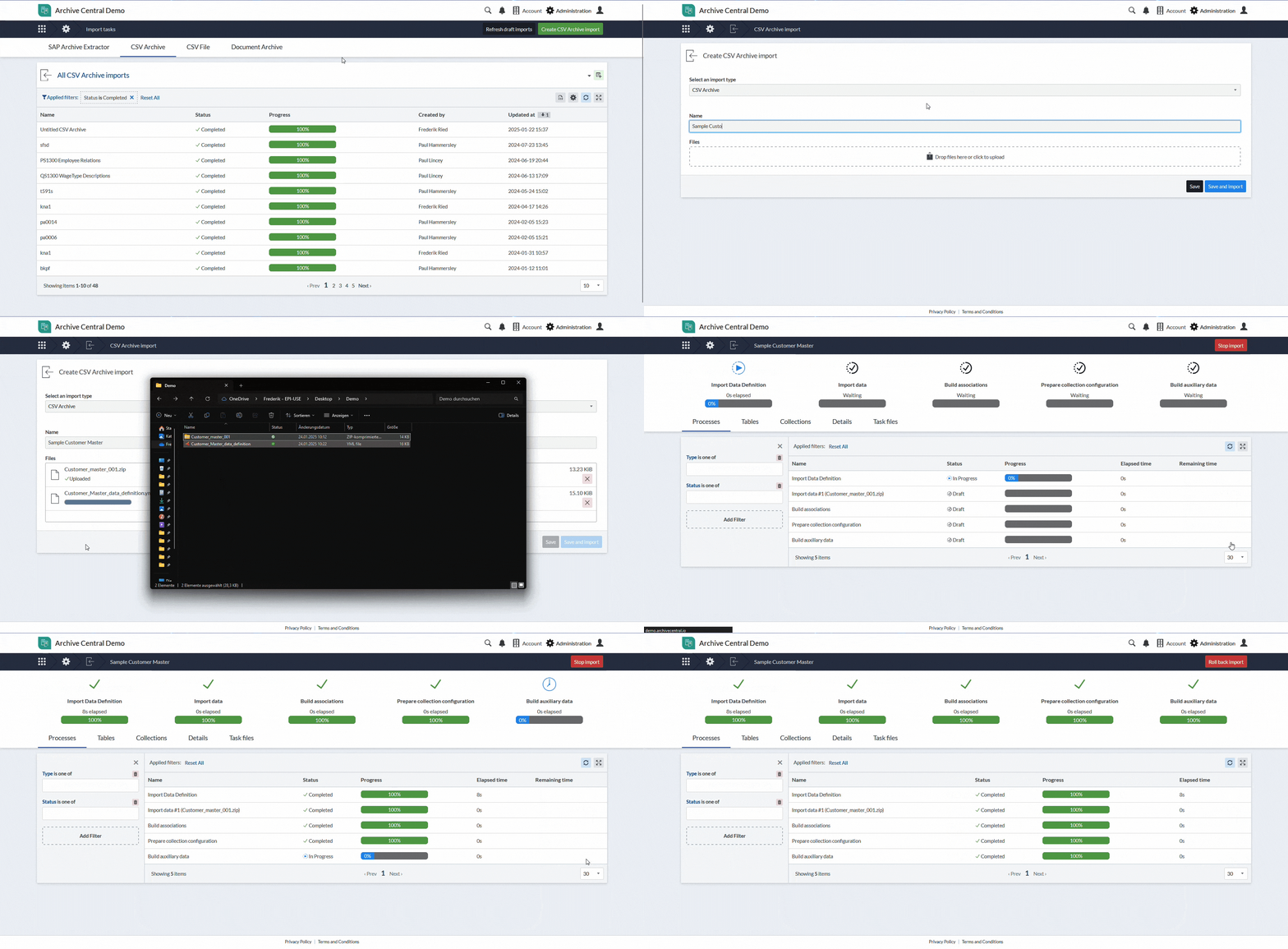
すでにデータ抽出ツールや社内の専門知識をお持ちの場合でも、Archive Centralは柔軟に対応します。抽出元のシステムに依存することなく、お客様独自の抽出データをインポートし、一元的に管理することが可能です。特定のプラットフォームからデータをアーカイブした実績がない場合でも、Archive Centralはさまざまな環境にシームレスに対応します。

Archive Centralは、データのアップロードと可視化の両プロセスをサポートし、お客様のデータを効果的に構造化できるよう設計されています。これにより、データを整理された状態で安全に管理し、必要な情報へ迅速にアクセスすることが可能になります。データ構造の設定が完了すれば、インポートは非常にシンプルです。ファイルをドラッグ&ドロップするだけで、データの取り込みを開始できます。

BringYourOwnData_export_1_iteration_2

単一の統一プラットフォーム

複数のシステムにまたがる統合アーカイブ

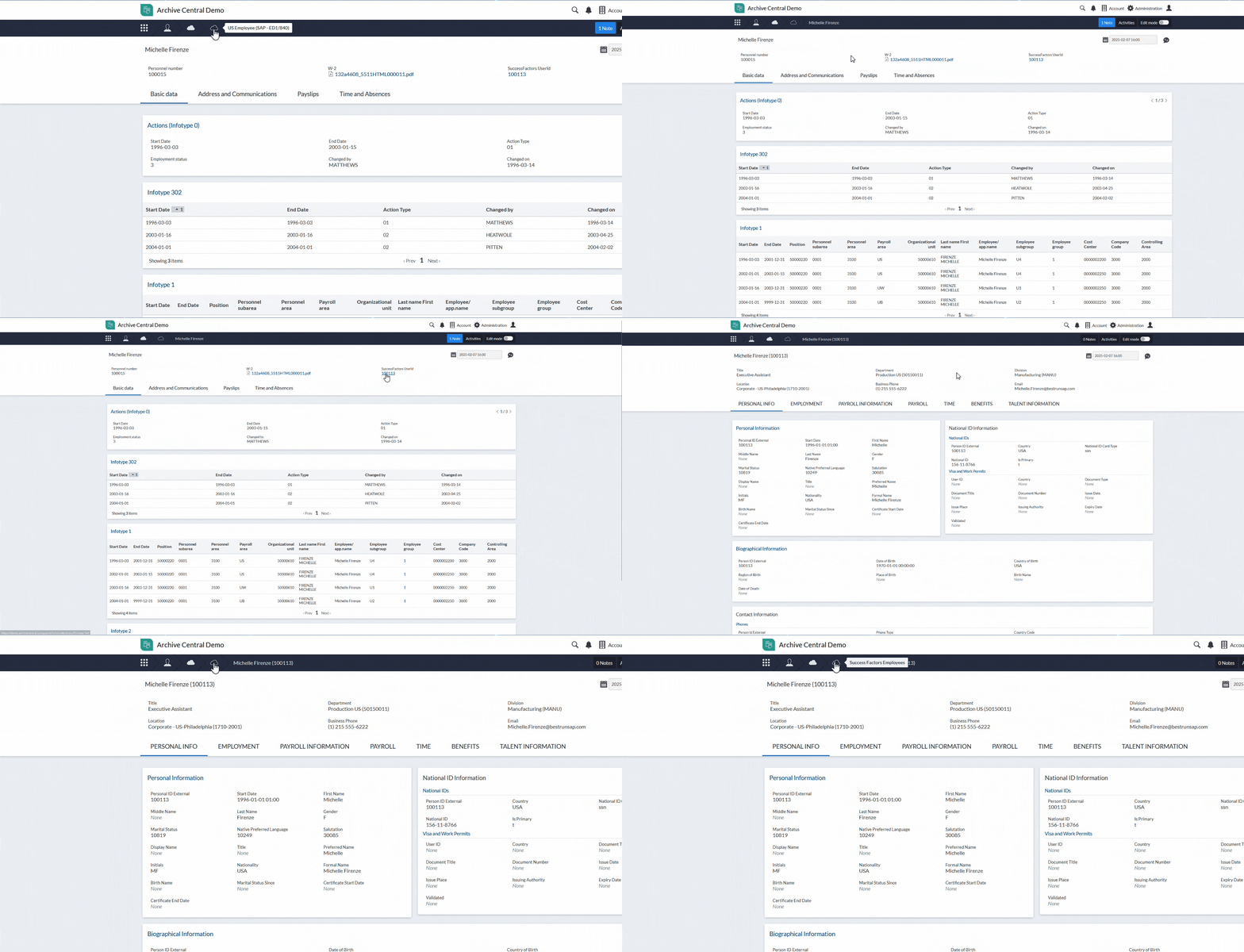
現代のITランドスケープでは、様々なソリューションが混在し、断片化されたデータ環境が構築されています。Archive Centralは、アーカイブデータを単一の統合プラットフォームに集約し、異なるシステム間に存在する関連レコードを容易に関連付けることができます。
 
顧客情報、ベンダー情報、請求書など、複数のソースに分散しているデータも、Archive Centralに統合することで包括的なビューとして確認できます。さらに、きめ細かなアクセス制御により、データのセキュリティを確保しながらコンプライアンス要件への対応を支援します。
 
また、同一のデータコレクション内でデータを表示することも、複数のコレクションをリンクして異なるビュー間をシームレスに移動することも可能です。

BringYourOwnData_export_1_iteration_2

添付ファイルのアーカイブ

添付ファイルのアーカイブ

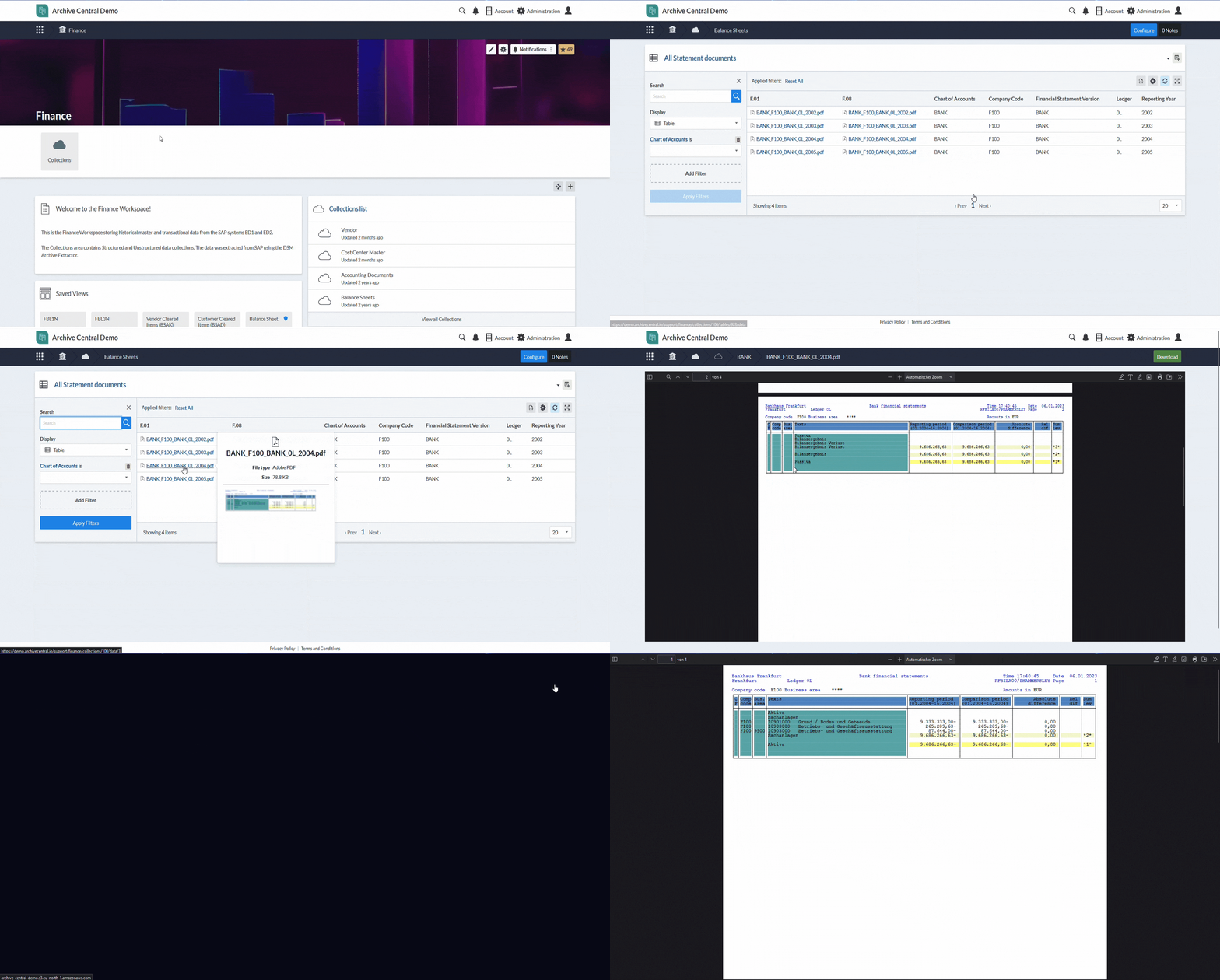
文書、画像、PDF、スプレッドシートは、様々な保管場所に散在し、管理が困難になることがよくあります。Archive Centralは、添付ファイルを対応するデータベースレコードに直接リンクすることで、この課題を解決します。

この統合により、データ整理の改善、インラインプレビューの提供、安全なダウンロードのサポートをすべて単一のプラットフォーム上で実現します。分散したファイル保管庫に依存する必要はなく、整理されたアクセス可能なデータ環境を実現します。

ArchivingFileAttachments_export_1_iteration_2

柔軟なグローバルホスティング

柔軟なグローバルホスティング

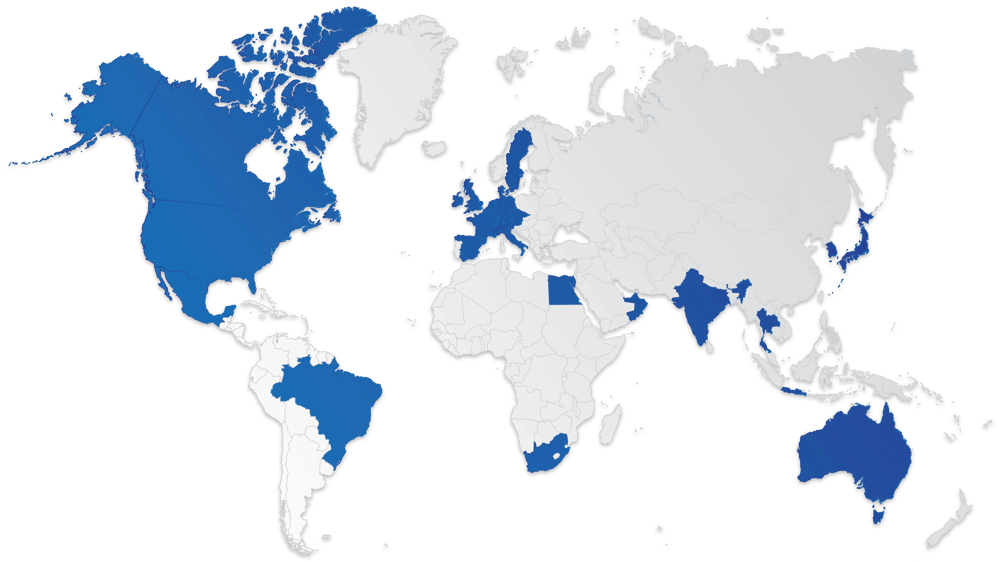
Archive Centralは、データホスティングに関して幅広い柔軟性を提供します。主要なハイパースケーラーとの戦略的パートナーシップにより、アーカイブデータを世界各国のデータセンターでホスティングすることが可能です。

当社のプラットフォームは、お客様のビジネスや規制上のニーズに最も適した地域に導入することができ、世界中どこでも安全で弾力性のあるデータアーカイブを提供します。

AC_Data_map_v4


AC__WebServer_Graphicwebp

安全なホスト型SaaSソリューション

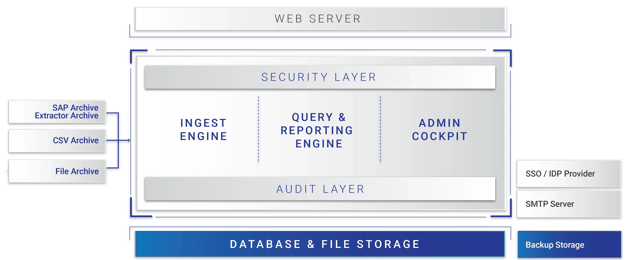
  • ベストプラクティスに沿って、このソリューションはホスト型SaaSソリューションとして展開されます。
  • アプリケーションは、弾力的なスケーリングとストレージのメカニズムを活用し、(GDPRやその他の個人情報保護法に準拠した)さまざまなホスティング・ロケーションを提供し、CDNを使用してグローバルに高速なレスポンスを実現します。
  • 例えば、給与明細書と従業員の紐付けや、請求書と対応するPDFファイルとの紐付けなど、Archive Centralに保存されるデータの一部とすることができます。
mark-of-trust-certified-ISOIEC-27001-information-security-management-black-logo-En-GB-1019 mark-of-trust-certified-ISO-IEC-27701-logo-En-GB-0420 21972-312_SOC_NonCPA


 導入事例

データに対する洞察を得る

無償システム分析レポート