Play video
I'm James Watson. I'm the director of global services for privacy and security here at EPI-USE Labs. And today, I'm wanting to talk a little bit about the changes to the SAP license model that are coming in as part of the S/4 and RISE process, and how we can help actually impact assess and help reduce that license cost with the use of our partner solution, Soterion. So firstly, the change that's occurring. The new model is called Full Use Equivalent or FUE license modelling, and that is based on specific authorization objects within the SAP environment. And any people that have roles with those authorization objects will be classified as a full use user. And as such, they will then go through for license management against SAP. So in many cases, you may have employees that have roles from previous jobs within the organization, and those roles have never been removed. They will possibly have role setups where you have quite complex roles for a Finance user. But, actually, if we created some Segregation of Duty to be able to say, well, actually, how often are you using that authorization versus the normal? You may have some team splits where you could say, well, one user does need that advanced usage. They're using it daily. But if another user is not and maybe only uses it once a month, then could that be a firefighter control for that user to be able to get that access? Or even is it a business change that could say the other users that do need those authorizations could go through? So there's a number of different ways that you can address this, but the first thing you need to understand is actually how large of a problem do you have. Now there are specific trace programs within SAP that need to be activated that will monitor exactly what your users are using. We can get those running. Once they've been running for a long enough period of time, we can hand over to our partner solution, Soterion, where they will ingest the information from those logs. They'll do an analysis for you, and they'll present back to you the FUE cost. They'll tell you what your FUE count is. Soterion also then have specific rule-sets designed to be able to help advise on how to reduce those FUE license costs. The change can be quite significant when you're going from the old model to the FUE license model. And you can run some of these checks prior to the migration to be able to say, for your existing organization in ECC, how many users do you have that have authorizations that would be classed as FUE in the new process? Or if you've already made that transition and you are already suffering from higher license costs, this is something where we'd be able to provide compliance software with a business payback case for a return on investment. We're quite excited by this opportunity to be able to bring a new license management component to the market, and EPI-USE Labs are very proud to work with Soterion as the technology base, but with our services team able to support you on the delivery of that role redesign project to be able to significantly reduce your license cost.
이 비디오에는 한국어 자막이 있습니다
EU Icons_Working file_Sept 2023_AA (2)-653
과다 또는 과소 라이선싱을 방지하여
컴플라이언스 이슈 회피
EU Icons_Working file_Sept 2023_AA (2)-654
감사 자동화 및 컴플라이언스 작업
간소화로 시간 절감
EU Icons_Working file_Sept 2023_AA (2)-655
실제 사용량에 맞춰 라이선스를
정렬하여 불필요한 비용 제거
EU Icons_Working file_Sept 2023_AA (2)-656
미사용 또는 저활용 역할과 계정을
제거해 최적의 라이선스 배분 실현


Soterion의 SAP License Manager가 제공하는 지원

Soterion의 SAP License Manager 모듈은 SAP 라이선스 관리를 위한 종합적이며 데이터 기반의 접근 방식을 제공합니다.
사용자 역할과 시스템 사용량을 정확히 추적해, 실제로 필요한 만큼만 비용을 지불하도록 지원합니다.
이 솔루션은 감사 프로세스를 자동화해 컴플라이언스를 단순화하고, 수작업 점검에 소요되는 시간을 크게 줄여줍니다.
역할 정리(role clean-up)와 비용 시뮬레이션 기능을 통해, 기업이 라이선스 배분을 최적화하고 불필요한 비용을 방지하며
모든 SAP 환경에서 컴플라이언스를 유지할 수 있도록 돕습니다.


접근 권한과 라이선스 영향 분석이 결합된 더 스마트한 역할 결정

License Manager는 Soterion의 Access Risk Management 모듈과 연동되어 보다 강력한 관리 체계를 제공합니다.
이를 통해 제안된 역할 또는 권한 변경 사항을 시뮬레이션하고, 리스크 노출뿐 아니라 SAP Full Use Equivalent(FUE) 요구사항에 미치는 영향까지 즉시 확인할 수 있습니다.
변경으로 인해 FUE 사용량이 증가할 경우 사전에 표시되어, 계획되지 않은 라이선스 비용을 방지하고 필요시 라이선스 팀의 승인을 받을 수 있도록 지원합니다.

Soterion License Manager 실제 데모 보기

Soterion License Manager 모듈의 짧고 체계적인 데모에 참여해 보세요.
실제 사용량 분석, 비용 절감 기회 식별, 예기치 않은 라이선스 비용 방지 방법을 보여드립니다.
샘플 데이터를 사용하므로 초기 설정이나 내부 승인 없이 바로 시작할 수 있습니다.

우리 회사의 SAP 데이터를 기반으로 한 시사점 도출

무상으로 제공되는 Soterion의 라이선싱 진단보고서를 예약하세요. 복잡한 설정이나 ABAP Transport 없이, 전문가가 잠재적인 과다 지출, 라이선스 불일치, FUE 사용 최적화 기회를 제시해 드립니다.

Play video
Welcome to an overview of Soterion's SAP Access Risk Assessment process. Soterion offers select organizations running SAP the opportunity to perform an SAP Access Risk Assessment on their data. In this video, we will explain the process at a high level and discuss the benefits of performing this assessment. Here's what we'll cover: How much effort is required from you or your team's side? What data is used from SAP for this Access Risk Assessment? How is this data extracted? The Process: What are the benefits to my organization? What happens to our data after the assessment? How secure is our data? And lastly, connecting to your Soterion hosted database. How much effort is required from you or your team's side? Your effort involves a few straightforward tasks. Downloading the Data Extractor from our website will take approximately five minutes. Installing the Soterion Data Extractor on a desktop or laptop will take roughly five minutes. Initiating the download from SAP will take ten minutes. The extraction may take up to sixty minutes to run, but it will run-in the background. And lastly, uploading the files to Soterion's data center in your geographic region will take approximately five minutes. What data is used from SAP for this access risk assessment? Soterion extracts SAP authorization related tables such as USR02 and AGR_Define. We also download user transaction logs to determine whether any remediation or role cleanup opportunities exist. A full list of tables downloaded can be found in Soterion's Data Extractor Guide. How is this data extracted? Soterion has created a Data Extractor utility that uses standard SAP functionality to read the SAP authorization tables. No custom function modules or transports need to be installed on your SAP system. The person performing the data extract will need the SAP authorization for the tables being downloaded. Soterion can provide an SAP role with the necessary authorization if required. The Process: Download the Soterion Data Extractor from the Soterion website. Install the Soterion Data Extractor on a desktop or laptop. The person performing the data extraction uses their SAP credentials to initiate the extraction process. Upload the downloaded files to the Soterion Data Center. Soterion will prepare a database with this data. The client will be notified on completion, and the next steps will be communicated, which could include a demonstration or providing logon details to review the SAP Access Risk results. What Are the Benefits to my organization? A Soterion SAP Access Risk Assessment allows your organization to understand its access risk exposure. Soterion presents this information in a business friendly manner to enhance effective decision making. Powerful risk remediation functionality helps address access risk violations, which is especially beneficial before impending audits. It also offers a mini proof of concept using data that you are familiar with. What happens to our data after the assessment? After the assessment, Soterion will delete the data upon request. How secure is our data? Soterion adheres to the latest security protocols, including annual ISO27001 certification, a SOC 2 Type 2 report, and annual penetration testing. We do not download personal data such as email addresses. SAP Usernames are downloaded but can be masked to hide this information if needed. All data can be viewed via Soterion's Data Extractor before being uploaded, and it is zip-locked for added protection during the upload process. Connecting to your Soterion-hosted database Accessing the Soterion database requires a username and password that comply with your SAP password policy. Two factor authentication can also be set up if needed. Thank you for watching this overview of Soterion's SAP Access Risk Assessment process. We hope this video has provided valuable insights into how the assessment works and its benefits to your organization.
이 비디오에는 한국어 자막이 있습니다


귀사의 SAP 라이선싱 및 최적화 과제는?

과다 측정된 라이선싱


불필요한 추가 라이선스 지출

많은 조직이 실제 필요 이상으로 SAP 사용자 라이선스를 구매하는 과다 라이선싱 문제를 겪고 있습니다. 이는 실제 시스템 사용량에 대한 가시성 부족으로 인해 발생하며, 결과적으로 상당한 비용 낭비로 이어집니다.

라이선스 사용 최적화

Soterion의 SAP License Manager는 실제 시스템 사용량을 추적해 필요한 라이선스만 비용을 지불하도록 돕습니다. 실시간 사용 데이터를 기반으로 라이선스를 정렬해 초과 라이선스를 제거하고 불필요한 지출을 방지합니다.

과소 라이선싱


컴플라이언스 위반 및 감사 리스크

과소 라이선싱은 필요한 라이선스가 충분히 할당되지 않았을 때 발생하며, 감사 시 컴플라이언스 위반으로 이어질 수 있습니다. 이는 SAP 벌금이나 예기치 못한 정산 비용의 원인이 될 수 있습니다.

컴플라이언스 및 적정 배분 보장

SAP License Manager는 실제 사용량을 기준으로 필요한 라이선스 수를 정확히 산정해 과소 라이선싱을 방지하고, SAP 감사 시 벌금 리스크를 줄여줍니다.

FUE 모델로의 전환

Full Use Equivalent(FUE) 라이선스로의 전환

SAP의 FUE 라이선스 모델로의 전환은 복잡할 수 있으며, 많은 조직이 적정 라이선스 수를 어떻게 산정하고 배분해야 할지 어려움을 겪습니다. FUE 산정 방식을 이해하지 못하면 과도한 라이선스 비용이 발생할 수 있습니다.

FUE 전환 단순화

Soterion 솔루션은 현재 라이선스 사용 현황에 대한 명확한 데이터 기반 인사이트를 제공해, FUE로의 전환을 보다 쉽게 합니다. 이를 통해 필요한 만큼만 비용을 지불하면서 컴플라이언스를 유지할 수 있습니다.

비효율적인 역할 관리

SAP 역할 및 권한 관리

비효율적인 역할 관리는 불필요한 라이선스 배분으로 이어질 수 있으며, 특히 비활성 또는 저활용 역할이 식별되지 않을 경우 관리 복잡성과 비용이 증가합니다.

역할 관리 간소화로 최적화 실현

이 모듈은 비활성 또는 미사용 SAP 역할을 식별해 시스템 정리와 라이선스 최적화를 지원합니다. 효과적인 역할 관리를 통해 라이선스 관리 프로세스를 단순화하고 비용을 절감할 수 있습니다.

라이선스 사용 현황에 대한 가시성 부족

라이선스 사용 추적의 어려움

실시간 가시성이 없으면 최적화 기회를 파악하기 어렵고, 그 결과 비용 낭비나 예기치 않은 지출이 발생할 수 있습니다.

더 나은 의사결정을 위한 실시간 인사이트

Soterion의 SAP License Manager는 실시간 가시성과 상세한 분석을 제공해, 라이선스 관련 의사결정을 지원하고 불필요한 지출을 줄여줍니다.

시간이 많이 소요되는 수작업 감사


수작업 라이선스 감사의 부담

수작업 감사는 시간이 많이 들고 오류 가능성이 높으며, 라이선스 최적화에 필요한 정확한 인사이트를 제공하지 못하는 경우가 많습니다.

효율성을 위한 감사 프로세스 자동화

SAP License Manager는 감사 프로세스를 자동화해 컴플라이언스 작업을 더 빠르고 효율적으로 수행할 수 있도록 지원합니다.


왜 EPI-USE Labs와 Soterion을 선택해야 할까요?
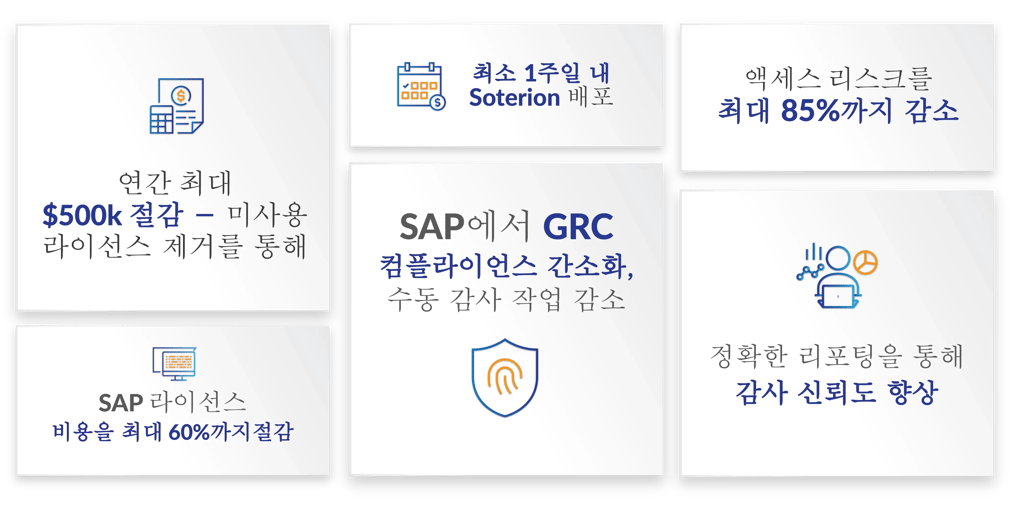
Soterian_Graphic_KR_2026_v2


우리는 일주일 안에 솔루션을 도입했고, 첫날부터 바로 효과를 보았습니다. 즉시 시스템을 사용할 수 있었고, ‘바로 사용 가능한’ 솔루션이었습니다. 기대했던 것보다 훨씬 더 좋았습니다.

Cecilie Relling, 재무 프로세스 개선 및 시스템 선임 스페셜리스트, Aker Solutions

우리는 사용자에게 부여하는 액세스를 최소화하고자 했지만, 예외적인 경우에는 추가 트랜잭션을 제공할 수 있는 역량도 필요했습니다. Soterion을 사용함으로써 사용자가 어떤 액세스와 어떤 트랜잭션을 사용했는지를 정확히 감사할 수 있었고, 이는 Soterion 사용에 의한 확실한 추가 이점이었습니다.

David Hall, 비즈니스 솔루션 총괄 책임자, Compass Group UK & Ireland

Soterion 솔루션은 우리가 필요로 하는 기능을 정확히 수행합니다. 매우 효과적인 것으로 입증되었으며, 우리는 이를 매일 사용하고 있습니다. 파이어파이터 액세스뿐만 아니라 SAP 권한 및 액세스와 관련된 거의 모든 영역에서 활용하고 있습니다.

Marko Lotens, 정보기술 부문 부사장, Masimo Consumer

EPI-USE Labs와 Soterion의 GRC 솔루션은 회사 전반에 인식을 제고하고, 책임을 IT 팀이 아닌 비즈니스 부서로 되돌려 놓았습니다.

Atle Myklebust, IT SAP 기술 서비스 팀장, Elkjøp Nordic

우리는 여태까지 수작업으로 처리해 왔지만, 보다 안정적이고 정교한 GRC 솔루션이 필요했습니다. 이미 EPI-USE Labs와 협업하고 있었기 때문에, Soterion은 우리 SoD 프레임워크에 완벽한 도구였습니다.

Piet Jan Van Egdom, 엔터프라이즈 시스템 팀 책임자, Nikon Europe BV

Soterion의 Access Manager를 도입한 이후, 승인 프로세스가 훨씬 투명해졌고 비즈니스 사용자들의 거부감도 더 이상 발생하지 않습니다.

Thijs Van Haaren, SAP 보안 기술 리드, Orkla

Soterion 덕분에 우리 IT 환경이 안전하고, 데이터가 안전하며, 사용자들이 무엇을 할 수 있고 할 수 없는지가 명확하게 관리되고 있음을 보장할 수 있습니다. 또한 이에 대한 보고가 가능하기 때문에, 저는 안심할 수 있고 조직을 위해 최선의 조치를 하고 있다고 느낍니다.

Zaki Mouden, 글로벌 엔터프라이즈 애플리케이션 총괄 책임자, BSI

Access Review Management에서 매우 좋은 성과를 거두었으며, 이제는 현업 관리자가 훨씬 적은 공수를 들여 이를 수행하고 있습니다.

Nick Achteberg, SAP 기술 서비스 수석 디렉터, Endeavor

testimonial-quote

더 알아보고 싶으신가요?

DSM-demo

License Manager 데모 예약

License Manager가 어떻게 작동하는지 보고 싶으신가요? GRC 전문가와 함께 데모를 예약해 보세요.

DSM-assessment

노출 리스크 진단

SAP 시스템에 숨겨진 직무 분리(SoD) 및 주요 트랜잭션 리스크를 식별하고, 사용자 접근 권한이 요구 사항에 적합한지 점검해 드립니다.
DSM-FAQ

GRC 2024 트렌드 보고서

SAP 고객을 위한 새로운 GRC 시대에 대한 Soterion의 인사이트와 전망을 확인해 보세요.

연락하기

SAP 라이선싱 전략 최적화