Play video
CC_Icons_Page-653
Client support via tracked ticketing
CC_Icons_Page-654
Knowledge-sharing via workspaces
CC_Icons_Page-655
Embedded Learning Management System (LMS)
CC_Icons_Page-656
Dashboards, reporting and SLA management
Sophisticated, automated ticketing framework

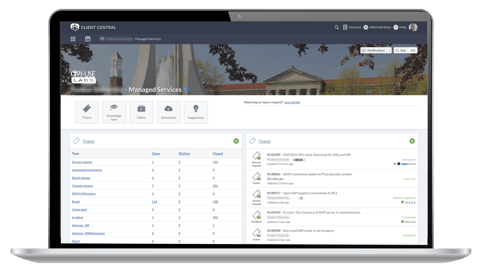
Managing client support requests is the main purpose of Client Central. The ticketing framework delivers a sophisticated automation solution, and includes the following functionality:

  • Record of all incidents, changes or activity with the date and time of change, as well as the person responsible for the change.
  • The option to add attachments to each ticket. This is stored on the ticket itself.
  • The ticket records and displays the response and resolution time on the ticket, in relation to the defined SLA.
  • Buttons are used to drive the workflow on a ticket and change it from one state to another, such as in progress, awaiting info or completed. They can be configured to require a comment or to simply progress the workflow.  
  • Tickets can be linked to each other to quickly navigate between relevant related tickets.
  • Tickets can be filtered based on any of the fields in the ticket, such as assignee, status, SLA compliance, date updated, and status. This helps to easily find and report on individual tickets. 
CC_Mockup3

Ticket configuration and reporting

Client Central provides a mechanism to configure tickets' behavior, making the solution extremely flexible, and easy to use. This includes:

  • Ticket types, and ticket status, such as Open, Awaiting Info, Escalated to Development 
  • Priorities to identify the severity of tickets, which can also be used for allocating service level agreements and rules
  • Custom Fields for custom classifications, and Rules for implementing ticket automation
  • Buttons which provide easy access to custom features.

Customized reporting

  • Big-scale reporting can be done on any of the ticket fields. You can use the information to build graphs in Client Central to display specific data visually.
  • Custom filters can be built so that reports can be saved and reused as required.
  • Client Central provides real-time SLA information; monthly SLA reports can be stored and easily accessed by our clients.
Laptop 2-1

Flexible Client Central 'workspaces'

'Workspaces' are logical areas which relate to a specific service, product or community that you want to collaborate on.  Workspaces are flexible, and can contain one or more of the following components: Ticketing, Downloads, Videos, Knowledge Bases, Forums, Suggestions, Widgets and Learning Management.

Administrators of workspaces can control access and visibility. This can be configured to be publicly available, or controlled by inviting specific Accounts or Users. Fine-grained content access can be provisioned within the underlying workspace, for example by only offering downloads to specific users or accounts.

CC_Mockup5v2

A customizable business platform

Client Central functionality includes:

  • 24/7 scheduling of transport imports
  • Error handling and notifications
  • Event logging that assists with auditing
  • Flexible customisation to accommodate all business processes
  • Pre-approval validations for format, system connection, release status, and import route logic checking.

Transport automation

EPI-USE Labs has  developed integrations with SAP, so once an SAP transport has been approved, it is automatically imported into the target system and the associated log files and statuses are included in the Client Central ticket. The benefit of this approach is that approvals are automated and auditable. This removes the need for approving changes via email, or other complex approval approaches.

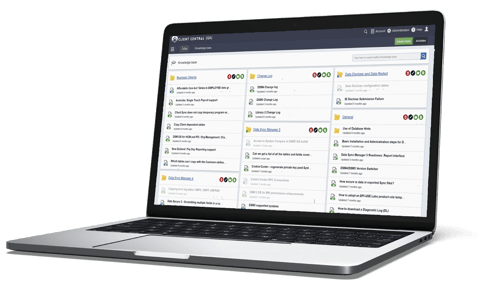
Knowledge base articles

The knowledge repository is a workflow-driven content management system that can be controlled through roles. Approvals ensure the content passes through a quality review before being published. Knowledge bases are linked to and configured per workspace, allowing you a flexible setup based on the purpose and needs of the specific workspace.

Access to knowledge base content creation is driven by roles, which are configured per account in Client Central, so can be flexibly designed. All content submissions are sent to content approvers to review.

Articles are created in the default language of the author, but translations can be added and maintained. If an article is not available in the end-user’s preferred language, the default article language is displayed to the user.

Responsive Mockup6_v2

Sharing knowledge and training

For our clients where common requests are encountered, Client Central's knowledge base capability allows solutions to be automatically proposed to reduce the number of tickets (ticket deflection). 

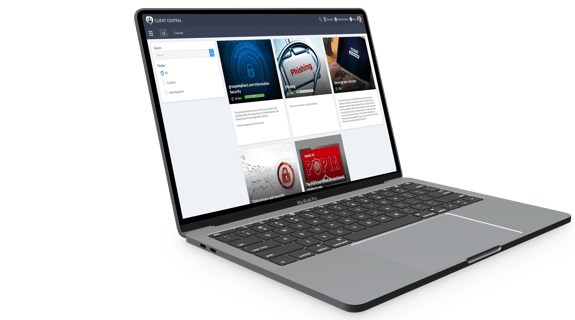
Client Central can also be used as a training platform to ensure new stakeholders can easily access content on specific topics. The solution also includes an evaluation capability to ensure concepts have been understood correctly.

Videos and downloads

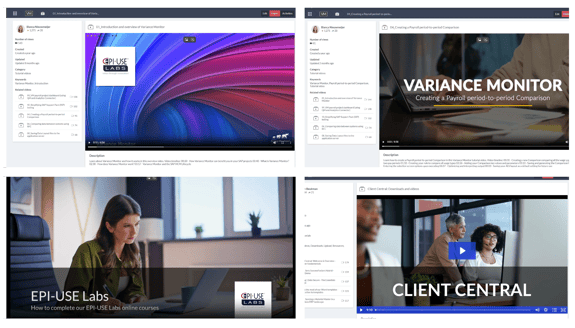
Client Central supports video uploading, and downloading large files. It uses a global content delivery network (CDN) to ensure the experience is optimized for users globally. Videos and downloads are configured via the workspace, and associated roles are provided for management.

Videos can be tagged and either uploaded directly, or linked to a popular video hosting platform (YouTube, Vimeo, Wistia). They can be rated, and associated thumbnails and metadata can be included for improved searching and tagging. Attachments such as associated presentations can be included with videos. 

Downloads can be organised and categorised into specific folders. Externally accessible links can be created for download sharing 'outside' of the Client Central platform.

Collage_AC

An efficient support and operations platform

We are also able to use Client Central as an ITIL (Information Technology Infrastructure Library)-based ITSM (IT Service Management) platform to provide structure and control across our clients' SAP technical and functional operations. This ensures that SAP landscapes run reliably, changes are governed, and issues are resolved quickly and consistently. Functions include:

  • Incident and request handling: Centralised, consistent response to user issues and standard service requests, ensuring fast restoration of service.
  • Problem resolution: Identifies underlying causes of recurring SAP issues to reduce disruptions and improve overall stability.
  • Change and release control: Manages transports, patches, upgrades, and configuration changes through a controlled process that protects system integrity.
  • Landscape and configuration management: Maintains an accurate view of SAP systems, components, and dependencies, enabling effective troubleshooting and impact assessment.
  • Proactive monitoring: Continuous monitoring across SAP, HANA, integrations, and infrastructure to detect and resolve issues before they impact the business.
  • Performance and capacity management: Ensures systems are optimised, right-sized, and capable of meeting business demand.
  • Service Level management and reporting: Tracks performance, uptime, and response times, giving stakeholders clear visibility of service health.
  • Continuous improvement and automation: Drives efficiency, reduces manual effort, and enhances service quality through ongoing optimization and automation initiatives.

When I have an issue I will log an incident or a request for information on the Client Central portal, and the responses have generally been very good.

Neil Wilson, HR Functions Transformation, Global Financial Institution

Client Central is a great place for knowledge base articles, videos, hints and tips.

Cristy Oliphant, SAP HR Payroll Support Manager, Subsea 7

There are huge benefits to having essentially a whole support team in EPI-USE Labs, which just didn’t make sense to have in-house.

Dean Finlayson, Corporate Application Development Lead, Isle of Wight Council

I love EPI-USE Labs! I have enjoyed working with them for years, both the support and the training is great.

Cindy Thomas, IT Technical Lead – HR, Jabil

The added value that EPI-USE Labs brought was the support of the team. The guys themselves are fantastic and very supportive.

SAP Solutions Manager, leading British energy retailer

The support desk has been outstanding – we get quick reaction times, and the consultant that was involved in our project was flexible and very talented!

Jan Huizinga, Technical consultant, Rabobank

testimonial-quote

Get in touch

Find out how Client Central helps our clients