Play video
Most organizations are moving from in-house legacy IT systems to cloud-first Software as a Service, or SaaS technologies. So why look at decommissioning technologies which follow a dated on-premises model? Archive Central is born in the cloud SaaS technology with infinite elasticity and a licensing model that allows you to flex up and flex down as systems come in and out of scope for legacy data retention. With Archive Central, any IT system can be decommissioned, with support for structured and unstructured data linked together for easy search and retrieval. Like all modern apps, there is no training required for end-users. And, of course, data privacy is built-in by design with all the important IT security certifications and data retention rules. These can be based on object keys, table rows, or even individual fields to be removed based on any data-driven criteria. Sunset and secure your legacy data with Archive Central.
Easily accessible via a web interface
Maximize cost efficiency
Role-based, read-only access to sensitive data
Data encrypted in transit and at rest
Comply with data privacy laws

How can you optimize the use of your data from legacy systems?


Embrace new technologies 

Legacy data shouldn’t hold you back from modernizing your IT landscape. Archive Central securely stores your legacy data in one centralized archive, eliminating the need for costly and outdated archiving solutions. This allows your business to adopt the latest technologies while ensuring your critical data remains accessible.


Secure your data with industry-leading compliance

Ensure compliance with GDPR and other data privacy regulations using Archive Central’s advanced security features. With role-based access controls, encrypted data storage, and industry-standard certifications, your sensitive information is protected against unauthorized access while meeting regulatory requirements.

Optimize your access to legacy data

Transform your legacy data into a searchable, secure archive accessible via a web-based interface. Archive Central allows you to create user-friendly layouts that mimic familiar system designs, so your team can quickly locate and retrieve the information they need without disruption or steep learning curves.


Focus your team on business-critical systems

Archive Central takes care of your legacy data storage and compliance needs, providing read-only access to meet legal requirements. By eliminating the need to maintain aging hardware or patch outdated software, your team can focus on strategic projects instead of managing old systems.

Play video
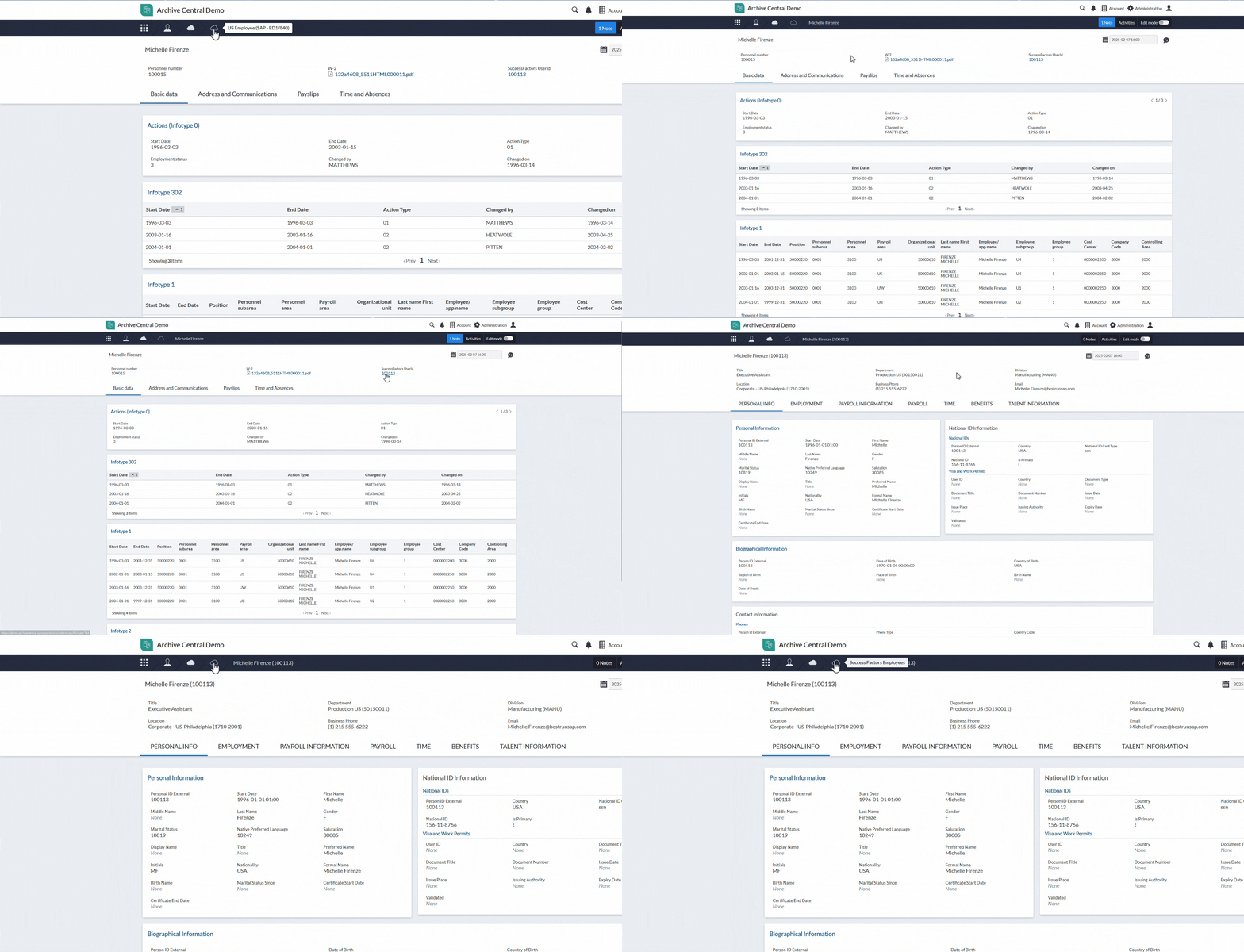
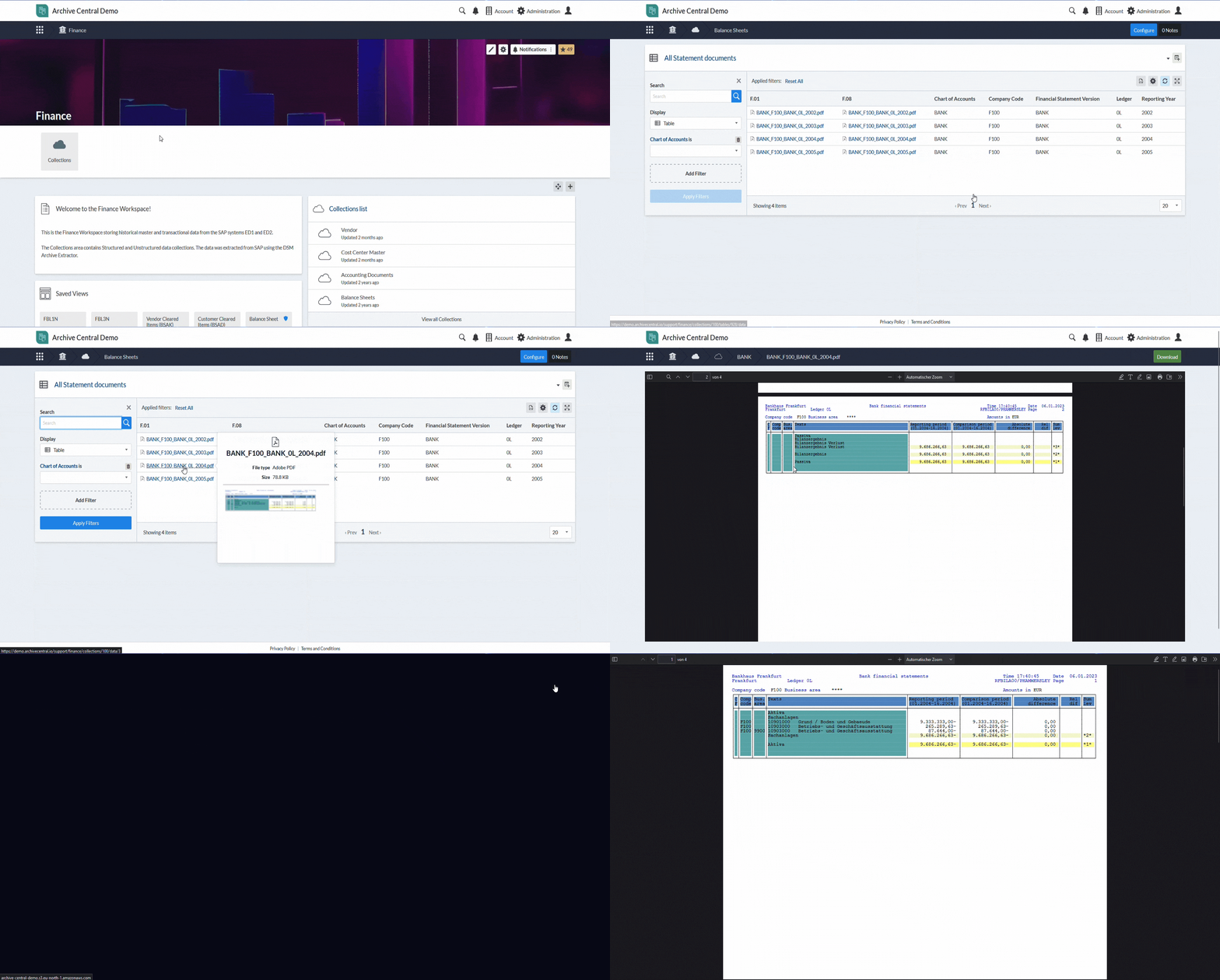
In this short video, we are looking at the basic concept of how data can be visualised in Archive Central. On this demo system, we have our test data grouped by different functional areas. So if I am a Finance user, my authorisation might only allow me to see this Finance workspace. In the Finance workspace I am now introduced to our concept of Collections. So a Collection is effectively our generic term of a data model. So we are grouping all the data that is related to this data model inside this Collection. And if we pick, for example, this vendor record that is coming from an SAP system, we can take a look at how this is used. So if I pick the vendor that I am interested in I can now see this vendor. And while the user interface at first looks different to how users might know it from the SAP world, we grouped the data in a very similar fashion. So if you would take a look at vendor records in SAP, the data would also be grouped by Address, Control, Payments transactions, Contact persons and so on. And we can do the same not just for master data but also for transactional data. So if I pick my example of Accounting Documents further down before drilling into one of the examples, every time I have data in such a tabular view, I have different options to choose from. So on the left hand side I have my filter criteria, where currently I am filtering down all the documents to the ones from fiscal year 2012, while also selecting on multiple company codes for which I have data on. But further than that, I can add filters on all the database tables and fields that are part of this collection. Also, what I can do if the data is displayed in such a tabular view. On the top right hand side, I can go to the table settings. Change the way the data is displayed like adding specific fields to this view. Group them in a specific order or in general prepare the display of this data. Because now I could either save this report again to reuse it later on, or if an auditor requests to have this subset of data provided, we can now download this data if we have the sufficient authorization on the system, and hand that over to the auditor. And inside one of these examples, we can again see as in your source system, you have the data related to the document header in one specific section; but you can also see the line items in a separate tab. And you could drill down into these line items as you could on your source system. The same is now possible for data that is also coming from different systems or different functional areas. Now I want to introduce you to the concept of Saved Views. Our Saved Views are effectively simple reports that can be built on top of Collections. In this example, I have a Saved View that is built on top of Employee Data that is also coming from an SAP system and visualising and grouping my employees by country of birth. If I'm not interested in all the employees that were born in Germany, I can simply drill down and take a look at that if I click in the corresponding section of my graph. We can now see on the left hand side also the filter criteria DE that it has created based on where I just clicked in the graph. And if I now just take a look at one of these records, and one point I want to highlight here is if we go to the Pay Information and select one payroll period and just drill down into this period; what our extractors can do is not just bring across everything that was stored in the database in the transparent format, but as you can see, our extractors can also handle any attachment or unstructured data that might be generated by reports on the source system, such as a payslip that is now, in this example, being downloaded and preserved on Archive Central in the PDF format displayed inline in my browser. And again, if my user has the authorisation, I could download this PDF on the top right hand side and provide it to whoever requested that data, such as an auditor. And another option to highlight in this section are these tables on the bottom side here. Such as the RT table or CRT table. SAP HR experts will directly see that these tables originated from clustered tables within my source system. So in this case, our extractors were able to transform the clustered tables into a transparent format so that we can very easily take a look and report on these tables. And also, if I click on one of these table headers, I again have the same options as we had for the accounting documents. Create specific filters. Save it as a Saved View or change and download the data that I prepared in this example. And the same approach goes for data that is coming from different systems, different functional areas. It is very flexible and I hope that this small introduction gave you a good understanding of how flexible the solution can be.

See Archive Central in action

Watch this quick demo using sample Finance data, followed by an HR employee example. This will give you a glimpse into how archived data is structured, accessed, and visualized within Archive Central.

Every organization’s data is different. If this doesn’t demonstrate the type of data you’re interested in, let us tailor one for you! Request a personalized demo, and we’ll show you how your data could look in Archive Central, using relevant examples that match your specific needs.

How is Archive Central used today?

Retiring of legacy systems

Retiring of legacy systems

Organizations often face high operational costs when maintaining legacy systems, which can be expensive to support because of outdated hardware, limited vendor support, and increasing security vulnerabilities. These systems may also rely on platforms that no longer meet modern security and compliance standards.

However, legal retention periods for business data often delay the retirement of these systems, forcing companies to maintain them longer than desired.

Archive Central provides a modern data management platform designed to address these challenges. By securely archiving critical business data in the cloud, organizations can decommission legacy systems without losing access to important records. Our platform ensures compliance with data retention regulations, offers advanced search and retrieval capabilities, and reduces the risks associated with obsolete technologies. This leads to significant cost savings, improved data governance and enhanced operational efficiency.

Right-sizing of ERP systems

Right-sizing of ERP systems

As businesses grow, their Enterprise Resource Planning (ERP) systems accumulate vast amounts of data, leading to performance degradation, an increase in storage costs, and complex data management challenges. Organizations need solutions to control and limit data growth, ensuring their ERP environments remain agile and cost-effective.

Archive Central addresses these needs by providing a secure, scalable repository where businesses can offload historical data and documents that are no longer required for daily operations. This data archiving process helps optimize ERP performance, reduce infrastructure costs, and simplify system upgrades or migrations as part of broader digital transformation initiatives. With Archive Central, businesses can maintain compliance and streamline data management, while focusing on leveraging their ERP systems for strategic growth.

Business transformation

Business transformation

Mergers, acquisitions, and divestitures often result in complex data management requirements. Organizations involved in these transactions must retain specific datasets for regulatory compliance, legal obligations, and governance purposes. Ensuring secure, controlled access to this data across different entities can be challenging.

Archive Central offers a robust solution for managing data during business transformations. Our platform enables organizations to securely archive and share relevant master and transactional data with authorized parties, ensuring compliance with industry regulations and corporate governance policies. With granular access controls, audit trails, and advanced data protection features, Archive Central supports seamless data transitions while maintaining the integrity and security of sensitive information.

Data privacy compliance

Compliance with data privacy laws, and data sovereignty

In today's regulatory landscape, businesses face increasing requirements to comply with  global and local data privacy laws, which often mandate that certain data must reside within specific geographic boundaries.

For example, Indian financial regulations require that financial data be stored and processed on servers located within India, with daily data synchronization to ensure compliance.

Archive Central is designed to support these data sovereignty requirements effectively. Our platform can be hosted in specific geographic regions, including India, to meet local compliance mandates. This flexibility allows organizations to archive sensitive data securely while ensuring adherence to regional data residency laws. Archive Central facilitates seamless data synchronization, robust security measures, and comprehensive compliance reporting, making it an ideal solution for businesses operating in multiple jurisdictions with stringent data localization requirements.

Realize your project

Once we understand your needs, our experts will analyze your data, tailor best practices to your needs, and handle everything from data export to organizing and visualizing your data. We'll engage your business users only when absolutely necessary. 

Organizing and visualizing your data

How can data be archived on Archive Central?

Export from SAP

Export data from SAP systems

For organizations using SAP systems, Archive Central simplifies the data archiving process through seamless integration with the SAP Archive Extractor. This extractor leverages the robust Data Sync Manager™ SAP object model, meticulously mapped by EPI-USE Labs over the past 25+ years. This ensures that data is coherently exported, maintaining the integrity of relationships and links between complex data structures, including the de-clustering of tables and extraction of related unstructured data that was uploaded as attachments.

Our automated analysis tools scan your SAP environment, identifying the optimal data sets for archiving, while ensuring compliance with data retention policies. This process reduces manual effort, minimizes errors, and accelerates data extraction.
 
Export from any system

Export data from any system

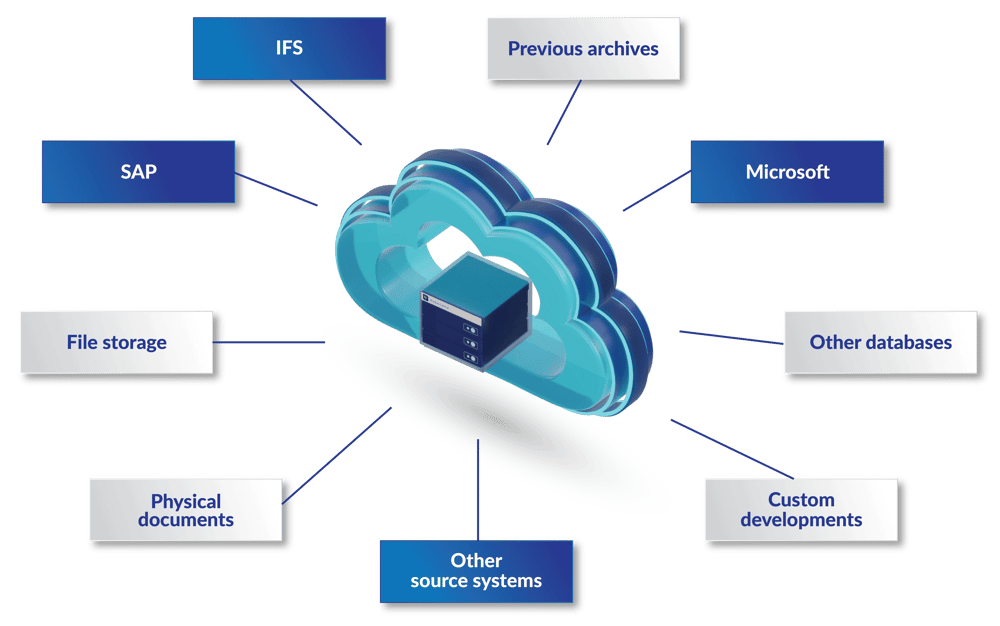
Archive Central isn’t limited to SAP data; we support archiving from any IT system. Whether your data resides in Microsoft applications, Oracle databases, custom-built software, or decades-old legacy platforms, our versatile solution ensures it’s securely archived.

Our platform handles diverse data types and formats, providing robust tools for secure storage, advanced searchability, and easy retrieval.

At the core of Archive Central is the commitment to support all current and future archiving needs. No matter what technologies your organization chooses to adopt in the next decade, Archive Central will continue to be a reliable archiving solution for your legacy systems. Our platform evolves alongside your business, ensuring long-term data accessibility and compliance.

AC_Data_cloud_v5

Bring your own data

Bring your own data

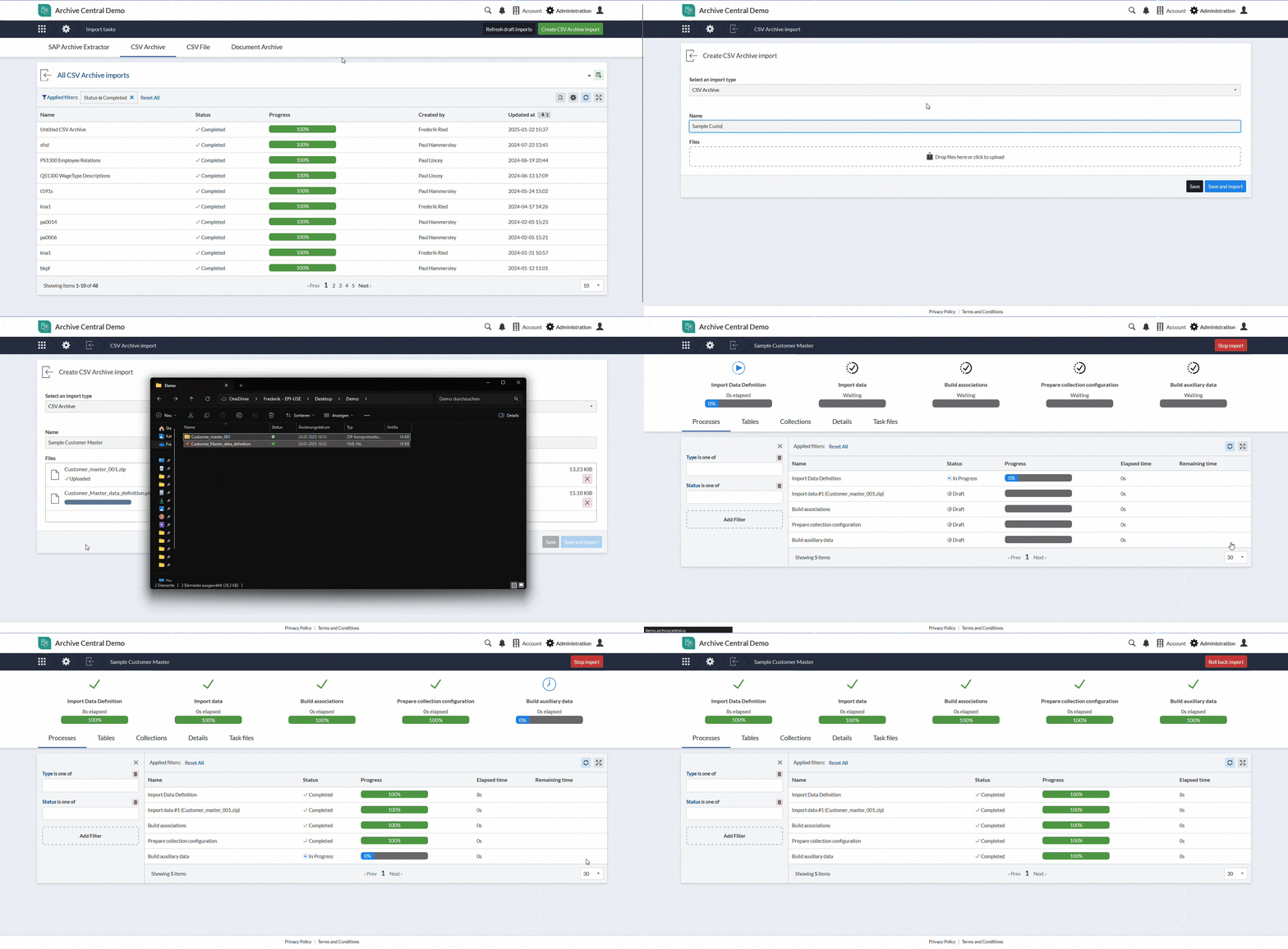
Already have data extraction tools and in-house expertise? No problem. Archive Central offers the flexibility to import and manage your own extracted data, regardless of the source system. Even if we haven’t previously archived data from a specific platform, our solution adapts seamlessly.

We assist in structuring your data effectively within Archive Central, catering to both the upload and visualization processes. Our platform ensures that your data remains well-organized and accessible. Once the data structure is in place, importing becomes effortless; as simple as dragging and dropping your files to kick off the process.

BringYourOwnData_export_1_iteration_2

Single, unified platform

Unified archiving across multiple systems

Modern IT landscapes often include a mix of best-of-breed solutions, creating fragmented data environments. Archive Central consolidates all archived data into a single, unified platform, allowing organizations to link related records across different systems effortlessly.

Whether it’s customer information, vendor details, or invoices appearing in multiple sources, our platform brings it all together for a comprehensive view. Granular access controls ensure data security while supporting compliance requirements.

You can either display the data in one and the same data collection, or simply link the collections to jump between the different views easily.

BringYourOwnData_export_1_iteration_2

Archive file attachments

Archive file attachments

Documents, images, PDFs, and spreadsheets often become scattered across various storage locations, making them difficult to manage. Archive Central eliminates this challenge by linking file attachments directly to their corresponding database records.

This integration improves data organization, provides inline previews, and supports secure downloads – all within the same platform. No more disconnected file repositories; just streamlined, accessible data.

ArchivingFileAttachments_export_1_iteration_2

Flexible global hosting

Flexible global hosting

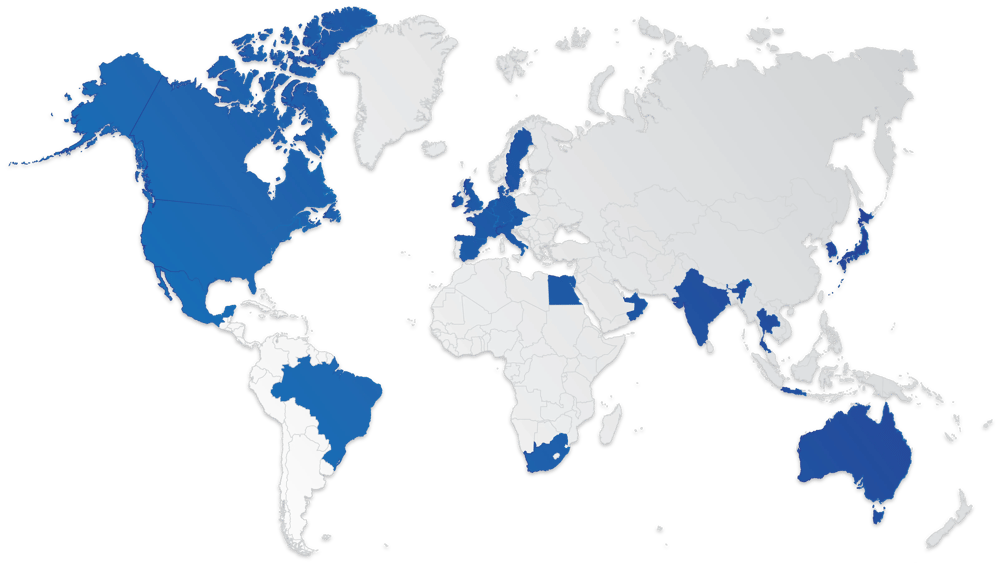
Archive Central offers extensive flexibility when it comes to data hosting. Through strategic partnerships with leading hyperscalers, we provide the ability to host your archived data in a wide range of countries and data centers worldwide, ensuring compliance with local data residency and sovereignty requirements.

Our platform can be deployed in the region that best fits your business and regulatory needs, providing secure and resilient data archiving anywhere in the world.

AC_Data_map_v4


AC__WebServer_Graphicwebp


Secure hosted SaaS solution 

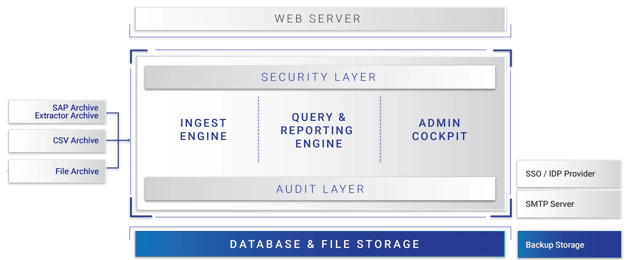
  • In line with best practices, the solution is deployed as a hosted SaaS solution.
  • The application leverages elastic scaling and storage mechanisms, provides a variety of hosting locations (in compliance with GDPR and other privacy legislation) and uses CDNs for fast responses globally.
  • Support for documents is built in as standard; for example, linking payslip documents to the employee or associating invoice records with their corresponding PDF files can be part of the data that is stored in Archive Central.

mark-of-trust-certified-ISOIEC-27001-information-security-management-black-logo-En-GB-1019       mark-of-trust-certified-ISO-IEC-27701-logo-En-GB-0420       21972-312_SOC_NonCPA


Client success

Want to know more?

DSM-demo
Book your Archive Central demo 

Book your demo to find out how you can get secure access to your historical data. 

DSM-assessment
Request Assessment

Get a free assessment to help you gain insight into your legacy SAP environment. 
DSM-FAQ
Explore responses to client questions

Have questions about Archive Central and how it would work for you? Take a look at what other clients are asking in these responses to FAQs.

Gain insight into your data

Free system analysis report