
Ultimate guide:
Navigating the S/4HANA path
Section 1
S/4HANA navigation path: How to chart your course
SUMMARY: This section provides a high-level roadmap for evaluating your SAP strategy: optimising ECC, or transitioning to S/4HANA. It outlines the strategic value of modernising with S/4HANA, options to optimise your current landscape without leaving ECC, and data-driven guidance using EPI-USE Labs' Enterprise Navigation Strategy. It also explains the architectural endpoints and technical migration paths: SAP-managed SaaS or self-hosted private cloud, and Greenfield, Brownfield, or IP-driven data migration.
The SAP landscape is evolving at breakneck speed. Between looming end-of-life deadlines for legacy systems and a constant influx of new technological capabilities, separating the ‘must-haves’ from the ‘nice-to-haves’ is difficult. This guide cuts through the vendor noise to help tech-curious leaders understand their true options and chart a clear course to SAP S/4HANA.
This section provides a high-level roadmap for evaluating if S/4HANA is the right foundation for your enterprise, how to get there, and the essential tools for the journey.
Evaluating your SAP strategy: Optimising ECC, or transitioning to S/4HANA?
Many organisations operate on legacy SAP ECC systems that are rapidly approaching the end of mainstream maintenance in 2027. However, a full migration to S/4HANA is not the only path forward. As your technical partner, our goal is to evaluate your unique landscape and help you make a final decision that perfectly aligns with your business requirements – whether that means optimising your current SAP ECC environment, or moving to a new platform.
There are myriad technical pathways and options available, depending on your goals:
Option 1: Modernising with S/4HANA (on-premises S/4HANA, versus SAP Cloud Private Edition, versus SAP Cloud Public Edition)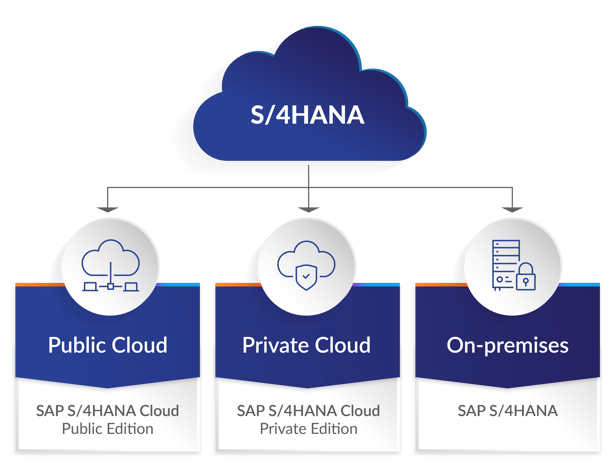
If our joint assessment reveals that an upgrade is the right strategic move, transitioning to S/4HANA is a proactive strategy to turn your SAP ERP from a system of record into a system of intelligence. This is what makes the move strategically worthwhile:
- Real-time business operations: Migrating to the in-memory SAP HANA database eliminates batch processing, allowing leaders to make decisions based on live, up-to-the-second operational data.
- Next-Generation AI integration: S/4HANA natively supports advanced AI. Whether leveraging SAP's own generative AI assistant to streamline operations, or integrating with external tools, the platform automates the mundane and elevates human decision-making.
- Escaping the legacy trap: You leave behind restrictive architectures for a modernised environment designed for continuous evolution.
More context on each of these endpoints will be covered in more detail in later sections in this guide.
Option 2: Optimising your current landscape
If a full system conversion does not currently align with your business goals, there are significant ways to optimise performance and reduce risk, without leaving ECC:
- System and data clean-up: We can streamline your existing environment by removing or archiving old data to reduce hardware storage costs and lower compliance risks. We can also revitalise your system by using tools like the SAP Code Inspector (SCI) and ABAP Test Cockpit (ATC) to identify and remove outdated or unused custom ABAP code.
- Business Suite on HANA (BSOH): If you want database modernisation without a full application overhaul, we can migrate your current non-HANA database to SAP HANA while staying on ECC. This introduces modern architecture benefits with far less business process impact than a full S/4HANA conversion.
- Infrastructure refresh and right-sizing: Ageing on-premises hardware is often over-provisioned or running beyond its supported lifecycle, driving unnecessary cost and risks. Refreshing or right-sizing your infrastructure – whether staying on-premises or moving to a hosted environment – can significantly reduce hardware maintenance costs, improve system performance, and eliminate the vulnerability of running on unsupported equipment.
- Virtualisation and consolidation: Where multiple physical servers are running underutilised workloads, virtualising your SAP landscape allows you to consolidate onto fewer, more efficient hosts. This reduces your physical footprint, lowers energy and licensing costs, and makes your environment easier to manage and scale.
- Hybrid cloud adoption: Rather than an all-or-nothing approach to the cloud, a hybrid model allows you to selectively move non-production systems (development, QA, training) to the cloud while keeping production on-premises. This reduces the cost of maintaining development infrastructure in-house, and gives you the flexibility to scale environments up or down on demand – without the risk of a full Production migration.
- Managed Services Transition (OPEX Model): Shifting from owning and managing your own SAP infrastructure (CAPEX) to consuming it as a managed service (OPEX) reduces the burden on your internal IT team and converts unpredictable capital expenditure into a predictable monthly cost. This is particularly valuable for organisations where the Basis team is stretched thin, or where hardware refresh cycles create irregular budget spikes.
- Non-production system optimisation: Non-production landscapes (development, test, and sandbox systems) are frequently bloated copies of Production, consuming disproportionate storage and compute resources. Using tools like EPI-USE Labs' Data Sync Manager, these systems can be refreshed with a lean, masked subset of Production data – dramatically reducing their footprint and the cost of running them, while also improving data privacy compliance.
Make a data-driven decision
To help guide this final decision, with our Enterprise Navigation Strategy we can perform a detailed analysis to gain comprehensive insights into your existing system. By extracting quantitative metadata – without exposing actual client data – we can analyse the potential impact on your business processes and custom code, ensuring the path we choose is the absolute best fit for your organisation.
How do you get to S/4HANA? Endpoints and migration paths
Getting to S/4HANA requires two major decisions: choosing who holds the keys to your system (the endpoint) and how you move your data (the migration path).
1. The architectural endpoints
- SAP-managed SaaS (Private/Public Cloud): A standardised, vendor-managed subscription. SAP provides the software, handles the infrastructure, and enforces regular, mandatory upgrades. It is fast to deploy, but requires you to adapt your business processes to fit the standard software.
- The self-hosted private cloud: The path of ultimate sovereignty. You purchase software licences and deploy S/4HANA on your own dedicated infrastructure (AWS, Azure, Google Cloud, or an internal data centre). You retain total control over data residency, deep system customisation, and the timing of your upgrade roadmap.
2. The technical migration paths
- Greenfield (new implementation): A fresh start, leaving legacy code behind. This is mandatory if moving to a standardised SaaS environment.
- Brownfield (system conversion): The ‘lift and shift’ approach. You convert your existing ECC system directly into S/4HANA, taking historical data and workflows with you (highly suited for the self-hosted private cloud).
- IP-driven data migration (Selective Data Transition): A hybrid model migrating only specific historical data and vital workflows, leaving obsolete junk behind. Read more in this blog.
| Migration Path | Pros | Cons |
|---|---|---|
| Greenfield | Leaves restrictive legacy architectures behind. Mandatory for highly standardised, multi-tenant SaaS environments. Allows adoption of out-of-the-box best practices. | Transactional data usually remains in a separate read-only environment. Requires significant change management and training. Core configurations and roles must be rebuilt from the ground up. |
| Brownfield | Business continuity focus – seamlessly upgrades your legacy application and database in place. Can be decoupled by migrating to a HANA database first (Business Suite on HANA) to minimise process impact. Excellent for retaining custom workflows in a private cloud. | The source system must be on ECC 6.0, fully Unicode enabled, and split into an ABAP-only stack. Requires heavy remediation of custom ABAP code using tools like SAP Code Inspector (SCI) and ABAP Test Cockpit (ATC). HANA's in-memory architecture requires rigorous data archiving first to avoid high storage costs. |
| IP-driven data migration | Avoids an all-or-nothing system conversion. Selectively migrates vital workflows while leaving obsolete junk behind. Significantly reduces target system memory footprint and costs. | Slicing out specific organisational entities requires specialised third-party software, which EPI-USE Labs can provide. Extensive data modelling and mapping make it highly complex without the right partner. High risk of broken links between historical and master data if executed poorly. EPI-USE Labs PRISM for S/4HANA solution is a flexible approach to create a lean, secure SAP estate. |
Section 2
S/4HANA navigation path: How to prepare for lift-off
SUMMARY: This section outlines why preparation for S/4HANA is a business simplification opportunity. It covers readiness checks, Simplification Item check, custom code analysis, data cleansing and archiving, CVI, Unicode conversion, Maintenance planner, Cloud-ALM and system sunsetting; compares Greenfield, Brownfield and Selective Data Transition; and reviews technical prerequisites, HANA options, pre-checks and Basis work to reduce migration time, avoid costly surprises and manage technical debt, data quality, resource capacity and change management risks.
The deadline is real; SAP will end mainstream maintenance for ECC by December 31, 2027. But what most organisations miss is that preparation for S/4HANA is not just a technical prerequisite; it’s a business simplification opportunity. Done right, the preparation phase identifies where your landscape can be streamlined, what can be archived or retired, and where years of accumulated complexity can finally be unwound. The result is a leaner runtime, a smaller data footprint, and a system primed for conversion.
This section breaks down the critical preparation steps – from readiness checks and custom code analysis, to data cleansing and Customer/Vendor Integration – so you can enter your migration project with clarity.
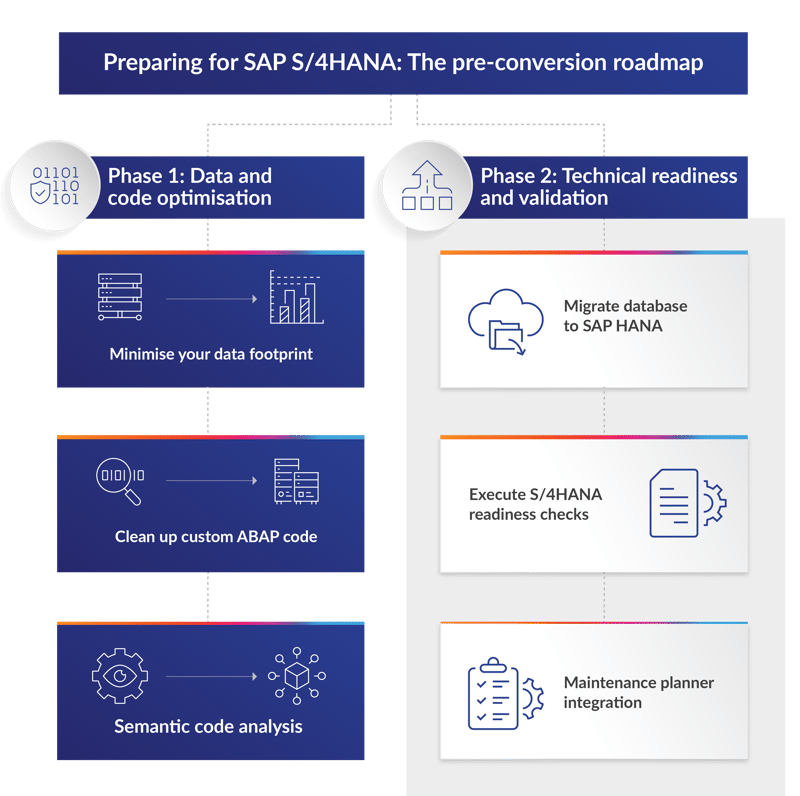
Why is preparing for an S/4HANA project critical?
Preparation is where the real value of an S/4HANA project begins. By systematically analysing your existing ECC system, cleansing data, and aligning your technical foundation, you avoid the costly surprises that derail migrations mid-flight. The work of preparing to migrate pays dividends in your existing landscape long before any cutover takes place.
The key preparation steps include:
- SAP Readiness check and Simplification Item check: These tools analyse your existing ECC system to identify compatibility issues, required functional changes, and necessary add-ons for S/4HANA.
- Customer/Vendor Integration (CVI): A mandatory pre-step for brownfield conversions. Customers and vendors must be converted into the SAP Business Partner (BP) model before the system can move forward.
- Custom code analysis: Use the ABAP Test Cockpit (ATC) to scan custom code (Z-code) for S/4HANA compatibility. Identify obsolete code that can be retired, reducing the scope of remediation.
- Data cleansing and archiving: Analyse and reduce data volume by archiving obsolete records. This significantly lowers migration time, improves system performance, and reduces expensive in-memory storage requirements on HANA.
- Unicode conversion: Your source system must be running on Unicode: this is a strict requirement for S/4HANA, with no exceptions.
- Maintenance planner: Run this tool to verify add-on compatibility, browser support, and to generate the stack XML file required for the upgrade.
- Cloud-ALM: Existing Enterprise Customers of SAP can also utilise CALM and benefit from using the free services of Cloud-ALM to assist with preparation work for their eventual migration to S/4HANA.
- System sunsetting: A full evaluation of the existing landscape will be conducted, and any systems that are identified as unnecessary or replaceable will be removed (such as removing Solution Manager and implementing CALM, or using an embedded Gateway).
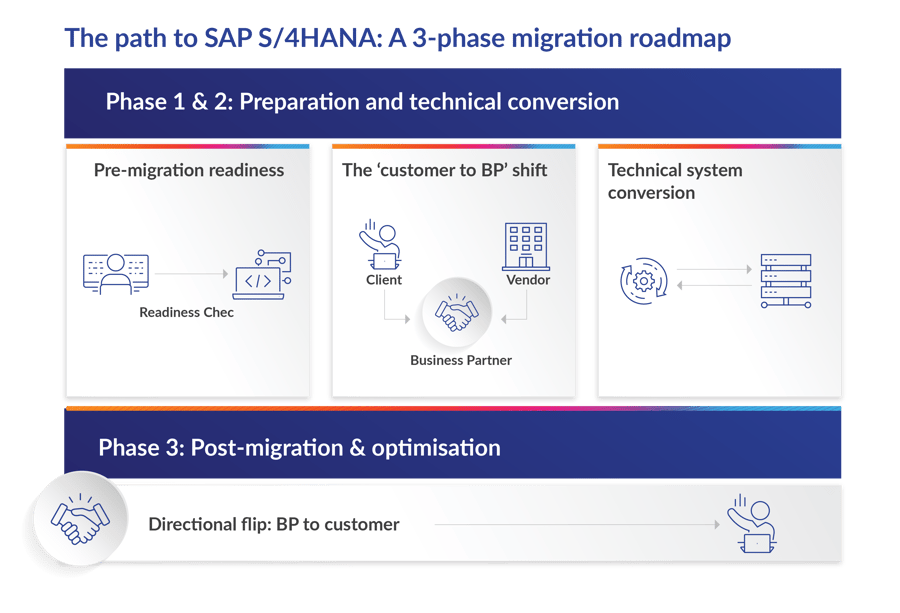
Choosing your migration strategy
Before diving into technical work, you need a clear strategic direction. Our first section introduced the three primary migration paths; this is how they shape your preparation:
- Greenfield (New Implementation): A blank-slate rebuild. This approach allows you to completely redesign business processes and adopt standard SAP best practices. It offers the highest transformation value but demands the most rigorous change management.
- Brownfield (System Conversion): Convert your existing ECC system directly to S/4HANA, fully retaining historical data, configurations, and past customisations. Often faster, but it carries the risk of bringing legacy technical debt into the new environment.
- Selective Data Transition: Create a new S/4HANA system and selectively migrate only the specific historical data, company codes, or entities that are strictly necessary—leaving behind unnecessary legacy data.
Your choice of path directly determines which preparation steps are mandatory and which are optional. Brownfield conversions, for example, require CVI completion and extensive custom code remediation. Greenfield deployments shift the burden toward process redesign and data migration planning.
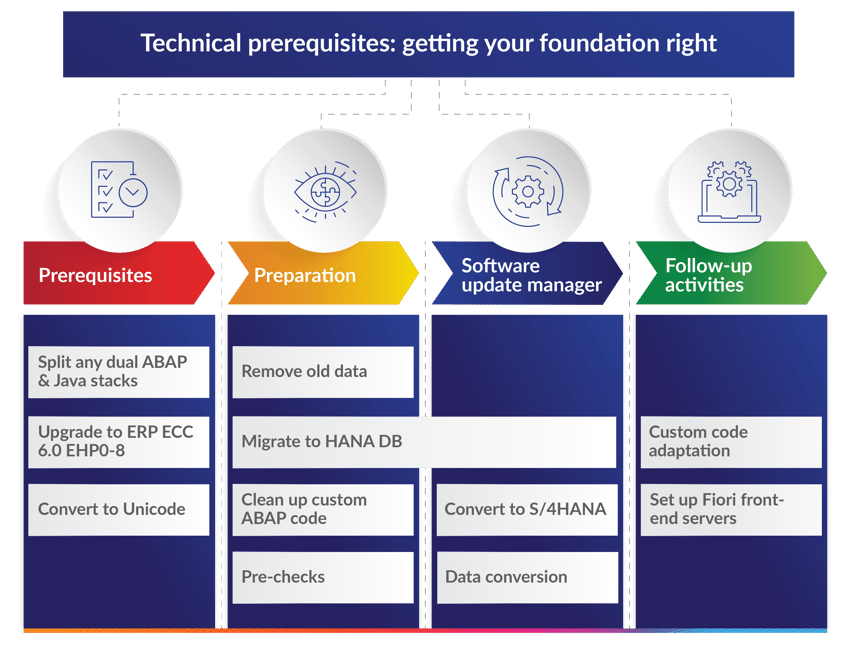
Before preparation for the actual S/4HANA conversion begins, your system must meet several baseline requirements. If any of these are unresolved, they become your first order of business.
Split Dual-Stack Systems (ABAP + Java)
If your existing ECC 6.0 system runs on a dual ABAP and Java stack, you must split it into two separate stacks. Only the resulting ABAP-only stack can be converted to S/4HANA. If your landscape contains no dual-stack systems, skip this step entirely.
Unicode Conversion
S/4HANA is shipped exclusively with Unicode, and the SUM process does not include a non-Unicode-to-Unicode conversion for a 7.5x target. If you also need to upgrade your source environment to ECC 6.0, you can combine both steps using the Combined Upgrade & Unicode Conversion (CU&UC). Converting to Unicode is a mostly technical exercise with minimal functional impact beyond regression testing of interfaces, self-services, and custom ABAP code.
Upgrade to ERP ECC 6.0
Your source system must be at minimum on ECC 6.0, since older SAP R/3 4.7 and SAP ECC 5.0 releases do not include the Customer/Vendor Integration (CVI) required for S/4HANA. The specific Enhancement Package version does not matter. If your system is also not yet on Unicode, you may be able to combine the upgrade with the Unicode conversion.
Once these baseline requirements are met, you can proceed to the core preparation phase.
Core preparation activities
Remove or archive old data
Before moving to SAP HANA or S/4HANA, understand the business case for minimising excess data. HANA's in-memory architecture uses significantly more expensive hardware to store data compared to traditional databases – carrying unnecessary historical records inflates both migration time and ongoing infrastructure costs.
Use this as an opportunity to clean up your entire system landscape. Embrace that Production archiving project you have been deferring. Reduce compliance risks associated with data privacy regulations. And remember: non-production systems often store more configurational and development data than Production. Further reduction is achievable through right-sizing non-production environments and removing unneeded data from Production.
Categories to think about when considering your data footprint:

Data ownership

Master data / transactional data
(Hint: you can archive the latter)

Legal compliance data
(What do you need to keep around and for how long?)
Privacy / GDPR
(Related to above, but think about non-production systems)
Hot/warm/cold storage
(S/4HANA requires hot storage)
Temporary data
(Do you have any old staging data you can drop?)

Housekeeping / technical data
(See SAP note 2388483)
Section 3
S/4HANA navigation path: On-premises endpoints and hyperscaler hosting
SUMMARY: This section focuses on choosing your SAP cloud endpoint for S/4HANA. It compares on-premises and SAP Cloud across control, cost structure, data sovereignty, updates, total cost of ownership, and security posture. It examines hybrid hyperscaler options and traditional virtualisation, including VMware vSphere, Proxmox / KVM, and Nutanix AHV, highlighting certification, cost profile, and risk, and shows how the right hosting model depends on infrastructure, cost, security, and risk tolerance.
Choosing your endpoint
Once the strategic case for moving to S/4HANA is settled, one question remains: where should the system actually run? The next two sections tackle that question from opposite directions.
This section focuses on hosting S/4HANA yourself, whether through hybrid hyperscaler platforms such as AWS and Azure, or traditional on-premises virtualisation.
Choosing where your S/4HANA system physically lives is one of the most consequential decisions you will make while planning your migration. It dictates your level of control, your financial model, your security posture, and how quickly you can adopt AI-driven capabilities. This section breaks down the real differences between on-premises and public cloud deployments, compares the leading hyperscaler and virtualization options, and frames the total cost of ownership so you can make a clear-eyed decision.
Our next section looks at the alternative, being SAP’s own cloud routes – RISE with SAP and GROW with SAP – and how each shapes your licensing, custom code, and the role your implementation partner plays.
It’s worth remembering that RISE and GROW are not required to reach S/4HANA ahead of the 2027 and 2030 support deadlines; they are two options among several, and for organisations that want to retain control over infrastructure, cost, or security, hosting outside SAP’s managed cloud is an equally valid route.
Read together, these two sections map the full range of S/4HANA endpoints, so you can weigh what SAP manages for you against what you can manage yourself – just as capably.
On-premises versus SAP Cloud: The strategic divide
In 2026, the gap between ‘on-premises’ and ‘public cloud’ has narrowed considerably, thanks to hybrid hyperscaler solutions like AWS Outposts and Azure Stack. Yet the choice still carries significant implications for control, cost structure, and innovation velocity.
Here is how the two models compare through the lens of an S/4HANA migration:
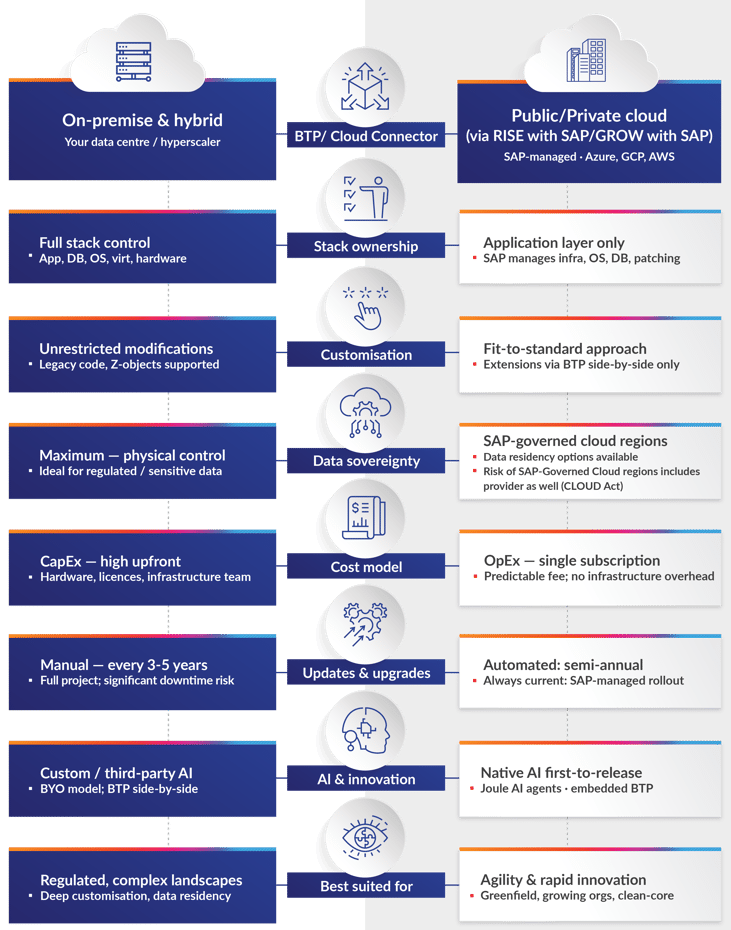
Architectural and strategic differences
| Feature | On-premises (Any-premise) | SAP Cloud |
|---|---|---|
| Control | Total. You manage the OS, DB, and application layers. High customisation (including modifications) is allowed. | Restricted. SAP or the provider manages the stack. Focus is on ‘Fit-to-Standard’ (configuration only). |
| Updates | Manual. You choose when to upgrade; often every 3–5 years. | Automatic/Planned. Semi-annual or annual updates pushed by SAP. |
| Hardware | Your data centre or local hyperscaler hardware (e.g., AWS Outposts). | Shared/multi-tenant or private cloud on global regions. |
| Data sovereignty | High. Physical data resides on your site; ideal for defence, government, or strict regulatory sectors. | Medium. Data resides in a provider's region (though 'Sovereign Cloud' options now exist in the EU and US). |
On-premises versus SAP Cloud: Advantages and trade-offs
Migrating to S/4HANA introduces real complexity when deciding on a hosting model. Understanding the advantages and trade-offs of each path is essential before committing.
| Dimension | On-premises | SAP Cloud ERP Private |
|---|---|---|
| Vendor Lock-In | Low | High |
| Hosting/Hyperscaler | Customer Controlled | SAP Controlled |
| Exit Complexity | Low–Medium | Medium–High |
| Contract Flexibility | High | Low |
| Cloud and AI applications | Options including SAP Joule | Confined to propriety SAP |
| Planning | N/A | Assessment |
| Clean Core | Work towards | Quality Gate |
| Approach | N/A | Brownfield (technical migration), Greenfield (new start), or selective data transition (SDT) |
| Timeline | N/A | 6-18 months |
| Effort | N/A | Effort high for complex landscapes but supported by tools and partners |
| Total SAP Landscape | N/A | Additional Cost for migration. Disruption during and after |
Example case study
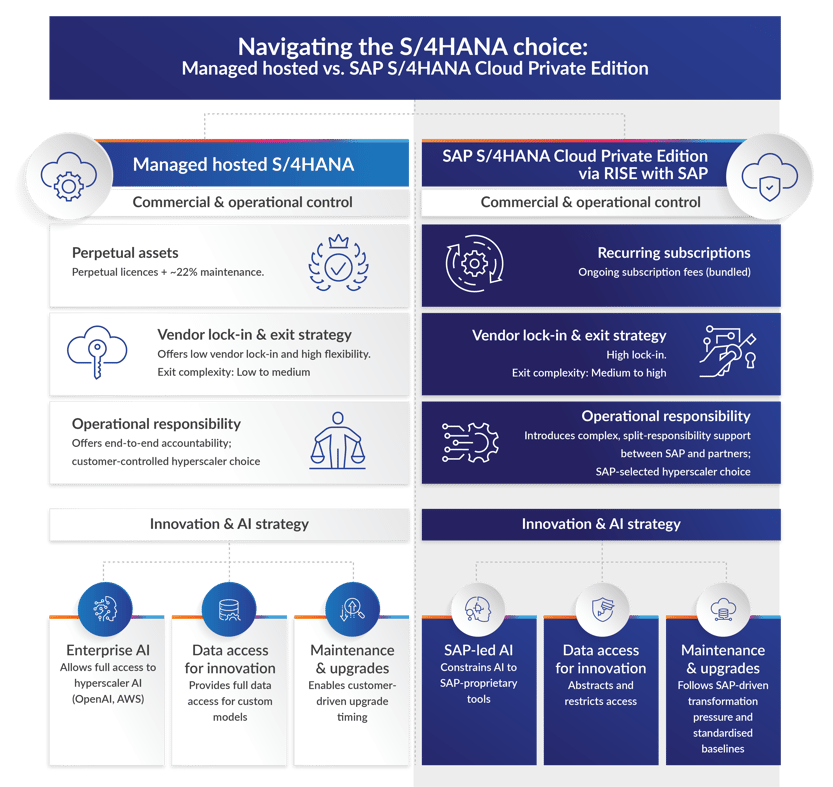
Our client is evaluating whether to remain on its current partner-hosted S/4HANA platform or migrate with ‘RISE with SAP’. The current hosted model offers higher flexibility and lower long-term costs, while SAP S/4HANA Cloud Private Edition via RISE with SAP provides SAP-led management, but with potential constraints.
Hybrid hyperscalers: Cloud power in your data centre
If you choose not to move to SAP S/4HANA Cloud Public Edition or SAP S/4HANA Cloud Private Edition, you have an option to host S/4HANA while maintaining full control. The most modern approach is the hybrid hyperscaler model: cloud-grade hardware installed in your own facility, managed through the same console you would use in the public cloud.
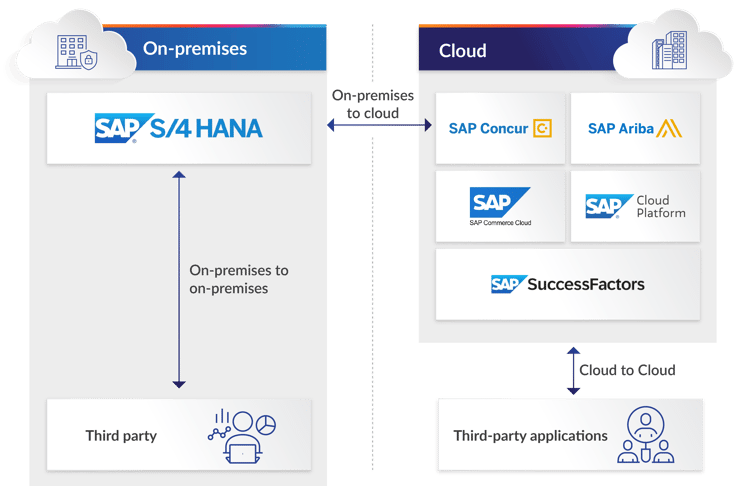
Traditional hardware and virtualisation: The classic path
If you prefer traditional infrastructure without the hyperscaler subscription layer, the 2026 hardware market is focused on HANA-optimised appliances. Staying away from the cloud means you take on the responsibility of SAP certification compliance – and SAP is very strict about which hypervisors can run productive HANA workloads.
VMware vSphere: The safe enterprise bet
VMware remains the ‘gold standard’ for on-premises SAP. Most SAP notes and best practices are written first for VMware.
- Certification: Fully certified for S/4HANA and HANA.
- Pros: Features like vMotion (live migration) and DRS (load balancing) are natively supported for SAP. It has the largest ecosystem of SAP-aware backup tools (Veeam, Cohesity).
- Cons: Since the Broadcom acquisition, licensing costs have increased significantly. The move toward per-core subscription models can be expensive for large HANA nodes.
Proxmox and KVM: The open-source alternative
In 2026, many organisations are evaluating Proxmox to escape VMware licensing. However, there is a critical certification catch:
- The status: Proxmox VE is not officially certified by SAP for productive S/4HANA workloads.
- The workaround: SAP does certify KVM – the engine under Proxmox – but specifically the SUSE Hypervisor (SLES for SAP Applications) or Red Hat Virtualization versions.
- The risk: Running production S/4HANA on standard Proxmox means SAP Support may refuse to assist with kernel-level performance issues until you replicate the problem on bare metal or a certified hypervisor.
- Best use: Proxmox is excellent for sandbox, development, and training environments to reduce costs, while production stays on a certified platform.
Nutanix AHV: The middle way
Nutanix has gained massive traction in 2026 as the primary alternative to VMware for SAP workloads.
- Certification: Fully certified for SAP HANA.
- Pros: Uses its own hypervisor (AHV), based on KVM but fully hardened and supported by both Nutanix and SAP. It offers ‘one-click’ simplicity and a more predictable cost model than VMware.
- Cons: Requires Nutanix-specific hardware or certified nodes – you cannot install it on any generic ‘white box’ server the way you can with Proxmox.
Virtualisation platform comparison (2026)
| Feature | VMware vSphere | Nutanix AHV | Proxmox / KVM |
|---|---|---|---|
| SAP Production Certified? | Yes | Yes | KVM only (SLES/RHEL) |
| Management Focus | Enterprise IT Teams | Hybrid Cloud / HCI | Linux / Open-Source Admins |
| Cost Profile | High (Subscription) | Medium-High (Appliance) | Lowest (Community/Support) |
| Live Migration | Supported for HANA | Supported for HANA | Restricted for HANA |
Total cost of ownership: Managed Hosted vs. SAP Cloud ERP Private
Understanding the financial model is as important as understanding the technology. Here is how the two primary hosting approaches compare across the key cost dimensions:
| Dimension | Managed Hosted | SAP Cloud ERP Private |
|---|---|---|
| Software | License maintenance (fixed) | Subscription fees |
| Infrastructure / Platform | Optimisable: you control the levers | Less opportunity for cost optimisation |
| Support | Support services (scalable) | Fixed as part of subscription; additional support services scalable |
| Migration Cost | N/A | Medium to High |
| ROI | Predictable | Dependent on scope |
Security considerations
Security is a critical factor in any hosting decision. On-premises deployments give you direct, physical control over your security perimeter – from network segmentation and firewall rules to encryption key management and access governance. SAP Cloud Private/Public deployments shift much of this responsibility to SAP and the hyperscaler, which brings enterprise-grade compliance certifications but reduces your ability to enforce bespoke security policies. Hybrid models land somewhere in between, often requiring a shared responsibility framework that must be clearly defined during project planning.
How can we help you?
EPI-USE Labs has global experts capable of supporting any type of migration or managed service, including:
- SAP Basis Managed Services:
End-to-end management and support of SAP environments using experienced Basis specialists and proprietary automation tools. This covers incident management, change request management, daily monitoring, system health checks, performance management, and landscape housekeeping — all underpinned by 24/7 global support centres. - BRIDGE Managed Services:
A complementary managed service designed specifically for organisations who have migrated to SAP via RISE with SAP. It fills the gaps left by SAP's Cloud Enterprise Services, covering areas like daily landscape health checks, job monitoring, transport management, performance management, and coordination with SAP for upgrades, refreshes, and system copies. - Cloud Management Services (Full-Stack):
A comprehensive, end-to-end managed cloud offering covering both SAP and non-SAP workloads across private and public cloud environments. This includes infrastructure management, real-time monitoring, patch updates, incident and change management, and access to EPI-USE Labs' automation IP via the Client Central platform. - Cloud Migrations:
A structured, accelerated migration service to move SAP systems to the cloud, including Selective Data Transition using a proprietary migration methodology called PRISM. Rather than a simple lift-and-shift, the service optimises and rationalises the SAP landscape, includes data integrity validation, data masking for compliance, and supports rehosting or refactoring approaches across AWS, Azure, and GCP. - Private Cloud Hosting:
Our iSphere Cloud solution offers secure, flexible private cloud infrastructure for SAP and non-SAP workloads, hosted in top-tier global data centres via Equinix and Teraco (Africa). Offerings include dedicated and leveraged private cloud, Backup-as-a-Service, and Disaster Recovery-as-a-Service, all built on Fujitsu hardware and independent hypervisor infrastructure. We also offer client-owned hardware/provider managed options. We protect your data sovereignty by building your cloud around your requirements anchored in your chosen jurisdiction, and fully managed by our engineering team across every layer of the stack. - SAP on AWS:
Infrastructure and managed services for SAP workloads running on Amazon Web Services. As an AWS Premier Tier Services Partner and AWS SAP Consulting Competency Partner, the team provides migrations, architecture design, optimisation, and ongoing management of SAP environments including S/4HANA, ECC, and BW/4HANA on AWS. - SAP on Azure:
Infrastructure and managed services for SAP workloads on Microsoft Azure. As a Microsoft Gold Partner, the team delivers lean, secure, and resilient SAP landscapes on the Azure platform, including migrations and ongoing management.
In closing
Regardless of the hosting model you choose, your security posture must account for SAP-specific concerns: transport management, role-based access controls, audit logging, and data masking for non-production environments. The right approach depends on your industry, regulatory landscape, and risk tolerance — and it should be a first-order consideration in your endpoint decision, not an afterthought.
Section 4
S/4HANA navigation path: What's the difference between SAP S/4HANA Cloud Private and Public Editions?
SUMMARY: This section outlines the defining decision in an SAP S/4HANA migration: choosing between RISE with SAP for S/4HANA Cloud Private Edition, and GROW with SAP for S/4HANA Cloud Public Edition. It compares deployment models, licensing, custom code, the Partner role, and the Shared Responsibility Model, and highlights four core phases for a successful migration: Discovery & Strategy, Preparation, Design & Plan, Build & Validate, and Deploy & Operate.
In Sections 1 and 2, we explored the strategic case for the move, and the preparation required to get there. Section 3 focuses on hosting S/4HANA yourself; and this section looks at SAP’s own cloud routes – RISE with SAP and GROW with SAP.
What do the 2030 and 2040 deadlines mean?
SAP is ending mainstream maintenance for its legacy ERP system (SAP ECC) on 31 December 2027. Extended maintenance is available until 31 December 2030.
SAP has publicly committed to maintaining and supporting S/4HANA until at least December 31, 2040 — guaranteeing the core architecture will remain relevant for well over a decade.
Two paths, one decision
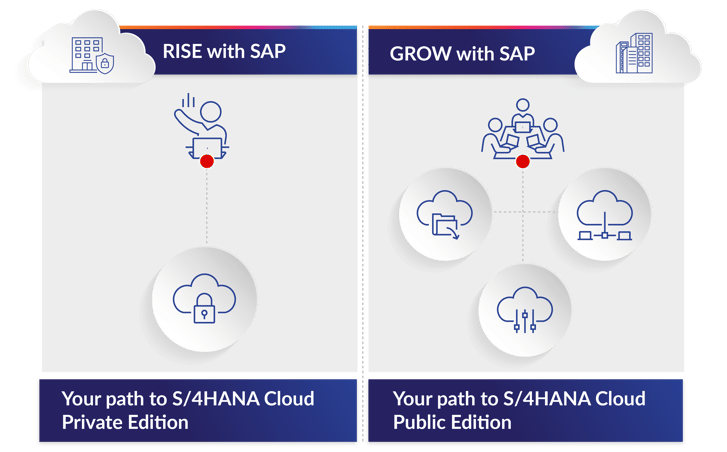
SAP has simplified its cloud portfolio into two primary offerings: RISE with SAP and GROW with SAP. Choosing between them is not just about selecting a software version; it is about defining your operational model for the next decade. The core difference comes down to the deployment model: RISE is your path to S/4HANA Cloud Private Edition, while GROW is exclusively your path to S/4HANA Cloud Public Edition.
Licensing implications
Migrating via RISE with SAP or GROW with SAP fundamentally changes your software licensing from a capital asset model to an operational expense model:
- Full Usage Equivalents (FUE): Licensing shifts from static named users to a weight-based metric that allows dynamic license allocation.
- Bundled subscription: The software license, maintenance contract, database, and cloud infrastructure are consolidated into a single subscription fee – reducing vendor flexibility.
- Legacy licence impact: Any investment in unused perpetual licenses is lost, though some discounts may be negotiated.
SAP Cloud Private Edition
Best for: Existing SAP ECC customers or large enterprises with complex, highly customised systems requiring deeper control over data and processes.
SAP positions RISE as "Business Transformation as a Service." It is designed to help you move your legacy footprint to the cloud without starting from zero — modernising systems while preserving the custom code and programs that make your business unique.
- Dedicated Private Cloud: Operated in a dedicated instance on the hyperscaler of your choice, offering some of the application flexibility of an on-premise system with full ABAP access and source code modifications. SAP prefers a clean-core approach, but does not enforce it.
- Controlled upgrades: You or your partner control the timing of patching and upgrades.
- Bundled pricing: RISE operates as a single subscription contract with SAP. Pricing is highly tailored based on infrastructure requirements and functional scope.
- Flexible migration: Supports Greenfield (new implementation), Brownfield (system conversion), and Bluefield (selective data transition).
What about custom code in SAP Cloud Private Edition?
S/4HANA introduces a simplified data model that consolidates multiple legacy financial tables into the single Universal Journal (ACDOCA). Your existing code must be adapted to function within this new architecture:
- Code remediation: Manually update or rewrite incompatible ABAP code to utilise new tables and structures.
- Code retirement: Unused code – identified via tools like SUSG or UPL – is typically deleted.
- Field length extensions: Changes such as the Material Number field increasing from 18 to 40 characters require code adjustments to prevent data truncation errors.
The Partner role in SAP Cloud Private Edition
While the RISE offering provides the cloud framework, your integration partner executes the technical heavy lifting.
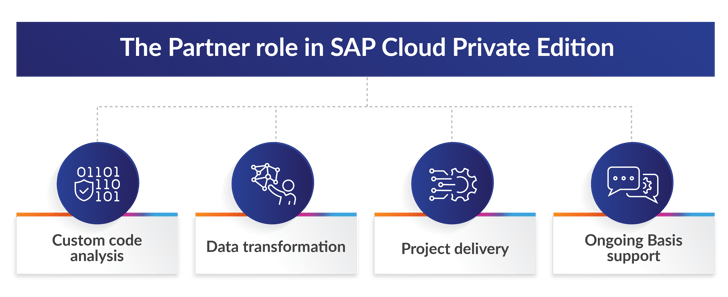
Core responsibilities include:
- Custom code analysis: Analyse your legacy system's custom ABAP code (Z-programs) and determine what to rewrite, adapt, or retire.
- Data transformation: Transform existing historical data, ensuring years of financial and operational records map accurately to the new system.
- Project delivery: Direct project execution, control technical downtime windows, and coordinate stakeholder communication throughout the migration.
- Ongoing Basis support: Basis support is still required from the application layer upward, including upgrade and maintenance projects. Find out how our BRIDGE Managed Services can help you in this scenario.
SAP Cloud Private Edition: Lessons from the field
- Preconfigured lead times in SAP's ticketing system frequently delay technical task routing by multiple days. Plan accordingly.
- Basis support is only included up to the infrastructure layer. In-house Basis teams or external partners are required for everything above.
- Third-party applications or agents are generally not supported on the SAP or operating system layer.
- While costing is simpler under one subscription bundle, it is not necessarily cheaper than on-premise.
SAP Cloud Public Edition
Best for: Mid-market companies or net-new SAP customers who want a clean start with a standardised, modern ERP – without the desire for heavy customisation.
GROW with SAP enforces standardised best practices. Your business adapts its processes to the software, not the other way around.
- Fully-managed Public Cloud: Operated entirely by SAP. Customisation is highly restricted and core code remains untouched.
- Mandatory auto-upgrades: Upgrades are automated and pushed by SAP frequently, ensuring you are always running the latest innovation.
- Simplified pricing: A straightforward subscription model based on users, covering software, standard infrastructure, and core services.
- Greenfield only: You start with a clean slate and bring over only essential master and open transactional data.
What about custom code in SAP Cloud Public Edition?
- Legacy code abandoned: Custom ABAP code is not moved into a public cloud environment. The business must adopt standard SAP processes to replace the functionality previously handled by custom code.
- BTP for critical gaps: If a critical custom process cannot be met by standard functionality, the logic is built from scratch as a separate application hosted on SAP Business Technology Platform (BTP).
The Partner role in SAP Cloud Public Edition
In a Public Cloud implementation, your partner acts less like a developer and more like a business consultant and change agent.
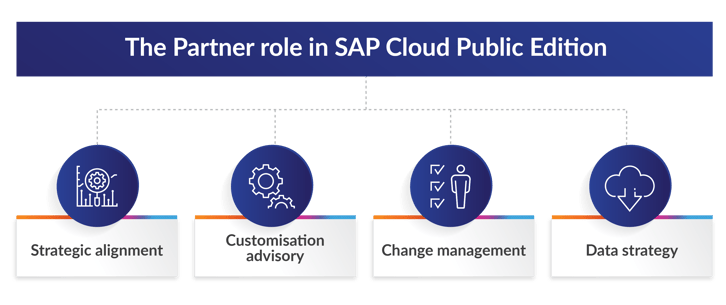
- Strategic alignment: Present SAP's pre-configured best practices and guide your teams on adapting existing business processes to fit out-of-the-box workflows.
- Customisation advisory: Solve operational challenges using standard functionality or leverage SAP BTP for necessary side-by-side extensions, keeping the core ERP clean.
- Change management: Drive user training, stakeholder communication, and smooth transition to the new way of working.
- Data strategy: Guide the extraction of legacy data, enforce external cleansing, and manage the upload into the new public cloud environment using standard SAP migration templates.
Lessons learned from real-world migrations
We have learned important lessons from migrations for our clients around the world.
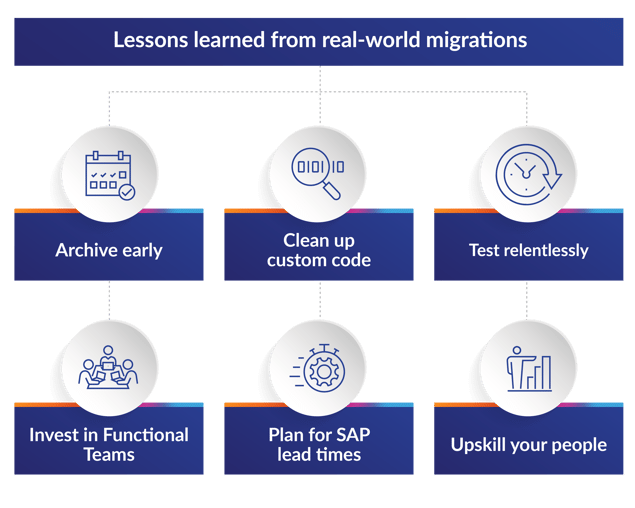
- Archive early: Execute data archiving before migration to reduce the data footprint — lowering both cost and complexity.
- Clean up custom code: Leverage BTP where possible to replace legacy customisations.
- Test relentlessly: Deep integration testing and UAT is critical throughout the process.
- Invest in Functional Teams: Strong functional teams are just as important — if not more so — than the technical migration team.
- Plan for SAP lead times: Time management is more important than ever. Factor in the new lead times when logging tickets with SAP RISE.
- Upskill your people: Teams need to transition from legacy Basis administration to cloud architecture and BTP development.
The Shared Responsibility Model
The biggest mistake companies make is assuming that moving to the cloud means SAP handles everything. SAP operates on a strict Shared Responsibility Model. While SAP takes over low-level infrastructure tasks, your internal team and your partner retain full accountability for how the application actually serves your business.
| Area | SAP Responsibility | SAP Customer / Partner Responsibility |
|---|---|---|
| Infrastructure | Operates and manages hyperscaler infrastructure and SAP-managed cloud environment | Not applicable |
| OS & Database | Performs installation, maintenance, and technical patching of OS and SAP HANA database | Assess, request, and validate patches in line with change management procedures |
| Application Patching | Delivers selected mandatory or critical SAP Notes | Assess, plan, request, and test all application-level patches and SPs |
| Application Configuration | Provides standard SAP-delivered system ("fit-to-standard" baseline) | Configure, harden, and secure the application per business and compliance requirements |
| Identity & Access Management | Delivers initial technical users and standard roles | End-to-end user lifecycle management, role design, authorisations, and SoD controls |
| Custom Code & Extensions | Not responsible for customer-developed objects | Full responsibility for ABAP, BTP extensions, security, performance, and compliance |
| Interfaces & Integrations | Secure SAP-managed technical endpoints and communication channels | Secure and operate customer-managed integrations, including third-party systems, APIs, RFC connections, and middleware |
| Data Protection & Classification | Provide platform-level security controls, including infrastructure encryption and access protection | Define data classification, manage encryption usage, and ensure protection, retention, and lawful processing of business data |
| Security Monitoring | Monitor SAP-managed infrastructure and platform components for security events | Perform application-level monitoring, logging, and detection of suspicious or unauthorised activity |
| Audit & Compliance | Provide infrastructure and platform audit reports, e.g., SOC | Implement application-level controls, prepare audit evidence, and ensure regulatory compliance, e.g., SOX, GDPR |
How is my ROI affected?
- CapEx to OpEx: Replace heavy hardware capital expenditures with a predictable, operational cloud subscription.
- Legacy risk: Retaining SAP ECC past the 2030 support deadline creates severe financial, security, and operational liabilities.
Navigating your endpoint: Your journey, your choice
Selecting your S/4HANA endpoint is a strategic decision that defines your future operating model — and fundamentally shifts how your integration partner operates.
RISE with SAP is designed for enterprises whose competitive edge relies on highly specialised, differentiated processes. It offers flexible upgrade paths and full developer access, providing the controlled framework necessary to migrate complex legacy systems on your own terms.
GROW with SAP is your rapid deployment option. Designed for fast adoption of standardised industry best practices, it features simplified subscription pricing, fully managed infrastructure, and mandatory auto-upgrades to keep your core perpetually modern.
| Feature | SAP Cloud Private | SAP Cloud Public |
|---|---|---|
| Main endpoint | S/4HANA Cloud Private Edition | S/4HANA Cloud Public Edition |
| Primary audience | Large enterprises, existing SAP installed base | Mid-market, net-new SAP customers |
| Migration path | System Conversion (Brownfield) and new implementation (Greenfield) | Greenfield (new implementation) only |
| Customisation level | High, like on-premise, full ABAP access; Clean Core advised but not enforced | Low, focus on best practices, BTP extensions |
| Upgrades | Controlled by client, flexibility | Mandatory and automated, SAP controlled |
| Pricing model | Bundled, subscription based on complex scope | Simplified, subscription based on users |
Ultimately, whether you choose RISE with SAP to transition complex operations or GROW with SAP to shed technical debt, the work does not end at go-live. A robust support framework – whether driven by an ongoing partner relationship or a dedicated internal team – remains an absolute necessity to sustain and optimise your new cloud environment.
Migration at a glance: Four core phases
Regardless of the chosen cloud endpoint, executing these four core phases is essential for a successful migration:
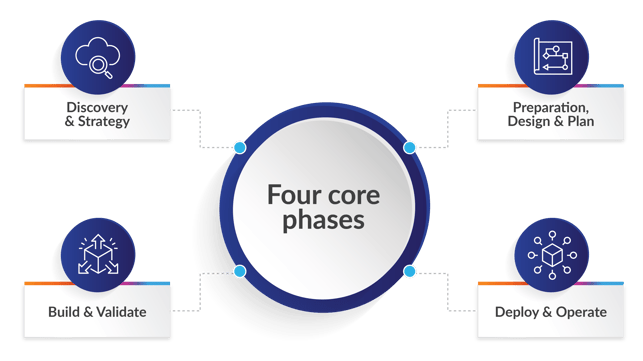
- Discovery & Strategy: Define the strategic scope, evaluate existing technical debt, and select the optimal cloud endpoint.
- Preparation, Design & Plan: Cleanse historical data, execute fit-to-standard workshops, and provision the initial sandbox environment.
- Build & Validate: Configure the core system, develop necessary BTP extensions, and validate functionality through rigorous user acceptance testing.
- Deploy & Operate: Execute the final data cutover, activate the production environment, and transition to the ongoing support model.
Section 5
S/4HANA navigation path: AI integration
SUMMARY: In this section, we explore how AI accelerates the S/4HANA migration lifecycle across discovery, migration, and post-go-live optimisation. We look at process mining, predictive complexity scoring, clean core validation, automated data mapping, AI-generated test scripts, and Joule for Developers to reduce risk, shorten timelines, and improve operational efficiency. EPI-USE Labs' Semantik platform, Joule, AWS Kiro Agents, SAP Cloud ALM, and SAP AI Units support code remediation, governance, observability, and autonomous operations in the Agentic Enterprise state.
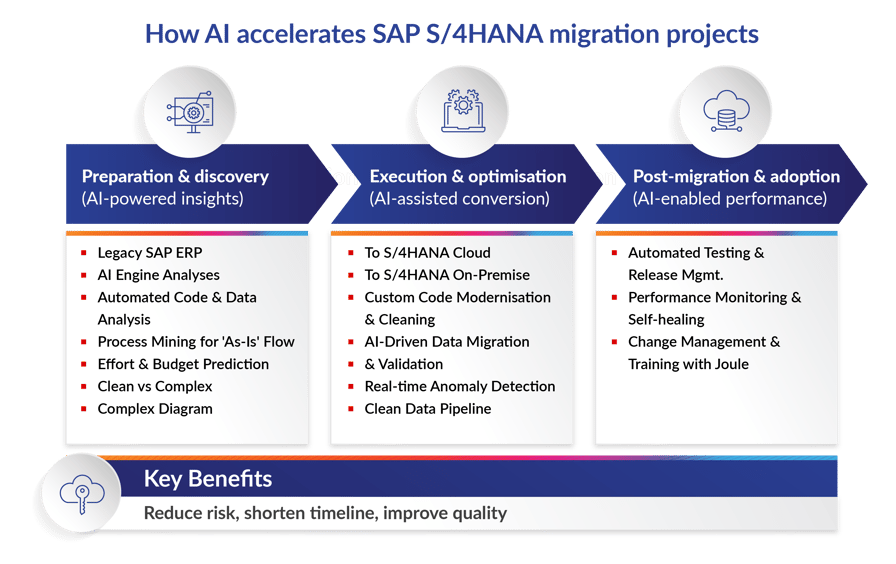
How will Artificial Intelligence (AI) shape your SAP S/4HANA migration? In 2026, AI is no longer an experimental add-on; it is a proven accelerator embedded across the entire migration lifecycle. From discovery through post-go-live optimisation, AI compresses timelines, reduces risk, and positions your new platform for autonomous operations from day one.
EPI-USE Labs has launched AI-enabled platforms to turn ambitious digital strategies into practical enterprise solutions. Central to this initiative is Semantik, providing the trusted semantic foundation needed to seamlessly accelerate the SAP S/4HANA adoption journey through its diverse suite of products.
There are three distinct phases where AI delivers measurable value in an S/4HANA conversion or migration project: Discovery, Migration, and Post-Go-Live Optimisation.
| Migration Phase | Primary Executive Value | AI Mechanism | EPI-USE Labs' Semantik Offerings |
|---|---|---|---|
| Discovery | Budget and Timeline Certainty | Gain insights into your landscape and enable machine learning to predict the exact effort required to fix custom code. | Semantik Map |
| Migration | Risk Reduction | Automated testing simulates peak business workloads to prevent go-live failures. | Semantik Flow |
| Post-Go-Live | Operational Efficiency | AI agents autonomously resolve supply chain and logistics exceptions. | Semantik Pulse |
Phase 1: AI-powered discovery and assessment
Before moving a single table, AI helps you understand the full scope of what you are migrating – and what you should leave behind.
- Process mining (SAP Signavio): AI agents analyse your actual ECC transaction logs to identify shadow processes and bottlenecks. Instead of manual workshops, AI provides a data-driven map of where you can standardise versus where you must retain custom logic.
- Predictive complexity scoring: Advanced discovery tools use machine learning to scan custom ABAP code. They do not just find errors – they predict the effort required to remediate code based on historical patterns from thousands of other migrations.
- Clean core validation: AI assistants map your legacy customisations to modern BTP-based side-by-side extensions, ensuring you do not pollute your new S/4HANA core with technical debt carried over from ECC.
- Custom Code migration AI assistant: This is your starting point for understanding issues that arise when converting custom code from ECC to S/4HANA. It explains ABAP Test Cockpit (ATC) findings in detail – including the corresponding simplification notes – covering data model and data type changes, deprecated functionality, and incompatible changes to SAP development objects.
With EPI-USE Labs' Semantik Map solution, you can analyse your legacy system's complexity with agentic AI. Identify potential migration bottlenecks and uncover deep structural insights, turning massive data sets into an actionable roadmap for your SAP S/4HANA journey.
Phase 2: Intelligent execution (the migration phase)
The actual move is where AI eliminates manual labour and mitigates risk at scale.
- Automated data mapping: AI-assisted ETL (Extract, Transform, Load) tools suggest mappings between legacy ECC tables and the unified S/4HANA Universal Ledger. The system identifies data quality issues – duplicate vendors, inconsistent addresses – and suggests fixes before the load happens.
- AI-generated test scripts: Using SAP Cloud ALM, functional requirements are automatically converted into test scripts. AI predicts performance bottlenecks by simulating synthetic workloads that mimic your peak business periods, ensuring business continuity through the transition.
- Joule for developers: Your team can use generative AI (Joule) to accelerate the rewriting of legacy ABAP into ABAP Cloud syntax, significantly shortening the Brownfield remediation timeline.
Understanding SAP AI Units
SAP AI Units are the virtual currency – similar to cloud credits – used for premium AI capabilities across your SAP landscape.
- Joule Base (No Units Required): Foundational tasks like basic navigation, information retrieval, and simple summarising are included within your existing SAP cloud licenses (S/4HANA, SuccessFactors, etc.).
- Joule Premium (AI Units Required): Complex, generative, or agentic workflows require AI Units. This includes specialised modules like Joule for Developers, Joule for Consultants, and advanced financial or supply chain insights.
With EPI-USE Labs' Semantik Flow solution, you can accelerate your SAP S/4HANA transition with secure, predictable modernisation outcomes. Leverage pre-build migration accelerators, intelligent orchestration, and AI-assisted pre-built data mapping to rapidly shift from legacy systems to a modern digital core.
Phase 3: The agentic transformation (post-go-live)
The goal of a 2026 migration is not just to reach S/4HANA – it is to reach the Agentic Enterprise state (or Autonomous Enterprise state), where your ERP actively drives outcomes rather than passively recording them.
- Autonomous workflows: Beyond simple automation, Agentic Orchestration handles exceptions end-to-end. If a procurement disruption is detected, an AI agent can autonomously suggest alternative suppliers or initiate re-routing of logistics – without waiting for a human to triage the alert.
- Joule deep research: Users no longer just run reports. They ask Joule complex questions like "Why is our DSO (Days Sales Outstanding) increasing in the APAC region?" Joule synthesises internal S/4HANA data with external market intelligence to deliver a strategic answer.
- Continuous observability: SAP Cloud Logging and Cloud ALM use ML-based anomaly detection to flag technical or business process issues before they cause downtime.
With EPI-USE Labs' Semantik Pulse solution, you can maintain continuous visibility over your SAP S/4HANA data health. Set up automated alerts with the data changes to notify data degradation or gap with the new environment.
What AI modules are available?
SAP Joule (In SAP Cloud)
Joule is SAP’s generative AI copilot designed to act as a unified, natural-language interface across the entire SAP cloud ecosystem. Unlike general-purpose chatbots, Joule is "business-aware," meaning it understands your specific enterprise data, business processes, and the underlying SAP data structures.
Joule Base (No Additional Cost) and Joule Premium (Paid Tier) are the two levels available for use. For an effective Clean Core strategy in 2026, you should use a combination of both, but Joule Premium (specifically the Joule for Developers and Joule for Consultants entitlements) provides the critical "agentic" capabilities required to automate the transition.
While Joule Base helps you navigate and learn, Joule Premium does the heavy lifting of code refactoring and governance automation.
AWS Kiro (SAP Cloud and On-Premise)
AWS recently introduced Kiro Agents specifically to help SAP customers manage the transition to S/4HANA. These are open-source AI agents that automate the evaluation of custom ABAP code.
- Code Assessment: It scans thousands of legacy ABAP objects in hours, not weeks.
- Classification: It uses AI (via Amazon Bedrock) to categorise code as "to be retired," "to be remediated," or "to be moved to BTP."
- Remediation Guidance: It provides specific suggestions for fixing code violations that block S/4HANA upgrades, helping you keep your SAP core "clean."
AWS provides a specialised extension for the Kiro IDE called SAP Power. This brings domain-specific SAP expertise directly into the development workflow.
- Multi-Framework Support: It understands the syntax and best practices for SAP CAP (Cloud Application Programming Model), SAPUI5, ABAP, and SAP BTP.
- Auto-Activation: When you open a .cds, .abap, or manifest.json file, the SAP Power agent activates automatically to provide context-aware suggestions.
- Integration with BTP: It can help scaffold and deploy applications directly to the SAP Business Technology Platform using natural language prompts.
| Phase | Key AI Tool | Primary Benefit |
|---|---|---|
| Assess | AWS Kiro Agents | Rapidly classifies legacy code (A-D levels). |
| Remediate | Custom Code Migration (ATC) | Proposes AI-generated code fixes for ABAP Cloud. |
| Build | Joule for Developers | Ensures new extensions are "side-by-side" and clean. |
| Govern | SAP Cloud ALM + Joule | Monitors technical debt and methodology compliance. |
How much time and cost does AI actually save?
By 2026, the integration of AI and process-mining tools into the S/4HANA migration lifecycle has moved from experimental to a proven driver of efficiency. Here is what the data shows:
| Migration Phase | AI-Driven Reduction | Notes |
|---|---|---|
| Discovery & Assessment | 40–50% time reduction | Process mining tools like Signavio replace weeks of manual workshops. |
| Code Adaptation | 30–40% time reduction | Joule for Developers accelerates ABAP remediation. ROI typically achieved within the first 14 months. |
| Project Setup | 10–16% time reduction | Joule Project Setup Agents automate configuration scaffolding. Costs calculated via SAP AI Units. |
| Testing & QA | 30–50% time reduction | AI-powered automated testing generates test cases and reduces manual rework. |
Data security and governance
Because Joule acts as an agent on your behalf, SAP has built in several layers of Sovereign AI protections. Here is how this impacts your security posture and internal governance.
Data security: The vaulted tenant model
SAP's 2026 security architecture ensures your sensitive business data is never used to train public AI models.
- Tenant isolation: All AI reasoning and data grounding occur within your private SAP BTP subaccount. Your code, financial figures, and process metadata are logically isolated from other customers.
- Zero-training clause: SAP explicitly guarantees that your data is not shared with third-party LLM providers for model training. The AI uses your data to answer your prompt, then discards the specific context once the session ends.
- Data masking: During the Discovery phase, AI tools typically analyse metadata and transactional headers rather than PII (Personally Identifiable Information), ensuring GDPR and CCPA compliance by design.
Internal governance: The human-in-the-loop mandate
Governance in 2026 is not about blocking AI – it is about orchestrating it. Your internal teams shift their focus from doing the work to approving the work.
- Role-Based Access Control (RBAC): Joule inherits your existing SAP authorisations. If a user does not have permission to see executive salaries in S/4HANA, Joule cannot retrieve that data for them – even if they ask in natural language.
- Auditability & Traceability: Every code change or process optimisation suggested by the AI includes a citation sidebar. You can see exactly which SAP Note, Best Practice document, or internal code snippet the AI used to justify its decision.
Authorisation and performance
What authorisation does the AI require?
The level of access evolves as the project progresses:
- Discovery Phase: Access to your SAP systems is read-only via RFC Connections or SAP Cloud ALM Integration. Service keys ensure secure connections.
- Migration and Change Phases: The AI transitions from a 'Consultant' role to a 'Developer' role. Write and execute access is required, strictly governed by SAP's Sovereign AI security framework. Access over a cloud connector is recommended for these activities.
Will AI monitoring degrade system performance?
The SAP AI stack – Joule, Signavio, and LeanIX – uses an asynchronous, event-driven architecture. The impact is minimal:
- CPU overhead: Typically less than 3% during active discovery.
- Memory impact: Negligible. The AI does not store its knowledge base in your local HANA memory – it uses a vector database on BTP.
- Network latency: Minor (milliseconds) due to the optimised Cloud Connector tunnel.
How does the AI handle dynamic ABAP logic?
Because dynamic ABAP does not reveal its data structures until runtime, AI uses a three-step Reasoning & Planning flow:
- Semantic trace: Instead of just reading the code, Joule uses the SAP Knowledge Graph to trace where the data originates – identifying whether a dynamic table is pulling from a specific set of OData services or CDS views.
- Static mapping of dynamic patterns: AI recognises common legacy dynamic patterns and maps them to modern ABAP Cloud equivalents, such as the RESTful ABAP Programming (RAP) model.
- Code explanation agent: If the logic is too opaque, Joule generates a human-readable explanation of the intent behind the dynamic logic, enabling your developers to make informed remediation decisions.
Executive Q&A
How do we secure sensitive legacy data when feeding it into these AI models?
Enterprise models operate entirely within your secure tenant and rely on strict data anonymisation to prevent external exposure.
Does deploying simulation tools genuinely accelerate user adoption or just add software bloat?
Hands-on simulations prevent post-go-live operational gridlock by allowing users to fail and learn safely before touching live data.
Are we permanently locked into the SAP AI ecosystem by taking this route?
No. You can connect third-party AI models and external data lakes using the SAP Business Technology Platform to maintain vendor flexibility.
How much manual human review is still required after the AI generates a test script?
Test leads must validate the logic to ensure complex edge cases and strict regulatory constraints are covered.
What is the fallback plan if AI-driven data cleansing corrupts master records?
You rely on immutable legacy backups and strictly test all cleansed data in a staging environment before the final production load.
Technical Deep-Dive Q&A
Is the language model processing our data multi-tenant?
No. Enterprise deployments use dedicated, stateless instances on the SAP Business Technology Platform to ensure complete data isolation.
How does the AI support a clean core architecture?
It automatically converts legacy core modifications into decoupled extensions hosted on the Business Technology Platform.
How do we detect AI hallucinations in generated test scripts?
Validation protocols cross-reference all AI-generated test paths against historical user transaction logs to verify accuracy.
How are custom legacy tables handled during data extraction?
The tool generates extraction modules and maps them to staging tables via the SAP Data Migration Cockpit API.
How does the system resolve syntax errors in its own code?
It uses an iterative feedback loop with the ABAP Test Cockpit to refine code until it passes all standard checks.
Section 6
S/4HANA navigation path: SAP Cloud project support during and post go-live
SUMMARY: In this section, we explain the shared responsibility model in SAP Cloud, defining SAP, partner, and client responsibilities across migration, dual maintenance, go-live, hypercare, and ongoing support. We highlight SAP Cloud ALM, SAP BTP, Clean Core, update impact testing, integration monitoring, and why a partner-led bridge service is essential to close the gap between platform operations and business needs.
Migrating to SAP S/4HANA Cloud Private Edition changes the rules of engagement. Infrastructure management, patching, and platform operations shift to SAP – but that doesn’t mean your organisation can sit back and watch. The reality is that the SAP Cloud redraws the responsibility lines; it doesn’t erase them.
This section breaks down exactly who owns what during an SAP Cloud migration, how to navigate the critical dual maintenance phase, what go-live and hypercare look like in a cloud-managed world, and why a partner-led bridge service on top of SAP's delivery is not optional; it’s essential.
The shared responsibility model: who owns what in the SAP Cloud?
One of the most common misconceptions about SAP Cloud is that it is a fully managed, hands-off experience. But it isn’t; the SAP Cloud is a shared responsibility model, and understanding the boundaries is the difference between a smooth migration and a costly surprise.
SAP's responsibilities
Under SAP Cloud, SAP takes ownership of the technical heavy lifting:
- Infrastructure and hosting: SAP provisions and manages the underlying cloud infrastructure – whether on AWS, Azure, or Google Cloud – through a single contract. You no longer manage hyperscaler relationships directly.
- Technical system operations: SAP handles Basis administration, database management (HANA), system monitoring, and incident resolution at the platform level.
- Database migration (DMO): The technical conversion of your database to HANA using the Database Migration Option is orchestrated by SAP as part of the SAP Cloud engagement.
- Patching and upgrades: SAP delivers regular system updates and security patches on a defined cadence. Unlike on-premises, you don’t control the precise timing – but Private Cloud Edition offers more scheduling flexibility than Public Cloud.
Partner (System Integrator) responsibilities
Your implementation partner carries the functional and process transformation workload:
- Functional customisation and configuration: Mapping your business processes to S/4HANA's capabilities, configuring the system, and adapting workflows to fit the target architecture.
- Customer-Vendor Integration (CVI) synchronisation: S/4HANA uses a unified Business Partner model, which means your existing customer and vendor master data needs to be brought together and correctly mapped before you go live.
- Simplification and deprecation assessment: S/4HANA removes a large number of ECC transactions, tables, and functional areas. SAP landscapes require assessment to identify what's affected, what can be retired, and where standard S/4HANA functionality replaces something your team currently relies on.
- Custom code remediation: Analysing, adapting, and where necessary retiring legacy ABAP code using tools like the Custom Code Migration Cockpit and ABAP Test Cockpit (ATC).
- Data cleansing and migration: Ensuring data quality before migration. Legacy data riddled with duplicates, orphaned records, and obsolete master data will not magically improve in transit.
- Integration design and hardening: Mapping and testing all interfaces between S/4HANA and satellite systems – whether SAP products like Ariba and SuccessFactors, or third-party applications.
- User acceptance testing (UAT) co-ordination: Designing test scripts, managing testing cycles, and ensuring that business-critical processes work correctly before cutover.
- Project management: Driving timelines, managing risks, and coordinating across SAP, the client, and any third-party vendors.
- Cloud ALM: Cloud Application Lifecycle Management for monitoring, alerting, and change management within the landscape.
- SAP BTP: Managing sub-accounts and connecting the sub-accounts to the Cloud Connectors.
With our BRIDGE Managed Services, we bridge the gap in managing SAP Cloud systems.
Client responsibilities
Your organisation is far from a passive participant:
- Business process decisions: Key users must validate process designs, approve configuration choices, and make timely decisions. Delayed sign-offs are the single most common cause of project overruns.
- Change management and training: End-user adoption doesn't happen on its own. Your teams need to be comfortable with new Fiori interfaces, updated workflows, and any shifts in how responsibilities are split across roles. Beyond the screens themselves, that means getting people up to speed on changed approval processes, new reporting tools, how master data is now maintained in a unified Business Partner model, and where their day-to-day transactions have moved or been replaced.
- Testing and validation: Business users own UAT execution. They must confirm that real-world scenarios produce correct results – not just that the system 'works'.
- Organisational readiness: Backfilling roles, securing executive sponsorship, and ensuring the business can sustain daily operations while key users are pulled into the project.
| Area | SAP | Partner | Client |
|---|---|---|---|
| Infrastructure & Hosting |  Owns Owns |
– | – |
| Basis & HANA Administration | Owns |
Supports during project | – |
| Database Migration (DMO) | Orchestrates |
Supports & validates | – |
| Patching & Upgrades | Delivers |
Tests impact | Validates business processes |
| Functional Configuration, CVI Synchronisation and Simplification |
– | Owns |
Approves & validates |
| Custom Code Remediation | – | Owns |
Provides requirements |
| Data Cleansing & Migration | – | Leads |
Owns data quality decisions |
| Integration & Interfaces | Platform support | Designs & builds |
Tests end-to-end |
| UAT & Business Testing | – | Designs scripts & coordinates | Executes & signs off |
| Change Management & Training | – | Supports & advises | Owns |
| Go-Live Decision | Advisory | Recommends | Final authority |
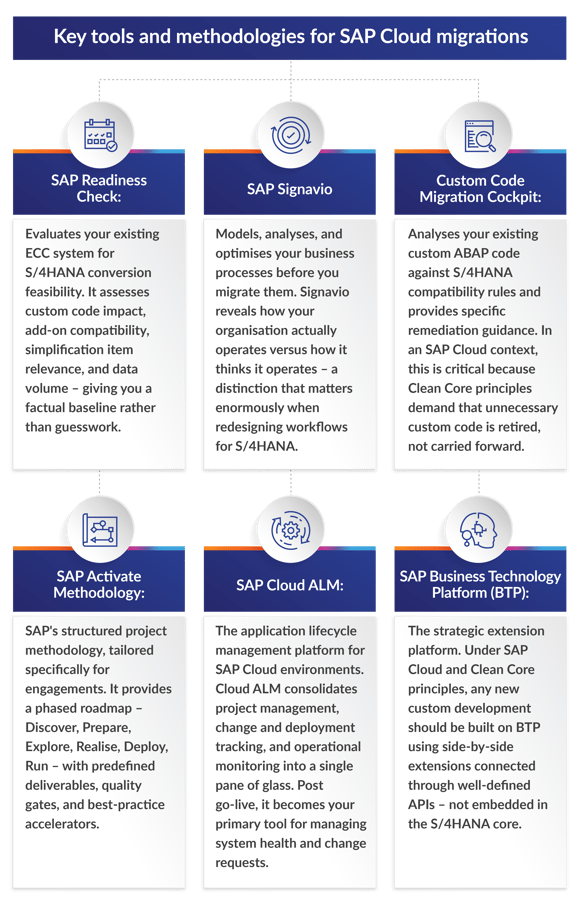
Key tools and methodologies for SAP Cloud migrations
SAP Cloud is not just a hosting agreement; it comes bundled with a toolkit designed to accelerate the journey. Understanding what is available and how to use it effectively separates a structured migration from a chaotic one.
Navigating dual maintenance with SAP Cloud
During the conversion process, your organisation operates in a dual maintenance reality: your legacy ECC system remains fully live to run daily business operations while parallel S/4HANA environments are built, configured, and tested. This is true regardless of whether you deploy on-premises or in SAP Cloud – but the cloud model introduces specific nuances.
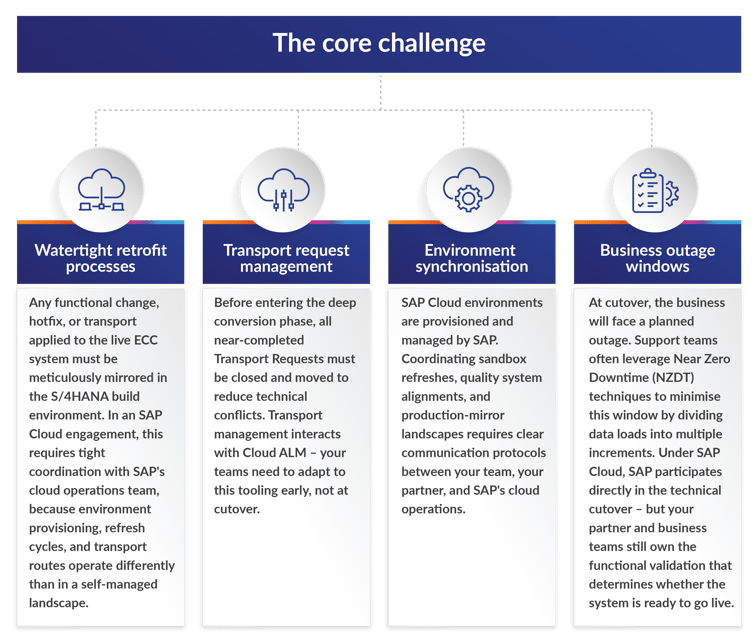
The core challenge
You must support both environments simultaneously until the final cutover, where the newly converted S/4HANA system officially takes over business-as-usual (BAU) operations. The risks are real and well-documented:
SAP Cloud-specific considerations
- SAP-controlled infrastructure timelines: Unlike on-premises, you cannot spin up or tear down environments on your own schedule. Environment provisioning requests go through SAP, and lead times must be factored into your project plan.
- Patch and update coordination: SAP may deliver scheduled patches to your Cloud landscape during the dual maintenance phase. Your project team must account for this in testing cycles to avoid regression surprises.
- Cloud ALM as the single source of truth: All change management, transport tracking, and monitoring should be consolidated in Cloud ALM during dual maintenance. Teams accustomed to Solution Manager will need to transition their processes.
Go-live support and hypercare in an SAP Cloud environment
Go-live with SAP Cloud is not a single moment – it is a controlled transition that demands coordination across SAP, your partner, and your internal teams. The technical cutover may be SAP-assisted, but the business readiness decision is yours.
The cutover
- Technical cutover: SAP's cloud operations team executes the final technical migration steps – database conversion, system activation, and infrastructure validation. Your partner validates functional readiness in parallel.
- Go/no-go decision: Despite SAP's involvement, the final go-live authorisation rests with you. Your partner should provide a structured go/no-go checklist covering data integrity, interface connectivity, critical process validation, and user readiness.
- Fallback planning: A clear rollback strategy must be agreed upon before cutover begins. With SAP Cloud, rollback involves coordination with SAP's cloud operations, making pre-agreed procedures and communication channels non-negotiable.
Hypercare
The first two to 12 weeks after go-live – the hypercare period – are when most post-migration issues surface. In an SAP Cloud environment, hypercare involves a three-party support model:
- SAP: Handles platform-level incidents – infrastructure outages, HANA performance issues, and Basis-related problems. SAP's incident response operates through defined SLAs tied to your SAP contract.
- Partner: Manages functional defects, process gaps, data issues, integration failures, and user support escalations. Your partner is the first line of defence for anything that is not a platform-level failure.
- Client: Business users identify and report process discrepancies, validate fixes, and manage workarounds for any interim gaps.
Critical reality check: SAP Cloud SLAs cover infrastructure and platform availability – they do not cover business process correctness, custom code defects, or integration failures. If a Fiori app displays incorrect pricing because of a configuration error, that is not SAP's problem. That is why partner-led hypercare is essential.
Post go-live: ongoing support, patching, and upgrades with SAP Cloud
Once hypercare concludes, your organisation transitions into steady-state operations. With SAP Cloud, this looks fundamentally different from traditional on-premises support.
What SAP handles
- Infrastructure management: Hardware, operating system, and HANA database administration are SAP's ongoing responsibility. You no longer need to provide Basis teams for these tasks.
- Scheduled patching and updates: SAP delivers patches, security updates, and feature packs on a regular cadence. Private Cloud Edition allows some scheduling flexibility; Public Cloud Edition enforces mandatory update windows.
- Platform monitoring: SAP monitors system health, availability, and performance through its cloud operations centre.
- Incident management: Platform-level incidents are handled by SAP support with contractual SLA commitments.
What you and your partner handle
- Application support: Functional issue resolution, configuration adjustments, workflow modifications, and user support remain your responsibility.
- Custom code and BTP extensions: Any side-by-side extensions built on BTP require ongoing maintenance, version management, and testing against S/4HANA updates. This is entirely outside the SAP Cloud scope.
- Integration monitoring and maintenance: Interfaces between S/4HANA and satellite systems – SAP and non-SAP – require continuous monitoring, error handling, and adaptation as connected systems evolve.
- Update impact testing: When SAP delivers a scheduled update, your team must test its impact on custom configurations, extensions, and integrations before it reaches production. SAP delivers the update; you validate it does not break your business.
- Continuous improvement: Post go-live, most SAP Cloud deployments launch as a Minimum Viable Product (MVP). Planned enhancements, additional process rollouts, and optimisation cycles must be budgeted and staffed.
- Standard system jobs: Background jobs that run in ECC must be reviewed. S/4HANA replaces some traditional batch processes (like asset depreciation) with real-time functionality. Teams must identify CPU-intensive transactions or long-running jobs that are no longer relevant or could cause issues in the new environment.
Why a partner bridge service is not optional
Here is the uncomfortable truth about SAP Cloud Public/Private: the gap between what SAP manages and what your business needs is wider than most organisations expect.
SAP's Cloud delivery covers infrastructure, platform operations, and technical system management. It does not cover:
- Functional application support
- Business process optimisation
- Custom code and BTP extension maintenance
- Integration monitoring and troubleshooting
- Update impact analysis and regression testing
- End-user support and training
- Continuous improvement and enhancement delivery
For organisations without deep, retained SAP expertise, this gap is a serious operational risk. A partner-led managed service – a 'bridge' between SAP's platform delivery and your business needs – fills this gap with the following:
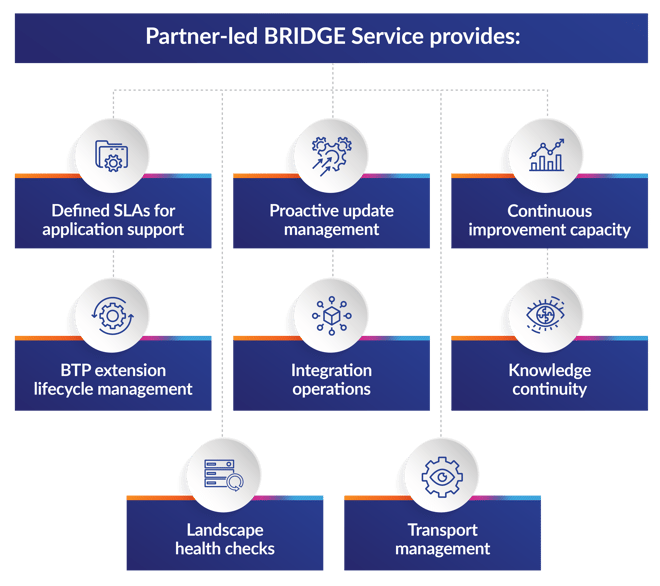
- Defined SLAs for application support: Response and resolution commitments for functional issues, not just infrastructure uptime.
- Proactive update management: Testing and validating SAP-delivered patches and updates against your specific configuration and extensions before they impact Production.
- Continuous improvement capacity: Dedicated staff for post-MVP enhancements, new process rollouts, and optimisation.
- BTP extension lifecycle management: Ongoing development, maintenance, and version management for side-by-side extensions.
- Integration operations: Monitoring, error resolution, and adaptation of interfaces across your application ecosystem.
- Knowledge continuity: Retained expertise about your specific implementation – configuration decisions, custom logic, integration architecture – that would otherwise walk out the door when the implementation partner disengages.
- Landscape health checks: System housekeeping, performance management, assessment of issues and provision of break-fixes.
- Transport management: Ensuring auditable and accurate management of transports moving through the landscape, whether manually or using automated tools.
Think of it this way: SAP keeps the engine running. A bridge service ensures the vehicle actually gets you where you need to go. Find out more about how with our BRIDGE Managed Services, we bridge the gap in managing SAP Cloud systems.
BTP and Clean Core: the long game
Migrating to SAP Cloud is not the finish line – it is the starting position. The strategic value of the move is unlocked through disciplined adoption of Clean Core principles and the SAP Business Technology Platform.
Clean Core
Clean Core is not a suggestion in a SAP Cloud environment – it is the operating model. SAP's update delivery assumes your core system is unmodified. Any custom ABAP code embedded in the core creates upgrade risk, testing overhead, and potential system instability with every patch cycle.
Post go-live, your support model must enforce Clean Core discipline:
- No new custom code in the S/4HANA core. All extensions are built on BTP.
- Existing custom code is progressively retired or migrated to BTP as side-by-side extensions.
- APIs are the only approved interface between S/4HANA and external logic.
BTP as the innovation platform
If S/4HANA is the high-performance engine of your business, BTP is the chassis that lets you bolt on custom features, AI capabilities, and third-party integrations without voiding the warranty. With SAP Cloud, BTP is your path to:
- Decoupled customisation: Build extensions that survive system updates because they live outside the core.
- Accelerated innovation: Develop, test, and deploy new functionality without touching the ERP. Continuous delivery becomes practical, not theoretical.
- AI and advanced analytics: SAP's AI capabilities – including Joule, predictive analytics, and process automation – are delivered through BTP Enterprises that ignore the Clean Core/BTP strategy are accumulating technical debt that will block AI adoption.
- Ecosystem integration: BTP serves as the integration layer between S/4HANA and the broader application landscape – SAP products, third-party tools, and custom applications alike.
The implication for ongoing support is clear: your post go-live team must have BTP development and operations skills, not just traditional SAP Basis and ABAP expertise.
Frequently Asked Questions
We are moving to SAP Cloud – does SAP handle everything after go-live?
No. SAP handles infrastructure, platform operations, HANA administration, and scheduled patching. Everything above the platform layer – functional support, custom code maintenance, integration monitoring, business process optimisation, and end-user support – remains your responsibility. Most organisations need a partner-managed service to fill this gap effectively.
How does dual maintenance differ with SAP Cloud compared to on-premises?
The core challenge is identical – you must keep your live ECC system and your S/4HANA build environment synchronised until cutover. With SAP Cloud, the key differences are that environment provisioning is SAP-controlled (requiring longer lead times), transport management integrates with Cloud ALM rather than Solution Manager, and SAP may deliver scheduled patches during your project that must be factored into testing cycles.
What happens when SAP pushes an update that breaks our custom processes?
This is precisely why Clean Core discipline and a partner bridge service matter. If your custom logic lives inside the S/4HANA core, SAP updates can break it – and that is not covered by SAP's SLA. If your extensions are properly built on BAIP with approved APIs, they are insulated from core updates. Either way, you need a team that proactively tests every SAP-delivered update against your specific landscape before it reaches production.
How long should we plan for hypercare after go-live?
Plan for a minimum of eight to 12 weeks of intensive hypercare, with a gradual ramp-down over the following three months. The first financial close cycle on the new system is a critical milestone – ensure hypercare coverage extends through it. Under SAP Cloud, hypercare is a three-party effort: SAP for platform issues, your partner for functional defects, and your internal team for business validation.
Can we reduce our internal SAP team after moving to SAP Cloud?
You can reduce infrastructure and Basis headcount because SAP absorbs those responsibilities. However, you will need to invest in new skills: BAIP development, Cloud ALM administration, integration operations, and Fiori UX management. The net effect is typically a shift in skill profiles rather than a significant headcount reduction. Organisations that cut too aggressively post-migration find themselves unable to manage updates, extensions, and continuous improvement.
What is the role of Cloud ALM versus Solution Manager under SAP Cloud?
Cloud ALM is SAP's strategic successor to Solution Manager for cloud-managed environments. Under SAP Cloud, Cloud ALM is the primary tool for project management, change and transport tracking, monitoring, and incident management. If your teams are experienced with Solution Manager, plan for a dedicated transition period – the tools serve similar purposes but operate differently.
How do we handle third-party integrations in an SAP Cloud environment?
Third-party integrations require the same rigour as on-premises – mapping, testing, hardening, and ongoing monitoring. The difference under SAP Cloud is that integration architecture should leverage SAP Integration Suite and BAIP middleware rather than direct point-to-point connections. This provides centralised monitoring, error handling, and easier adaptation when connected systems change. Your partner bridge service should include integration operations as a core deliverable.
Section 7
S/4HANA navigation path: Standard project support during and post go-live
SUMMARY: Migrating to SAP S/4HANA is not a single event; it is a sustained operational shift. The journey depends heavily on maintaining stability during the transition and establishing robust support operations once the new system is live. This section is your comprehensive guide to the standard support items required during an S/4HANA migration, the complexities of dual maintenance, and the critical differences between supporting Cloud and on-premises environments.
Navigating the dual maintenance phase
During the conversion process, most organisations run a dual maintenance setup. Your Business as Usual (BAU) legacy systems – typically ECC – remain fully live and operational, while parallel S/4HANA environments are built and tested alongside them. You must support both environments simultaneously until the final cutover, where the newly converted S/4HANA system officially takes over BAU operations.
Operating in dual maintenance introduces specific risks and demands highly controlled procedures:
- Watertight retrofit processes: Any functional changes, test incidents, or hotfixes applied to the live BAU system must be meticulously mirrored (retrofitted) in the S/4HANA build environment. Failure to do so results in system differences, missing transports, and critical business functions absent at go-live.
- Transport request (TR) management: Before moving deeply into the S/4HANA conversion phase, Basis teams must close and migrate all near-completed Transport Requests to reduce technical conflicts.
- Business outage management: At the point of cutover, the business will face an outage window. Support teams often leverage techniques like Near Zero Down Time (NZDT) to limit this outage by dividing data loads into multiple increments.
Standard project support items: during and post go-live
Whether you are in the thick of the migration or settling into your post-go-live reality, standard support items generally overlap with traditional SAP environments – but S/4HANA introduces new nuances that demand attention.
- System maintenance, upgrades, and patching: With S/4HANA, patching and upgrades are dictated by your deployment model. However, maintenance now heavily involves safeguarding the 'Clean Core' – avoiding alterations to the core ERP code and ensuring that standard system updates will not break your customised processes.
- Basis and functional work: Basis teams are critical during the transition. Their tasks include applying necessary SAP Notes to the legacy ECC server to prepare for migration and performing full backups of the production system to secure a fallback point. Post-go-live, Basis teams must adapt to managing the in-memory SAP HANA database, requiring new skills in HANA architecture and hardware management.
- Standard system jobs: Background jobs that ran effortlessly in ECC must be reviewed. S/4HANA operates in real-time, and some traditional batch jobs (like asset depreciation) are replaced by real-time functionality. Teams must perform a detailed analysis to identify CPU-intensive transactions or long-running background jobs that are no longer relevant – or could cause unwanted side effects in the new environment.
- Third-party application and integration: S/4HANA acts as a digital core connecting to numerous satellite applications (e.g., Ariba, SuccessFactors, or non-SAP software). Support teams must focus heavily on hardening these interfaces to prevent unauthorised access to sensitive data and ensure smooth data flow across the ecosystem.
- Transports and system configuration changes: Because of the dual landscape, transport management requires strict governance. You must secure the transport management of HANA views and Fiori Apps to avoid erroneous changes to program code. A Senior Project Management Office (PMO) should enforce strict approval gates for any proposed system configurations or customisations.
- Resource adjustments and monitoring: A successful transition requires sustained involvement from IT, finance, and data teams. Support leaders must plan for workforce capacity and backfills so that day-to-day operations and critical tasks – like the financial close – are not disrupted.
- Project work and development: Support teams must analyse custom code (Z-code) using the ABAP Test Cockpit (ATC) to check compatibility. Development teams must shift their mindset to the SAP Business Technology Platform (BTP). Any new project work or unique extensions should be built on BTP rather than inside the ERP, utilising approved APIs to prevent accumulating technical debt.
Cloud vs. on-premises support: key differences
When transitioning to SAP S/4HANA, your support model diverges significantly depending on whether you choose Cloud or On-premises. The main differences centre around infrastructure management, upgrade cycles, and extensibility.
Infrastructure and hosting responsibilities
- On-premises: You have maximum control, but this comes with the highest management burden. Your internal IT teams (or a managed service provider) are entirely responsible for supporting the hardware, operating system, database, and application layers.
- SAP S/4HANA Cloud Public Edition: A multi-tenant SaaS model hosted, managed, and maintained entirely by SAP. SAP handles all infrastructure support and Basis tasks.
- SAP S/4HANA Cloud Private Edition: A single-tenant SaaS model. While you gain more control and a dedicated instance, the infrastructure is still managed and maintained by SAP (on a chosen hyperscaler like AWS, Google Cloud, or Azure), removing the day-to-day hardware support burden from your internal teams.
Upgrades and patching cycles
- On-premises: Your organisation dictates the timeline for upgrades and patches. While this offers stability and control, it can lead to massive, disruptive upgrade projects every few years if the system falls behind.
- Cloud: Cloud environments operate on continuous innovation cycles. The Public Edition receives mandatory, automatic updates (quarterly or semi-annually), meaning your support team must focus on testing and adopting new features rather than executing the technical upgrade itself. The Private Edition allows more flexibility in scheduling updates, but you are still bound to a subscription model and regular update cadence.
Customisation vs. configuration (the 'Clean Core')
- On-premises: Support teams have full access to modify the core ABAP code, enabling highly tailored processes. However, this creates immense support challenges during future upgrades.
- Cloud: SAP strictly enforces the 'Clean Core' methodology. In the Public Edition, there is no direct core customisation – only configurability. All functional extensions must be built side-by-side using BTP. Cloud support therefore shifts away from deep ABAP code troubleshooting and toward managing APIs, BTP integrations, and standardised best practices.
| Aspect | On-premises | Cloud (Public Edition) | Cloud (Private Edition) |
|---|---|---|---|
| Infrastructure | Fully client/partner managed | Fully SAP managed | SAP managed |
| Upgrade Timing | Client controlled | Mandatory, automatic | Flexible scheduling |
| Customisation | Full core ABAP access; modernise/ extend via BTP | Configuration only; extend via BTP | Full core ABAP access; extend via BTP |
| Support Burden | Highest – Infrastructure and platform to application | Lowest – application focus only | Moderate – application and config, limited platform |
After cutover: what changes?
Support requirements shift significantly after a system cutover, transitioning from migration-focused tasks to system stabilisation, continuous improvement, and adapting to new real-time processes. Here is what to expect:
- Handling initial disruptions (hypercare): Immediately following cutover, support operations must be prepared for 'hypercare' scenarios. Hypercare needs to run through the first month-end, to monitor these once-a-month processes, as many other interfaces and process get tested live for the first time. Information flow may be disrupted, and teams might need to manage reporting delays or revenue reconciliation discrepancies that require significant incremental manual work. The priority is rapid elimination of these defects and manual workarounds.
- Adapting to real-time processes and new IT controls: The shift to S/4HANA alters fundamental IT and business controls. Traditional batch jobs are often replaced by real-time functionality, meaning support teams must adjust related user controls and procedures. General IT controls – including backup and restore processes, change management, and interface integrations – all need updating to align with the new platform.
- Transitioning away from Systems Integrators (SIs): Post-cutover, the goal is to return to business as usual. Your internal support team must leverage their newly developed S/4HANA architecture skills to manage the environment, enabling the organisation to gradually reduce its dependence on external SIs.
- Leveraging Managed Services/TechOps: Organisations may also shift their support strategy to utilise post-go-live managed services. These services provide ongoing application management, Basis and platform support, and further modernisation initiatives backed by defined Service Level Agreements (SLAs). We also have a dedicated team to facilitate and consult you on your Managed Services requirements.
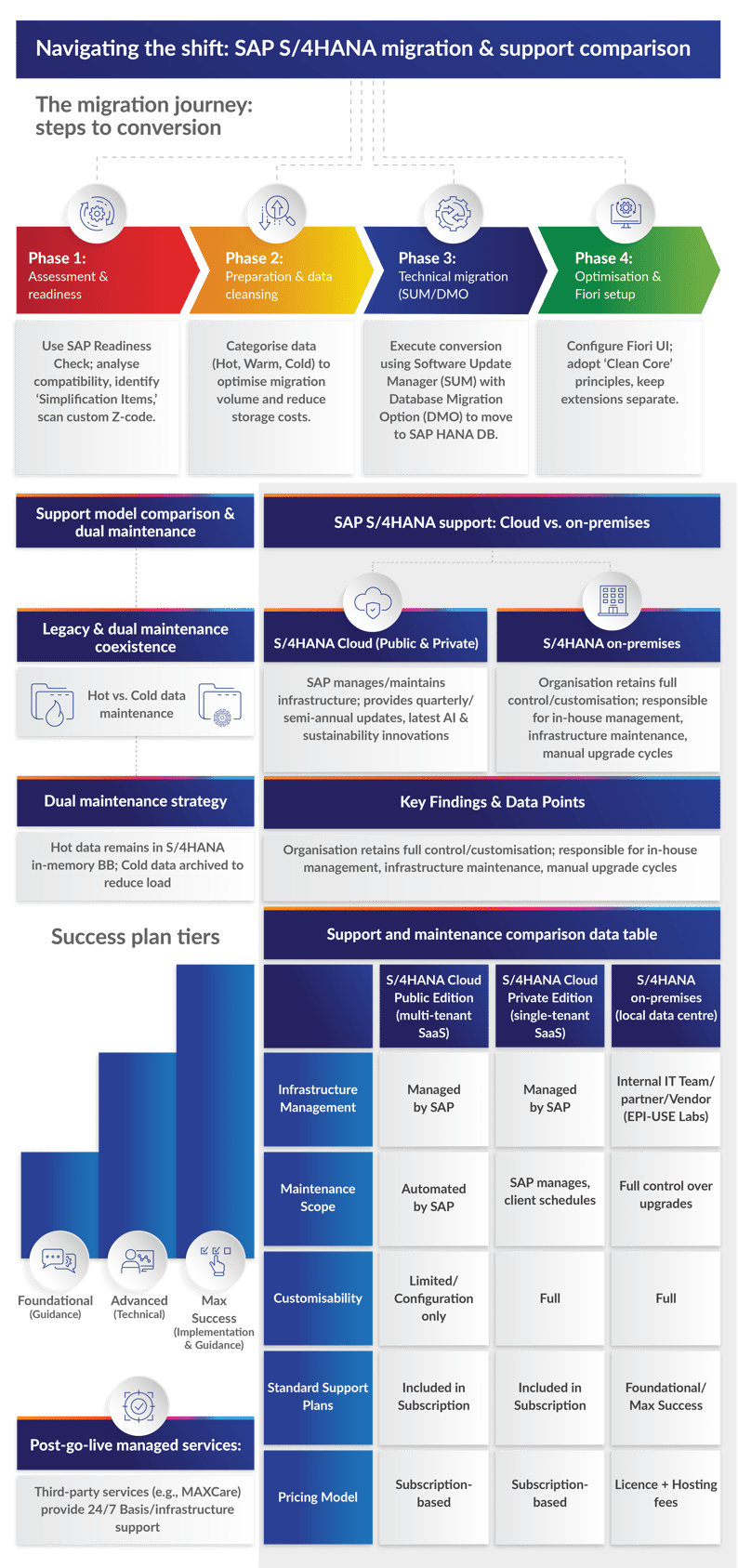
The role of SAP BTP after migration
Migrating to S/4HANA completely redefines how your business uses the SAP Business Technology Platform (BTP). If S/4HANA is the new, high-performance engine of the business, BTP is the flexible chassis that allows you to bolt on custom features, AI capabilities, and third-party integrations – without ever voiding the engine's warranty.
What is SAP BTP?
At its core, SAP BTP is a comprehensive collection of cloud, analytics, AI, machine learning, application development, and integration tools. It is designed to act as the unified technological foundation for enterprise mission-critical business processes.
How S/4HANA enhances BTP use cases
- Enabling the 'Clean Core' strategy (decoupled customisation): In legacy SAP ECC environments, unique business requirements were met by writing custom ABAP code directly inside the core ERP system. Over time, this created massive technical debt, making upgrades incredibly difficult and risky. When you migrate to S/4HANA, BTP becomes the SAP-sanctioned platform for building all customisations and extensions outside of the core ERP. S/4HANA and BTP communicate through well-defined APIs and the SAP Integration Suite. Because the custom code lives on BTP instead of inside S/4HANA, standard system updates and patches no longer break your custom applications.
- Accelerated innovation and continuous delivery: Because S/4HANA relies on BTP to handle custom extensions, it drastically speeds up the innovation lifecycle. Development teams can build, test, and deploy new functionalities on BTP without altering the core ERP. This decoupled approach simplifies continuous delivery models and allows organisations to implement innovations much more quickly – a major advantage for digital transformation.
- The gateway to AI and advanced technology: S/4HANA provides the simplified digital core, but BTP is the platform that unlocks next-generation technology. Migrating to S/4HANA and adopting BTP allows your business to seamlessly integrate embedded AI (like SAP's AI assistant, Joule), predictive analytics, and process automation into daily workflows. Enterprises that ignore the Clean Core/BTP strategy are accumulating technical debt that will ultimately block their ability to adopt AI in the future.
- Simplified ecosystem integration: Modern enterprises rarely run on SAP alone. S/4HANA relies heavily on BTP to serve as the integration layer between the core ERP and other SAP cloud products (like Ariba or SuccessFactors) as well as third-party, non-SAP applications.