Play video
When you subscribe to SAP SuccessFactors, you get a really polished HCM or employee experience, both for master data within Employee Central as well as talent modules. Unfortunately, SuccessFactors does not live in isolation. You need a payroll system and you also need a finance system. In the case of SuccessFactors, that is most commonly Employee Central Payroll and an S/4HANA system such as S/4HANA Cloud or S/4HANA Private Cloud Edition. Because these systems need to talk to one another, there are synchronisation jobs that run on a regular basis. And unfortunately, these do not always work as intended. Oftentimes, things do not synchronise and therefore you are sitting with missing data on payroll or missing data on your S/4HANA system. This could be a real big problem when you have to run payroll only to realize that not all of the data is on the payroll system. With the Query Manager Integration Monitor solution, we can help you guarantee that the data is there. We compare the data on the source such as SuccessFactors as well as on the target such as Employee Central Payroll or even an HCM on-premise payroll system and help you see what is missing, what didn't synchronise correctly or what wasn't mapped correctly, enabling you to fix these issues before your payroll run, helping you get payroll done on time.
2025-653-1
Monitoring service using SAP-certified solution
2025-654-1
Easy implementation of SAP SuccessFactors process controls
2025-655-1
Proactive Integration Monitoring with pre-built dashboards
Strict SAP security protocols

Data is managed via the strict SAP and SuccessFactors security protocols.

Query Manager™ is the only SAP-certified solution for real-time reporting on HCM and Payroll data including hybrid scenarios and SAP. This distinction ensures that the solution follows the appropriate security considerations and guidelines from SAP. The Query Manager solution is also approved to run on SuccessFactors Employee Central Payroll.

Blog: SAP-certified Partner and Solution | Blog: Third-party software on ECP?

Pre-built hybrid content

Save time and accelerate your reporting capabilities with our pre-built, easy-to-use reporting catalog. It includes reports designed with integration for hybrid scenarios specifically in mind.

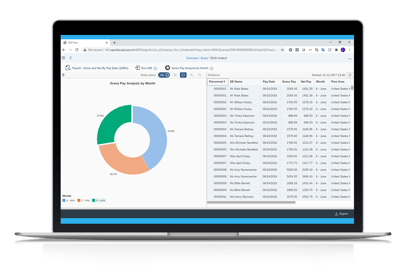
The sample report includes a comparison of the key replication fields and highlights any differences. All reports can be scheduled so that email notifications of discrepancies are automated.

Blog: Report on data from SAP and SuccessFactors | Webinar: Hybrid HCM reporting | Webinar: Solve reporting challenges

Work in Microsoft Excel

You can work in and share your data via Microsoft Excel. Easily distribute replication reports for resolution.

You can refresh, analyze, share, and present critical SAP and SuccessFactors data on demand in Microsoft Excel. Once you have built an Excel worksheet with all the formatting and formulas that you need, you can simply click a button to refresh your spreadsheet with live data from SAP.

Blog: Work with your data in Excel | Webinar: How you can work with SAP data in Excel 

Query Manager looks at our on-premise data, and the data in our SuccessFactors system, and allows us to compare that data and determine if there are any inaccuracies. Once we run the replication, we can see how many errors there are, what’s not right and what’s not matching. It’s so quick, we can filter out the noise we don’t need and focus on what’s important.

Don Parker, AGM of IT Department, NAL

I am blown away. (Query Manager) takes any and every variable in SAP, and can mash it up to a depth that is needed on my job. What I need it for is to dig into the depths of SAP for anomalies that I know lurk in bad data.

Jane Coleman, EA, CPP Nonresident Tax Administrator, Purdue University

testimonial-quote

Simplify upgrade and support pack testing

Easily identify replication issues

When data is moved between systems, you need to ensure that the data has moved over accurately and consistently, without any discrepancies. Our solution provides a detailed comparison of the data between the two systems – including any mapping rules – in real time, to identify any mismatches quickly and easily.

Get in touch

Simplify SAP & SuccessFactors Integration Monitoring