
Migrating to SAP S/4HANA Cloud Private Edition changes the rules of engagement. Blog 6 in our S/4HANA series breaks down exactly who owns what during an SAP Cloud migration, how to navigate the critical dual maintenance phase, what go-live and hypercare look like in a cloud-managed world, and why a partner-led bridge service on top of SAP's delivery is not optional; it’s essential. The reality is that the SAP Cloud redraws the responsibility lines; it doesn’t erase them.
Blog 6 in S/4HANA navigation series
SUMMARY: In this blog, we explain the shared responsibility model in SAP Cloud, defining SAP, partner, and client responsibilities across migration, dual maintenance, go-live, hypercare, and ongoing support. We highlight SAP Cloud ALM, SAP BTP, Clean Core, update impact testing, integration monitoring, and why a partner-led bridge service is essential to close the gap between platform operations and business needs.
Migrating to SAP S/4HANA Cloud Private Edition changes the rules of engagement. Infrastructure management, patching, and platform operations shift to SAP – but that doesn’t mean your organisation can sit back and watch. The reality is that the SAP Cloud redraws the responsibility lines; it doesn’t erase them.
This blog – Blog 6 in our S/4HANA series – breaks down exactly who owns what during an SAP Cloud migration, how to navigate the critical dual maintenance phase, what go-live and hypercare look like in a cloud-managed world, and why a partner-led bridge service on top of SAP's delivery is not optional; it’s essential.
The shared responsibility model: who owns what in the SAP Cloud?
One of the most common misconceptions about SAP Cloud is that it is a fully managed, hands-off experience. But it isn’t; the SAP Cloud is a shared responsibility model, and understanding the boundaries is the difference between a smooth migration and a costly surprise.
SAP's responsibilities
Under SAP Cloud, SAP takes ownership of the technical heavy lifting:
- Infrastructure and hosting: SAP provisions and manages the underlying cloud infrastructure – whether on AWS, Azure, or Google Cloud – through a single contract. You no longer manage hyperscaler relationships directly.
- Technical system operations: SAP handles Basis administration, database management (HANA), system monitoring, and incident resolution at the platform level.
- Database migration (DMO): The technical conversion of your database to HANA using the Database Migration Option is orchestrated by SAP as part of the SAP Cloud engagement.
- Patching and upgrades: SAP delivers regular system updates and security patches on a defined cadence. Unlike on-premises, you don’t control the precise timing – but Private Cloud Edition offers more scheduling flexibility than Public Cloud.
Partner (System Integrator) responsibilities
Your implementation partner carries the functional and process transformation workload:
- Functional customisation and configuration: Mapping your business processes to S/4HANA's capabilities, configuring the system, and adapting workflows to fit the target architecture.
- Customer-Vendor Integration (CVI) synchronisation: S/4HANA uses a unified Business Partner model, which means your existing customer and vendor master data needs to be brought together and correctly mapped before you go live.
- Simplification and deprecation assessment: S/4HANA removes a large number of ECC transactions, tables, and functional areas. SAP landscapes require assessment to identify what's affected, what can be retired, and where standard S/4HANA functionality replaces something your team currently relies on.
- Custom code remediation: Analysing, adapting, and where necessary retiring legacy ABAP code using tools like the Custom Code Migration Cockpit and ABAP Test Cockpit (ATC).
- Data cleansing and migration: Ensuring data quality before migration. Legacy data riddled with duplicates, orphaned records, and obsolete master data will not magically improve in transit.
- Integration design and hardening: Mapping and testing all interfaces between S/4HANA and satellite systems – whether SAP products like Ariba and SuccessFactors, or third-party applications.
- User acceptance testing (UAT) co-ordination: Designing test scripts, managing testing cycles, and ensuring that business-critical processes work correctly before cutover.
- Project management: Driving timelines, managing risks, and coordinating across SAP, the client, and any third-party vendors.
- Cloud ALM: Cloud Application Lifecycle Management for monitoring, alerting, and change management within the landscape.
- SAP BTP: Managing sub-accounts and connecting the sub-accounts to the Cloud Connectors.
With our BRIDGE Managed Services, we bridge the gap in managing SAP Cloud systems.
Client responsibilities
Your organisation is far from a passive participant:
- Business process decisions: Key users must validate process designs, approve configuration choices, and make timely decisions. Delayed sign-offs are the single most common cause of project overruns.
- Change management and training: End-user adoption doesn't happen on its own. Your teams need to be comfortable with new Fiori interfaces, updated workflows, and any shifts in how responsibilities are split across roles. Beyond the screens themselves, that means getting people up to speed on changed approval processes, new reporting tools, how master data is now maintained in a unified Business Partner model, and where their day-to-day transactions have moved or been replaced.
- Testing and validation: Business users own UAT execution. They must confirm that real-world scenarios produce correct results – not just that the system 'works'.
- Organisational readiness: Backfilling roles, securing executive sponsorship, and ensuring the business can sustain daily operations while key users are pulled into the project.
| Area | SAP | Partner | Client |
|---|---|---|---|
| Infrastructure & Hosting |  Owns Owns |
– | – |
| Basis & HANA Administration | Owns |
Supports during project | – |
| Database Migration (DMO) | Orchestrates |
Supports & validates | – |
| Patching & Upgrades | Delivers |
Tests impact | Validates business processes |
| Functional Configuration, CVI Synchronisation and Simplification |
– | Owns |
Approves & validates |
| Custom Code Remediation | – | Owns |
Provides requirements |
| Data Cleansing & Migration | – | Leads |
Owns data quality decisions |
| Integration & Interfaces | Platform support | Designs & builds |
Tests end-to-end |
| UAT & Business Testing | – | Designs scripts & coordinates | Executes & signs off |
| Change Management & Training | – | Supports & advises | Owns |
| Go-Live Decision | Advisory | Recommends | Final authority |
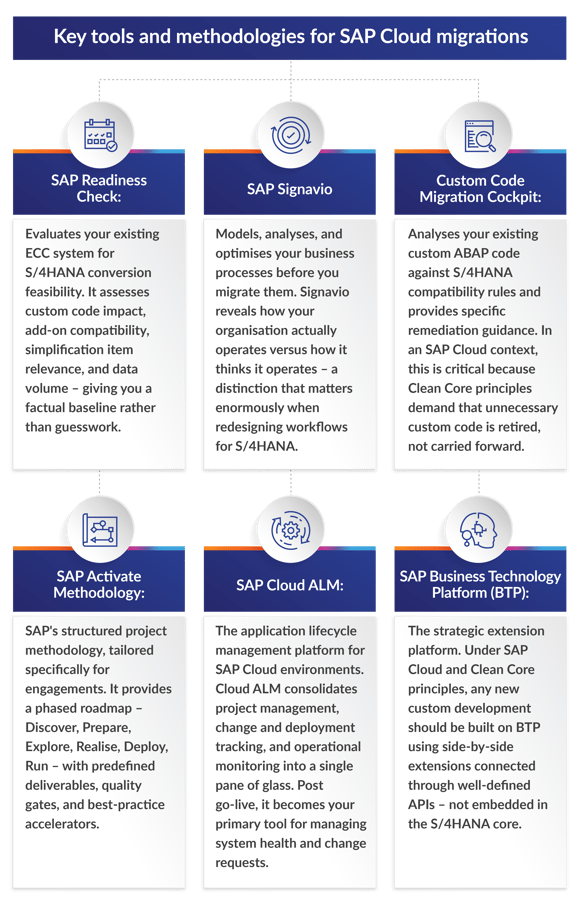
Key tools and methodologies for SAP Cloud migrations
SAP Cloud is not just a hosting agreement; it comes bundled with a toolkit designed to accelerate the journey. Understanding what is available and how to use it effectively separates a structured migration from a chaotic one.
Navigating dual maintenance with SAP Cloud
During the conversion process, your organisation operates in a dual maintenance reality: your legacy ECC system remains fully live to run daily business operations while parallel S/4HANA environments are built, configured, and tested. This is true regardless of whether you deploy on-premises or in SAP Cloud – but the cloud model introduces specific nuances.
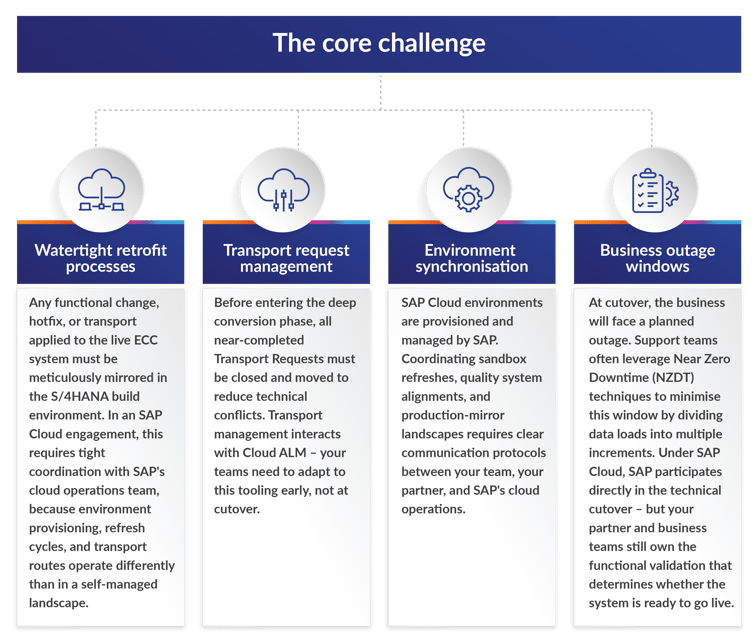
The core challenge
You must support both environments simultaneously until the final cutover, where the newly converted S/4HANA system officially takes over business-as-usual (BAU) operations. The risks are real and well-documented:
SAP Cloud-specific considerations
- SAP-controlled infrastructure timelines: Unlike on-premises, you cannot spin up or tear down environments on your own schedule. Environment provisioning requests go through SAP, and lead times must be factored into your project plan.
- Patch and update coordination: SAP may deliver scheduled patches to your Cloud landscape during the dual maintenance phase. Your project team must account for this in testing cycles to avoid regression surprises.
- Cloud ALM as the single source of truth: All change management, transport tracking, and monitoring should be consolidated in Cloud ALM during dual maintenance. Teams accustomed to Solution Manager will need to transition their processes.
Go-live support and hypercare in an SAP Cloud environment
Go-live with SAP Cloud is not a single moment – it is a controlled transition that demands coordination across SAP, your partner, and your internal teams. The technical cutover may be SAP-assisted, but the business readiness decision is yours.
The cutover
- Technical cutover: SAP's cloud operations team executes the final technical migration steps – database conversion, system activation, and infrastructure validation. Your partner validates functional readiness in parallel.
- Go/no-go decision: Despite SAP's involvement, the final go-live authorisation rests with you. Your partner should provide a structured go/no-go checklist covering data integrity, interface connectivity, critical process validation, and user readiness.
- Fallback planning: A clear rollback strategy must be agreed upon before cutover begins. With SAP Cloud, rollback involves coordination with SAP's cloud operations, making pre-agreed procedures and communication channels non-negotiable.
Hypercare
The first two to 12 weeks after go-live – the hypercare period – are when most post-migration issues surface. In an SAP Cloud environment, hypercare involves a three-party support model:
- SAP: Handles platform-level incidents – infrastructure outages, HANA performance issues, and Basis-related problems. SAP's incident response operates through defined SLAs tied to your SAP contract.
- Partner: Manages functional defects, process gaps, data issues, integration failures, and user support escalations. Your partner is the first line of defence for anything that is not a platform-level failure.
- Client: Business users identify and report process discrepancies, validate fixes, and manage workarounds for any interim gaps.
Critical reality check: SAP Cloud SLAs cover infrastructure and platform availability – they do not cover business process correctness, custom code defects, or integration failures. If a Fiori app displays incorrect pricing because of a configuration error, that is not SAP's problem. That is why partner-led hypercare is essential.
Post go-live: ongoing support, patching, and upgrades with SAP Cloud
Once hypercare concludes, your organisation transitions into steady-state operations. With SAP Cloud, this looks fundamentally different from traditional on-premises support.
What SAP handles
- Infrastructure management: Hardware, operating system, and HANA database administration are SAP's ongoing responsibility. You no longer need to provide Basis teams for these tasks.
- Scheduled patching and updates: SAP delivers patches, security updates, and feature packs on a regular cadence. Private Cloud Edition allows some scheduling flexibility; Public Cloud Edition enforces mandatory update windows.
- Platform monitoring: SAP monitors system health, availability, and performance through its cloud operations centre.
- Incident management: Platform-level incidents are handled by SAP support with contractual SLA commitments.
What you and your partner handle
- Application support: Functional issue resolution, configuration adjustments, workflow modifications, and user support remain your responsibility.
- Custom code and BTP extensions: Any side-by-side extensions built on BTP require ongoing maintenance, version management, and testing against S/4HANA updates. This is entirely outside the SAP Cloud scope.
- Integration monitoring and maintenance: Interfaces between S/4HANA and satellite systems – SAP and non-SAP – require continuous monitoring, error handling, and adaptation as connected systems evolve.
- Update impact testing: When SAP delivers a scheduled update, your team must test its impact on custom configurations, extensions, and integrations before it reaches production. SAP delivers the update; you validate it does not break your business.
- Continuous improvement: Post go-live, most SAP Cloud deployments launch as a Minimum Viable Product (MVP). Planned enhancements, additional process rollouts, and optimisation cycles must be budgeted and staffed.
- Standard system jobs: Background jobs that run in ECC must be reviewed. S/4HANA replaces some traditional batch processes (like asset depreciation) with real-time functionality. Teams must identify CPU-intensive transactions or long-running jobs that are no longer relevant or could cause issues in the new environment.
Why a partner bridge service is not optional
Here is the uncomfortable truth about SAP Cloud Public/Private: the gap between what SAP manages and what your business needs is wider than most organisations expect.
SAP's Cloud delivery covers infrastructure, platform operations, and technical system management. It does not cover:
- Functional application support
- Business process optimisation
- Custom code and BTP extension maintenance
- Integration monitoring and troubleshooting
- Update impact analysis and regression testing
- End-user support and training
- Continuous improvement and enhancement delivery
For organisations without deep, retained SAP expertise, this gap is a serious operational risk. A partner-led managed service – a 'bridge' between SAP's platform delivery and your business needs – fills this gap with the following:
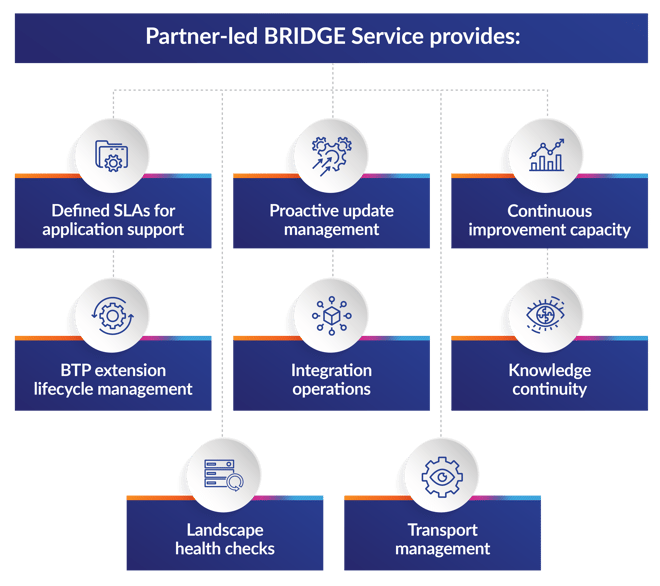
- Defined SLAs for application support: Response and resolution commitments for functional issues, not just infrastructure uptime.
- Proactive update management: Testing and validating SAP-delivered patches and updates against your specific configuration and extensions before they impact Production.
- Continuous improvement capacity: Dedicated staff for post-MVP enhancements, new process rollouts, and optimisation.
- BTP extension lifecycle management: Ongoing development, maintenance, and version management for side-by-side extensions.
- Integration operations: Monitoring, error resolution, and adaptation of interfaces across your application ecosystem.
- Knowledge continuity: Retained expertise about your specific implementation – configuration decisions, custom logic, integration architecture – that would otherwise walk out the door when the implementation partner disengages.
- Landscape health checks: System housekeeping, performance management, assessment of issues and provision of break-fixes.
- Transport management: Ensuring auditable and accurate management of transports moving through the landscape, whether manually or using automated tools.
Think of it this way: SAP keeps the engine running. A bridge service ensures the vehicle actually gets you where you need to go. Find out more about how with our BRIDGE Managed Services, we bridge the gap in managing SAP Cloud systems.
BTP and Clean Core: the long game
Migrating to SAP Cloud is not the finish line – it is the starting position. The strategic value of the move is unlocked through disciplined adoption of Clean Core principles and the SAP Business Technology Platform.
Clean Core
Clean Core is not a suggestion in a SAP Cloud environment – it is the operating model. SAP's update delivery assumes your core system is unmodified. Any custom ABAP code embedded in the core creates upgrade risk, testing overhead, and potential system instability with every patch cycle.
Post go-live, your support model must enforce Clean Core discipline:
- No new custom code in the S/4HANA core. All extensions are built on BTP.
- Existing custom code is progressively retired or migrated to BTP as side-by-side extensions.
- APIs are the only approved interface between S/4HANA and external logic.
BTP as the innovation platform
If S/4HANA is the high-performance engine of your business, BTP is the chassis that lets you bolt on custom features, AI capabilities, and third-party integrations without voiding the warranty. With SAP Cloud, BTP is your path to:
- Decoupled customisation: Build extensions that survive system updates because they live outside the core.
- Accelerated innovation: Develop, test, and deploy new functionality without touching the ERP. Continuous delivery becomes practical, not theoretical.
- AI and advanced analytics: SAP's AI capabilities – including Joule, predictive analytics, and process automation – are delivered through BTP Enterprises that ignore the Clean Core/BTP strategy are accumulating technical debt that will block AI adoption.
- Ecosystem integration: BTP serves as the integration layer between S/4HANA and the broader application landscape – SAP products, third-party tools, and custom applications alike.
The implication for ongoing support is clear: your post go-live team must have BTP development and operations skills, not just traditional SAP Basis and ABAP expertise.
Explore the rest of the blog series
This is Blog 6 in a multi-part series on navigating the path to S/4HANA. Explore the rest of the series:
Blog 1: S/4HANA navigation path: How to chart your course
Blog 2: S/4HANA navigation path: How to prepare for lift-off
Blog 3: S/4HANA navigation path: On-premises endpoints and hyperscaler hosting
Blog 4: S/4HANA navigation path: What's the difference between SAP S/4HANA Cloud Private and Public Editions?
Blog 5: S/4HANA navigation path: AI integration
Blog 7: S/4HANA navigation path: Standard project support during and post go-live