
I didn’t come up with the term ‘Lights out testing’; it was a term used by several people I met when we first partnered with Worksoft. ‘Lights out testing’ was very much the target for us in the work we’ve been doing integrating our test data management solutions (parts of the Data Sync Manager (DSM) Suite) with Worksoft's leading test automation products. I’ve realised that this is also a destination for many organisations running SAP. Like every destination, it requires a journey to get there.
SUMMARY: ‘Lights out testing’ is the target for organisations running SAP, as S/4HANA migration stretches deep SAP expertise and exposes gaps in test data automation. Worksoft Capture and Certify help expand test automation scripts, while components of the EPI-USE Labs' Data Sync Manager (DSM) Suite, including Object Sync, Object Extractor and Data Locate, provide standing data and Recordsets for realistic regression testing. Using the right tools, daily testing becomes more robust, with the core building blocks in place to deal with AI-driven change.
Let’s start with a confession: I didn’t come up with the term ‘Lights out testing’. It was a term used by several people I met when we first partnered with Worksoft. It struck such a chord with me, and exemplifies so well what we are now able to do, that I just keep on using it. ‘Lights out testing’ was very much the target for us in the work we’ve been doing integrating our test data management solutions (parts of the Data Sync Manager (DSM) Suite) with Worksoft's leading test automation products. I’ve realised that this is also a destination for many organisations running SAP. Like every destination, it requires a journey to get there.
Pressure testing
I’ve spoken with many clients over the last 18 months, and there are several themes in the challenges they’re facing with their SAP estate. S/4HANA migration, or avoidance thereof, is driving a lot of the big projects being undertaken and stretching the capacity of the workforce with deep SAP expertise. Plans are being put forward and challenged on topics like ‘who can test these changes’, ‘who has the skills and the time’?
This in itself has uncovered a gap between what the senior management believed was in place for automation of testing and what is actually happening on the ground. Many organisations have invested in automation technologies but not actually fully rolled it out across all geographies and areas of the business. There are a variety of reasons for this but often it comes down to faith in the automated testing. Those responsible for cleaning up any mess caused by faulty changes progressing to Production would rather manually make sure themselves than rely on an automation solution that isn’t intuitive enough to allow them to build the coverage of testing required without carving out a very large chunk of their existingly stretched calendars.
The response from senior managers: ‘use the S/4HANA migration to close this gap of automated testing and widen the coverage, then start our lives on S/4HANA with those automated scripts up and running’.
Challenge 1: recording the scripts
For those organisations that have a testing automation tool in place, meeting the push from senior management requires an expansion of the test script coverage and quality of the scripts, within a short time frame.
From the very first interaction with Worksoft Certify, I sensed this was built by people who’d been through the same struggles I had with automating in SAP. Longer ago than I would care to mention, I battled LSMW and eCATT recordings mainly around data migration from legacy systems into SAP. The challenges I faced back then seem so well catered for with Worksoft and the ability to treat steps as ‘lego blocks’ that could be copied and pushed into other scripts was very powerful. I was provided with an existing Sales Order script and when it hit an issue on the demo examples I’d chosen, I was quickly able to use Live Touch to add an extra button push in the middle. I’d had no training and hadn’t bothered to read any documentation (I know, I know - who’d have thought that of me!?).
This is very much the technical back end of the solution though. The game changer is Worksoft Capture which tracks, documents and builds scripts by allowing an end-user to simply do what they would normally do. In the move to S/4HANA this might even come as part of UAT allowing the same processes that were previously actioned in SAP GUI to be carried out in Fiori. So in one fell swoop we’re getting - process standardisation and documentation as well as test automation scripts. All at a time where the expertise of those who designed the system changes are available to support and ensure the right approach is being used. This really is a once in a SAP system lifetime opportunity… think how many Production defects occur when someone is doing something not exactly as the system was designed for it to be done. And how many times testing missed that defect because it was testing what should have been done.
Challenge 2: getting the data to run the scripts on
From the dawn of time they came…backing up and restoring, shadow replicating and invariably running BDLS. Production data has always been the source of test data for SAP. The complexity of SAP out of the box, multiplied by the processes that wouldn’t bend to ‘best practice’, and the tight integration between different modules meant that generating test data, unconnected to what happened in Production, was a fool's errand.
For twenty years DSM has been replicating data from Production systems into non-production systems for testing, training etc. With test automation there are two parts to it. You want the ‘standing data’ which is often examples of master data to be up to date and an accurate reflection of what is in Production. For example, pricing conditions, material masters recently extended to a new plant or new vendors/customers that are only in Production.
This is the domain of Object Sync and can be integrated into the automation process, as we’ll discuss shortly. But the second part is the critical piece now; Object Extractor allows you to select data and pick up related data in the same way as Object Sync but rather than recreating the data in a non-production system it typically writes parts, or all of the data, to files. This can be CSV files, XML or JSON as standard options with an infinite world of possibilities as custom formatters. For Worksoft we have created formatters that actually connect to the Worksoft API and write the Recordsets directly against the Layouts used with the test scripts.
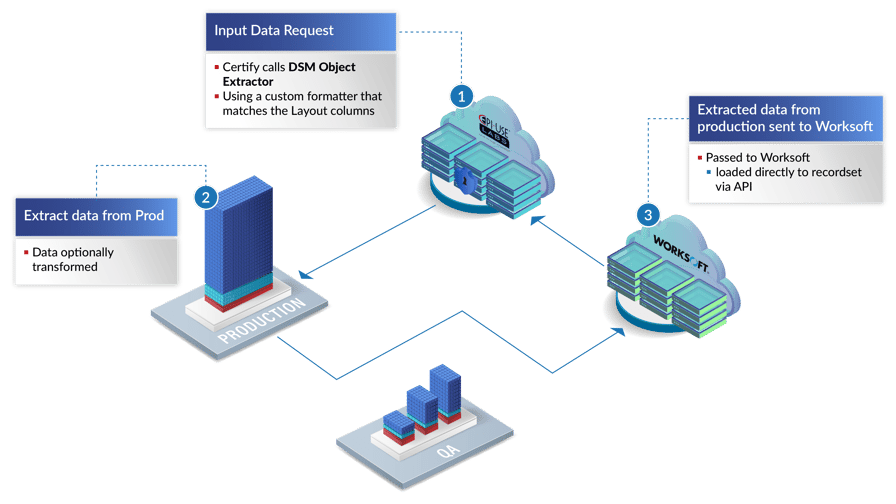
The records are written against DSM run numbers so if the script is run daily, say for Sales Orders and picks up orders of a particular type that happened today, then those recordsets accumulate so that over time you have an entire library of real data for use in testing. Perhaps there might be a significant change to a process as part of a project and you could look at when there would have been a lot of relevant data for that process happening in Production. By going back and fetching those recordsets in Certify you could build a significant set of realistic data for regression testing. If a full DSM license is in place, a user could also go into Object Extractor and choose specific transactions they want to get the data for testing from and send that to Certify, then manually go and run a test script against the recordset that was just created by the API. Further building the library of real test data.
The power of building a custom, fully relevant and utterly extensive test data library that can be indexed based on dates in the calendar, is extremely valuable.
Automation, automation, automation
Accurate data for manual testing requirements is good, but it's even better to be able to reassure the business that every day the key transactions from Production are being used in a test system to validate the latest config changes. Using Workforce Software’s Continuous Test Manager, you can relatively quickly get Data Connect set up, and have some daily testing happening and users only notified when something fails. As time passes, there are then two things that can be iterated:
- More processes – different types of orders or just different transactions – Purchase Orders, Production Orders, etc.
- Proactively resolving false positives through built-in master data alignment:
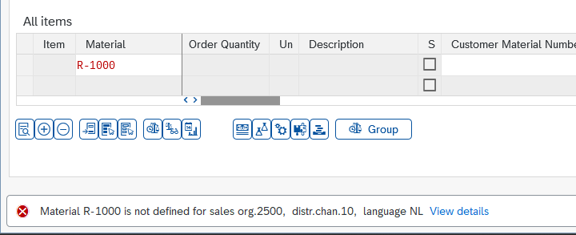
When an error like this occurs, the offending master data type can be added to the Object Sync steps of the process. So in this example, the materials in the order line items are first added to an Object Sync and copied from Production to the test system before the automation is started. With each one added the testing becomes more robust and less time-consuming for the stretched SAP support teams.
With our new Semantik platform we will also be able to provide similar capabilities for wider SAP cloud services and related non-SAP enterprise system Automation of Data for Test Automation (ADTA), such as SalesForce. This would allow for end-to-end, lights-out testing of processes and transactions in a ‘best of breed’ landscape, where the life cycle includes non-SAP systems where critical data objects originate or are updated.
Everything faster than before
I nearly did it. In the year 2026, I nearly got through an entire blog without mentioning AI.
I’ll keep it short and sweet; the ability to require changes, and to make those changes to systems, is going up almost exponentially with the impact of AI. With more changes coming through than ever before (and a backlog queuing behind the S/4HANA projects), it is essential that the core building blocks of scripts and data are in place to deal with AI-driven change, and to allow AI to drive testing.